# Getting Started

Welcome to Orangepill. Let's take you down the rabbit hole.

**Orangepill** helps you easily build apps for Bitcoin and DeFi. Use **Orangepill** to integrate cryptocurrencies, ERC20 tokens and virtual currencies into your solution. We encapsulate the complexity of web3 programming into set of microservices exposed as simple and fast REST API.

### What can I do with **Orangepill** ?

Map `identities` within your solution, setup `virtual accounts`, `deposit` digital `assets`, move `assets` between `virtual accounts` and `withdraw` them back to blockchain, with paying minimal or no blockchain fees. And then build apps on top of it.

This guide will help you understand main concepts and integration steps.&#x20;


# Introduction

Orangepilll is the fastest way to enable Bitcoin and DeFi.

**Orangepill** is DeFi accounting core layer on top of multi-blockchain infrastructure for managing and moving digital assets and liabilities.

<figure><img src="/files/edEnnSZSS52eUyMMD3f1" alt=""><figcaption><p>Orangepill Components Diagram</p></figcaption></figure>

## Orangepill Cloud

**Orangepill Cloud** is a scalable and reliable software-as-a-service platform for building solutions based on digital and crypto assets. All available DeFi services are exposed as fast REST API.

## Orangepill Cluster

**Orangepill Cluster** is self-hosted instance of Orangepill Core for Enterprise customers. All available DeFi services are exposed as fast REST API. Orangepill Cluster connects to multi-blockchain infrastructure.&#x20;

##


# Orangepill API

Orangepill platform building blocks.

{% embed url="<https://drive.google.com/file/d/1hdSNza5f-QWphLqSdVdDXkC5sL5E3C6I/view?usp=sharing>" %}
Orangepill Academy - How it works?
{% endembed %}


# Overview

Features of Orangepill RESTful API.

## Idempotency

The HTTP `idempotency-key` request header field can be used to carry idempotency key in order to make non-idempotent HTTP methods such as `POST` or `PATCH` fault-tolerant

Client can make the same request repeatedly because of network error, timeout etc.. but the same operation will not be executed twice. If Client repeats the same request by sending the same Idempotency Key value in request headers, and the request will be responded with the same response as the original request.&#x20;

Name of the request header is `idempotency-key`.

{% hint style="info" %}
Usage of Idempotency is optional.
{% endhint %}

## Security

### x-api-key

The HTTP `x-api-key` request header field must be used to identify Realm.

### Authorization

Add `Authorization` request header with `x-api-key` value.

### Authentication

To get x-api-key for Orangepill Admin API or Orangepill API send authentication data to `/auth/login` endpoint.

#### Orangepill Admin API Login

Use your email and password of Orangepill Realm [Admin](/orangepill-api/realms-and-admins#setup-realm-admin-user).

{% tabs %}
{% tab title="cURL" %}

```shell
curl --location --request POST 'https://admin.orangepill.cloud/v1/auth/admins/login' \
--header 'x-api-key: AXVubzpwQDU1dzByYM==' \
--header 'Content-Type: application/json' \
--data-raw '{
    "realm_key": "0dd4f142-f6de-4657-a521-352c9e17fcbe",
    "email": "your@email.com",
    "password": "your_password"
}'
```

{% endtab %}
{% endtabs %}

in response you will receive `x-api-key`.

{% tabs %}
{% tab title="Response" %}

```json
{
    "x-api-key": "1NHSjRWMWd5YkdkR2FWRm5iME1MjJjZGE0MTYtMjA4Yy00MTJjLThjMzgtOTcwNzhiMGQ3ODA2OnRvbWlzbGF2LmJpc2NhbkBnbWFpbC5jb206Y21oM1QyYzFkRlZ4WjFkNVFqUXhWMHd5UmtNMFJ6VnZXVm81YUZvd4ZDNnMVRYWk5SQ1JUSkE9PQ=="
}
```

{% endtab %}
{% endtabs %}

#### Orangepill API Login

Use Realm key, Username and Password of Orangepill Realm [User](/orangepill-api/identities-and-users#create-user).

{% tabs %}
{% tab title="cURL" %}

```shell
curl --location --request POST 'https://api.orangepill.cloud/v1/auth/admins/login' \
--header 'x-api-key: AXVubzpwQDU1dzByYM==' \
--header 'Content-Type: application/json' \
--data-raw '{
    "realm_key": "0dd4f142-f6de-4657-a521-352c9e17fcbe",
    "username": "your_username",
    "password": "your_password"
}'
```

{% endtab %}
{% endtabs %}

in response you will receive `x-api-key`.

{% tabs %}
{% tab title="Response" %}

```json
{
    "x-api-key": "1NHSjRWMWd5YkdkR2FWRm5iME1MjJjZGE0MTYtMjA4Yy00MTJjLThjMzgtOTcwNzhiMGQ3ODA2OnRvbWlzbGF2LmJpc2NhbkBnbWFpbC5jb206Y21oM1QyYzFkRlZ4WjFkNVFqUXhWMHd5UmtNMFJ6VnZXVm81YUZvd4ZDNnMVRYWk5SQ1JUSkE9PQ=="
}
```

{% endtab %}
{% endtabs %}

Add `x-api-key` header to every HTTP call.

### Ownership

Each created entity is flagged with `owner: authenticated_user.id` thus enabling automatic scope filtering and ownership.

### Roles

User can have different roles in a realm.

<table><thead><tr><th width="183.5">Role</th><th width="553.5">Description</th></tr></thead><tbody><tr><td><code>admin</code></td><td>Create and update users and entities. Can manage deleted entities.</td></tr><tr><td><code>manage</code></td><td>Create and update users and entities.</td></tr><tr><td><code>user</code></td><td>Create and update entities.</td></tr></tbody></table>

### Scopes

User is limited in it's scope to access data.

User scopes:

<table><thead><tr><th width="188.66666666666666">Scope</th><th width="501">Description</th></tr></thead><tbody><tr><td><code>realm</code></td><td>Access to realm entities.</td></tr><tr><td><code>own</code></td><td>Access to own entities.</td></tr></tbody></table>

### Cumulative Permissions

<table><thead><tr><th width="196">Role, Scope</th><th>Permission</th></tr></thead><tbody><tr><td><code>user,own</code></td><td>Can read owned entities.<br>Can write owned entities. <br>Can delete owned entities. <br>Cannot delete owned user. <br>Cannot undelete.<br>Cannot create users.</td></tr><tr><td><code>user,realm</code></td><td>Can read all entities.<br>Can write owned entities. <br>Can delete owned entities. <br>Cannot delete owned user. <br>Cannot undelete. <br>Cannot create users.</td></tr><tr><td><code>manage,own</code></td><td>Can read owned entities.<br>Can write owned entities. <br>Can delete owned entities. <br>Can delete owned user. <br>Can undelete owned.<br>Cannot create users.</td></tr><tr><td><code>manage,realm</code></td><td>Can read all entities.<br>Can update all entities.<br>Can delete all entities.<br>Can delete all users.<br>Can undelete all. <br>Cannot create users.</td></tr><tr><td><code>admin,own</code></td><td>Can read owned entities.<br>Can write owned entities.<br>Can delete own entities.<br>Can delete own user.<br>Can undelete own.<br>Can create users.</td></tr><tr><td><code>admin,realm</code></td><td>Can read all entities.<br>Can write all entities.<br>Can delete all entities.<br>Can delete all users.<br>Can undelete all.<br>Can create users.</td></tr></tbody></table>

### API scopes

When calling API you can apply following scopes on entities.

<table><thead><tr><th width="245.66666666666666">Scope</th><th width="249.33333333333337">Description</th></tr></thead><tbody><tr><td><code>own (default)</code></td><td>Entities where current user is owner.</td></tr><tr><td><code>all</code></td><td>All realm entities.</td></tr><tr><td><code>incoming</code></td><td>Applies only for transactions. Transactions where current user is owner of destination account.</td></tr><tr><td><code>outgoing</code></td><td>Applies only for transactions. Transactions where current user is owner of source account.</td></tr><tr><td><code>deleted</code></td><td>Deleted entities.</td></tr></tbody></table>

## Soft delete

Entities are never physically deleted, hence soft delete mechanism is applied. When `DELETE` method is invoked on REST API interface, Orangepill middleware will flag the entity as `deleted: true`,  and timestamped as `deleted_at: Date.now()`.  Entities marked as deleted are filtered out from **scopes** `all` and `own`. To view deleted entities either disable **scopes** by adding `?scope=false` to URL query or choose `?scope=deleted` if exists for specific endpoint.

## RESTful

Orangepill API is completely RESTful thus being interface for buidling frontend and backend apps.

### `find` Find entities

Find entitites by query.

#### Parameters

<table><thead><tr><th width="178">Property</th><th>Type</th><th width="91">Default</th><th>Description</th></tr></thead><tbody><tr><td><code>limit</code></td><td><code>Number</code></td><td><code>null</code></td><td>Max count of rows.</td></tr><tr><td><code>offset</code></td><td><code>Number</code></td><td><code>null</code></td><td>Number of skipped rows.</td></tr><tr><td><code>fields</code></td><td><code>String|Array&#x3C;String></code></td><td><code>null</code></td><td>Fields to return.</td></tr><tr><td><code>sort</code></td><td><code>String|Array&#x3C;String></code></td><td><code>null</code></td><td>Sorted fields.</td></tr><tr><td><code>search</code></td><td><code>String</code></td><td><code>null</code></td><td>Search text.</td></tr><tr><td><code>searchFields</code></td><td><code>String|Array&#x3C;String></code></td><td><code>null</code></td><td>Fields for search.</td></tr><tr><td><code>scope</code></td><td><code>String|Array&#x3C;String>|Boolean</code></td><td><code>null</code></td><td>Scopes for the query. If <code>false</code>, the default scopes are disabled.</td></tr><tr><td><code>populate</code></td><td><code>String|Array&#x3C;String></code></td><td><code>null</code></td><td>Populated fields.</td></tr><tr><td><code>query</code></td><td><code>String|Object</code></td><td><code>null</code></td><td>Query object. If <code>String</code>, it will be converted with <code>JSON.parse</code></td></tr></tbody></table>

#### REST endpoint

```
GET {serviceName}/all
```

#### Results

```
[
    {
        id: "akTRSKTKzGCg9EMz",
        ...
    },
    {
        id: "0YZQR0oqyjKILaRn",
        ...
    }
]
```

### `list` List entities

List entities with pagination. It returns also the total number of rows.

#### Parameters

<table><thead><tr><th width="176">Property</th><th>Type</th><th width="89">Default</th><th>Description</th></tr></thead><tbody><tr><td><code>page</code></td><td><code>Number</code></td><td><code>null</code></td><td>Page number.</td></tr><tr><td><code>pageSize</code></td><td><code>Number</code></td><td><code>null</code></td><td>Size of a page.</td></tr><tr><td><code>fields</code></td><td><code>String|Array&#x3C;String></code></td><td><code>null</code></td><td>Fields to return.</td></tr><tr><td><code>sort</code></td><td><code>String|Array&#x3C;String></code></td><td><code>null</code></td><td>Sorted fields.</td></tr><tr><td><code>search</code></td><td><code>String</code></td><td><code>null</code></td><td>Search text.</td></tr><tr><td><code>searchFields</code></td><td><code>String|Array&#x3C;String></code></td><td><code>null</code></td><td>Fields for search.</td></tr><tr><td><code>scope</code></td><td><code>String|Array&#x3C;String>|Boolean</code></td><td><code>null</code></td><td>Scopes for the query. If <code>false</code>, the default scopes are disabled. Example: <code>?scope=-own,all</code> removes own scope, and adds all.</td></tr><tr><td><code>populate</code></td><td><code>String|Array&#x3C;String></code></td><td><code>null</code></td><td>Populated fields.</td></tr><tr><td><code>query</code></td><td><code>String|Object</code></td><td><code>null</code></td><td>Query object. If <code>String</code>, it's converted with <code>JSON.parse</code></td></tr></tbody></table>

#### REST endpoint

```
GET {serviceName}
```

#### Results

```
{
    rows: [
        {
            id: "2bUwg4Driim3wRhg",
            ...,
        },
        {
            id: "Di5T8svHC9nT6MTj",
            ...,
        },
        {
            id: "YVdnh5oQCyEIRja0",
            ...,
        },
    ],
    total: 3,
    page: 1,
    pageSize: 10,
    totalPages: 1,
}
```

### `count` Count entities

Get the number of entities by query.

#### Parameters

<table><thead><tr><th width="174">Property</th><th>Type</th><th width="94">Default</th><th>Description</th></tr></thead><tbody><tr><td><code>search</code></td><td><code>String</code></td><td><code>null</code></td><td>Search text.</td></tr><tr><td><code>searchFields</code></td><td><code>String|Array&#x3C;String></code></td><td><code>null</code></td><td>Fields for search.</td></tr><tr><td><code>scope</code></td><td><code>String|Array&#x3C;String>|Boolean</code></td><td><code>null</code></td><td>Scopes for the query. If <code>false</code>, the default scopes are disabled.</td></tr><tr><td><code>query</code></td><td><code>String|Object</code></td><td><code>null</code></td><td>Query object. If <code>String</code>, it's converted with <code>JSON.parse</code></td></tr></tbody></table>

#### REST endpoint

```
GET {serviceName}/count
```

#### Results

```
15
```

### `get` Get an entity by ID

Get an entity by ID.

#### Parameters

<table><thead><tr><th width="134">Property</th><th>Type</th><th width="97">Default</th><th>Description</th></tr></thead><tbody><tr><td><code>&#x3C;id></code></td><td><code>any</code></td><td><code>null</code></td><td>ID of the entity. The name of the property comes from the primary key field.</td></tr><tr><td><code>fields</code></td><td><code>String|Array&#x3C;String></code></td><td><code>null</code></td><td>Fields to return.</td></tr><tr><td><code>scope</code></td><td><code>String|Array&#x3C;String>|Boolean</code></td><td><code>null</code></td><td>Scopes for the query. If <code>false</code>, the default scopes are disabled.</td></tr><tr><td><code>populate</code></td><td><code>String|Array&#x3C;String></code></td><td><code>null</code></td><td>Populated fields.</td></tr></tbody></table>

#### REST endpoint

```
GET {serviceName}/{id}
```

#### Results

```
{
    id: "YVdnh5oQCyEIRja0",
    ...,
}
```

##


# Realms and Admins

Realm is isolated domain of data.

Use Orangepill Console to purchase credits and activate access to Tiers. Tiers are available in various Cluster Zones (US, EU). Each activated Tier will be deployed as new Realm. Tier settings like rate limit and available API credits apply to each Realm.

Realm data is physically isolated and private. It cannot be shared with other Realms.

Use Realms to separate various projects and data domains. You cannot make transactions or share identities, virtual accounts or any other entity outside the scope of Realm.&#x20;

## Setup Realm Admin User

You can create Users for the Realm using Orangepill Console or using API.&#x20;

You can find `realm.id` in Orangepill Console.

For Roles list check [here](/orangepill-api/overview#roles).

For Scopes list check [here](/orangepill-api/overview#scopes).

{% hint style="info" %}
New Identity will be created and assigned to new User. Fields`identity.country` and `identity.accounting_currency` will be set to `realm.country` and `realm.accounting_currency` values.
{% endhint %}

{% tabs %}
{% tab title="cURL" %}

```shell
echo "create admin user for Realm id=634b5be77f6a7b0be52dffcc"

curl --location --request POST 'https://api.orangepill.cloud/v1/realms/634b5be77f6a7b0be52dffcc/users' \
--header 'x-api-key: AXVubzpwQDU1dzByYM==' \
--header 'idempotency-key: 27373fabc392933deffda' \
--header 'Content-Type: application/json' \
--data-raw '{
    "username": "user1",
    "password": "password1",
    "scopes": "realm",
    "roles": "admin",
    "data": {
        "my_field_1": "my_value_1",
        "email": "optional@email.com"
    }
}'
```

{% endtab %}
{% endtabs %}

In response we get new Admin User in Realm with access to all scopes. You can use this User to interact with API.

```json
{
    "id": "636eb6d79cfba3cb92ac479a",
    "username": "user1",
    "password": "21da8dc09355b747831267aeee57cf7ac82d7da748cb97c110e7853e14b90835d0965baa3bc7ca7ef53d4225b5afa98062fc141f28c2c7b42ecda7b5b593ded6",
    "identity": "636eb6d79cfba3cb92ac4799",
    "scopes": "realm,own",
    "roles": "admin,manage,user",
    "data": {
        "my_field_1": "my_value_1",
        "email": "optional@email.com"
    },
    "created_at": 1668200151426,
    "active": true,
    "deleted": false
}
```

## List available API credits

Use this API call to check currently available API credits for this Realm.

{% tabs %}
{% tab title="cURL" %}

```shell
echo "create admin user for Realm id=634b5be77f6a7b0be52dffcc"

curl --location --request GET 'https://api.orangepill.cloud/v1/realms/634b5be77f6a7b0be52dffcc/credits/available' \
--header 'x-api-key: AXVubzpwQDU1dzByYM==' \
--header 'Content-Type: application/json'
```

{% endtab %}
{% endtabs %}

In response we will get number of available credits.

```json
{
    "credits": 245033
}
```


# Identities and Users

Identity is entity holder. User is entity owner.

{% hint style="info" %}
Identities are mandatory.
{% endhint %}

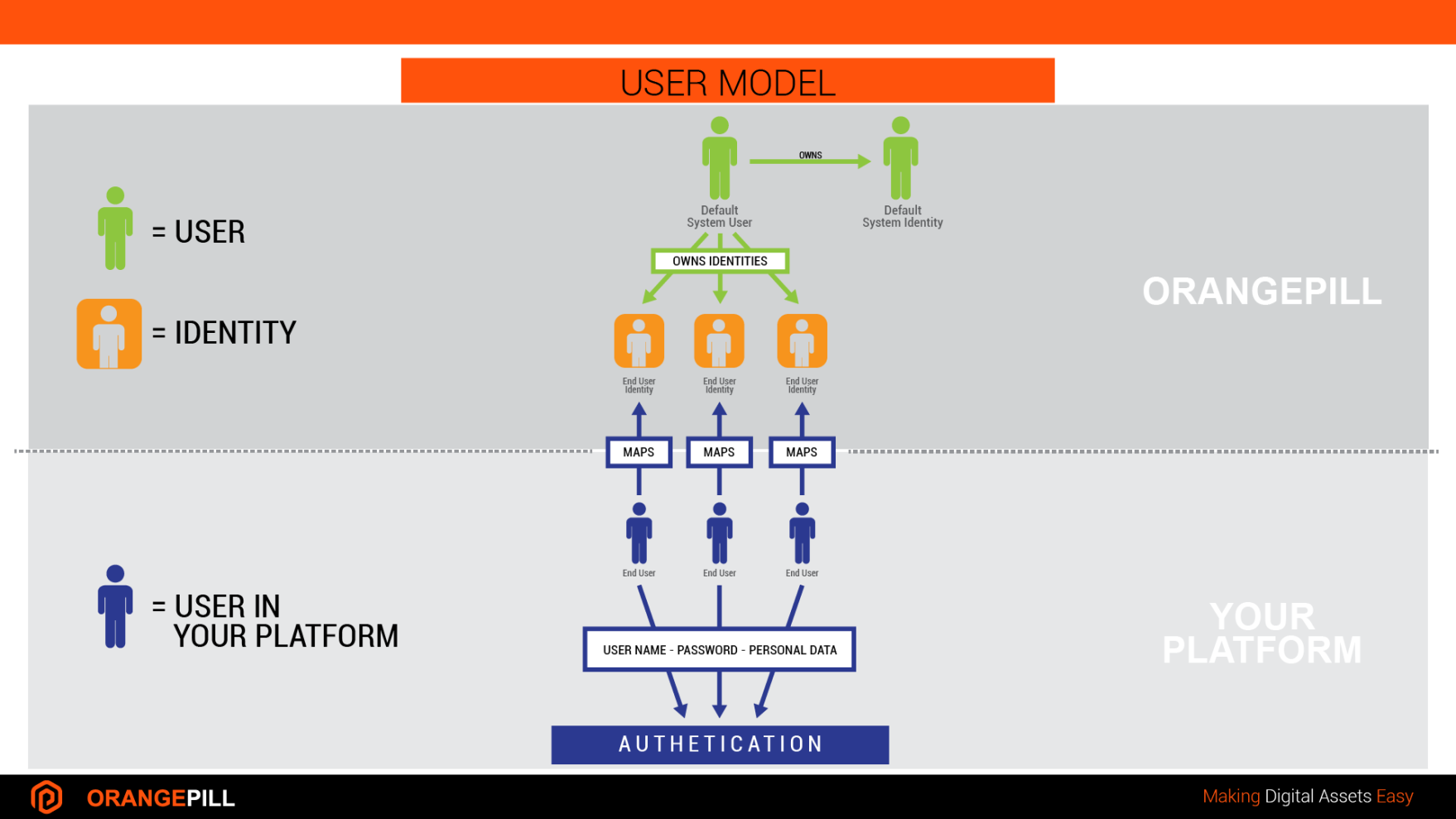
Identity is entity that can be impersonated by User.

Use `Identities` to define holders of `Accounts`.

#### Parameters

<table><thead><tr><th width="227.5">Param</th><th>Description</th></tr></thead><tbody><tr><td><code>type</code> (optional)</td><td>Allowed values are <code>neutral</code>, <code>person</code> and <code>company</code>. Defaults to <code>neutral</code>.</td></tr><tr><td><code>country</code> (optional)</td><td>Country where Identity is residing. If empty, will set to Realm default.<br>Allowed values are: "AF", "AX", "AL", "DZ", "AS", "AD", "AO", "AI", "AQ", "AG", "AR", "AM", "AW", "AU", "AT", "AZ", "BH", "BS", "BD", "BB", "BY", "BE", "BZ", "BJ", "BM", "BT", "BO", "BQ", "BA", "BW", "BV", "BR", "IO", "BN", "BG", "BF", "BI", "KH", "CM", "CA", "CV", "KY", "CF", "TD", "CL", "CN", "CX", "CC", "CO", "KM", "CG", "CD", "CK", "CR", "CI", "HR", "CU", "CW", "CY", "CZ", "DK", "DJ", "DM", "DO", "EC", "EG", "SV", "GQ", "ER", "EE", "ET", "FK", "FO", "FJ", "FI", "FR", "GF", "PF", "TF", "GA", "GM", "GE", "DE", "GH", "GI", "GR", "GL", "GD", "GP", "GU", "GT", "GG", "GN", "GW", "GY", "HT", "HM", "VA", "HN", "HK", "HU", "IS", "IN", "ID", "IR", "IQ", "IE", "IM", "IL", "IT", "JM", "JP", "JE", "JO", "KZ", "KE", "KI", "KP", "KR", "KW", "KG", "LA", "LV", "LB", "LS", "LR", "LY", "LI", "LT", "LU", "MO", "MK", "MG", "MW", "MY", "MV", "ML", "MT", "MH", "MQ", "MR", "MU", "YT", "MX", "FM", "MD", "MC", "MN", "ME", "MS", "MA", "MZ", "MM", "NA", "NR", "NP", "NL", "NC", "NZ", "NI", "NE", "NG", "NU", "NF", "MP", "NO", "OM", "PK", "PW", "PS", "PA", "PG", "PY", "PE", "PH", "PN", "PL", "PT", "PR", "QA", "RE", "RO", "RU", "RW", "BL", "SH", "KN", "LC", "MF", "PM", "VC", "WS", "SM", "ST", "SA", "SN", "RS", "SC", "SL", "SG", "SX", "SK", "SI", "SB", "SO", "ZA", "GS", "SS", "ES", "LK", "SD", "SR", "SJ", "SZ", "SE", "CH", "SY", "TW", "TJ", "TZ", "TH", "TL", "TG", "TK", "TO", "TT", "TN", "TR", "TM", "TC", "TV", "UG", "UA", "AE", "GB", "US", "UM", "UY", "UZ", "VU", "VE", "VN", "VG", "VI", "WF", "EH", "YE", "ZM", "ZW"</td></tr><tr><td><code>currency</code> (optional)</td><td>Accounting Currency used to calculate FIAT value of Transactions. If empty, will set to Realm default.<br>Allowed values are: "AED", "AFN", "ALL", "AMD", "ANG", "AOA", "ARS", "AUD", "AWG", "AZN", "BAM", "BAT", "BBD", "BCH", "BDT", "BGN", "BHD", "BIF", "BMD", "BND", "BOB", "BRL", "BSD", "BTC", "BTN", "BWP", "BYN", "BYR", "BZD", "CAD", "CDF", "CHF", "CLF", "CLP", "CNY", "COP", "CRC", "CUC", "CUP", "CVE", "CZK", "DJF", "DKK", "DOP", "DOGE", "DZD", "EGP", "ERN", "ETB", "ETH", "EUR", "FJD", "FKP", "FLOW", "FUSD", "FREE", "GMC", "GMC_BSC", "RMD", "GBP", "GEL", "GGP", "GHS", "GIP", "GMD", "GNF", "GTQ", "GYD", "HKD", "HNL", "HRK", "HTG", "HUF", "IDR", "ILS", "IMP", "INR", "IQD", "IRR", "ISK", "JEP", "JMD", "JOD", "JPY", "KES", "KGS", "KHR", "KMF", "KPW", "KRW", "KWD", "KYD", "KZT", "LAK", "LBP", "LEO", "LINK", "LKR", "LRD", "LSL", "LTC", "LTL", "LVL", "LYD", "MAD", "MDL", "MGA", "MKD", "MKR", "MMK", "MMY", "MNT", "MOP", "MRO", "MUR", "MVR", "MWK", "MXN", "MYR", "MZN", "NAD", "NGN", "NIO", "NOK", "NPR", "NZD", "OMR", "PAB", "PAX", "PAXG", "PEN", "PGK", "PHP", "PKR", "PLN", "PYG", "QAR", "RON", "RSD", "RUB", "RWF", "SAR", "SBD", "SCR", "SDG", "SEK", "SGD", "SHP", "SLL", "SOS", "SRD", "STD", "SVC", "SYP", "SZL", "THB", "TJS", "TMT", "TND", "TOP", "TRY", "TTD", "TRON", "TUSD", "BUSD", "TWD", "TZS", "UAH", "UGX", "UNI", "USD", "USDC", "USDT", "USDT_TRON", "INRT_TRON", "USDT_MATIC", "UYU", "UZS", "VEF", "VND", "VUV", "WBTC", "WST", "XAF", "XAG", "XAU", "XCD", "XCON", "XDR", "XLM", "XOF", "XPF", "XRP", "YER", "ZAR", "ZMK", "ZMW", "ZWL", "AED", "AFN", "ALL", "AMD", "ANG", "AOA", "ARS", "AUD", "AWG", "AZN", "BAM", "BAT", "BBD", "BCH", "BDT", "BGN", "BHD", "BIF", "BMD", "BND", "BOB", "BRL", "BSD", "BTC", "BTN", "BWP", "BYN", "BYR", "BZD", "CAD", "CDF", "CHF", "CLF", "CLP", "CNY", "COP", "CRC", "CUC", "CUP", "CVE", "CZK", "DJF", "DKK", "DOP", "DOGE", "DZD", "EGP", "ERN", "ETB", "ETH", "EUR", "FJD", "FKP", "FLOW", "FUSD", "FREE", "GMC", "GMC_BSC", "RMD", "GBP", "GEL", "GGP", "GHS", "GIP", "GMD", "GNF", "GTQ", "GYD", "HKD", "HNL", "HRK", "HTG", "HUF", "IDR", "ILS", "IMP", "INR", "IQD", "IRR", "ISK", "JEP", "JMD", "JOD", "JPY", "KES", "KGS", "KHR", "KMF", "KPW", "KRW", "KWD", "KYD", "KZT", "LAK", "LBP", "LEO", "LINK", "LKR", "LRD", "LSL", "LTC", "LTL", "LVL", "LYD", "MAD", "MDL", "MGA", "MKD", "MKR", "MMK", "MMY", "MNT", "MOP", "MRO", "MUR", "MVR", "MWK", "MXN", "MYR", "MZN", "NAD", "NGN", "NIO", "NOK", "NPR", "NZD", "OMR", "PAB", "PAX", "PAXG", "PEN", "PGK", "PHP", "PKR", "PLN", "PYG", "QAR", "RON", "RSD", "RUB", "RWF", "SAR", "SBD", "SCR", "SDG", "SEK", "SGD", "SHP", "SLL", "SOS", "SRD", "STD", "SVC", "SYP", "SZL", "THB", "TJS", "TMT", "TND", "TOP", "TRY", "TTD", "TUSD", "BUSD", "TWD", "TZS", "UAH", "UGX", "UNI", "USD", "USDC", "USDT", "USDT_MATIC", "UYU", "UZS", "VEF", "VND", "VUV", "WBTC", "WST", "XAF", "XAG", "XAU", "XCD", "XCON", "XDR", "XLM", "XOF", "XPF", "XRP", "YER", "ZAR", "ZMK", "ZMW", "ZWL"</td></tr><tr><td><code>alias</code> (optional)</td><td>Create related <a href="/pages/qESpsFQL7JARkufxZDV0#identity-aliases">alias</a> object.</td></tr><tr><td><code>data</code> (optional)</td><td>Use this object to freely model the identity. </td></tr></tbody></table>

## **Create Identity**

Example model for **neutral** identity.

{% tabs %}
{% tab title="cURL" %}

```shell
curl --location --request POST 'https://api.orangepill.cloud/v1/identities' \
--header 'x-api-key: AXVubzpwQDU1dzByYM==' \
--header 'idempotency-key: 27373fabc392933deffda' \
--header 'Content-Type: application/json' \
--data-raw '{
    "country": "US",
    "currency": "USD",
    "type": "neutral",
    "data": {
        "nickname": "Player123",
        "level": "3",
        "color": "blue",
        "type": "premium",
        "external_reference": "ref-myreference1"
    }
}'
```

{% endtab %}
{% endtabs %}

in response is new `Identity`.

{% tabs %}
{% tab title="Response" %}

```json
{
    "id": "634b56217f6a7b0be52dffbd",
    "country": "US",
    "currency": "USD",
    "type": "neutral",
    "data": {
        "nickname": "Player123",
        "level": "3",
        "color": "blue",
        "type": "premium",
        "external_reference": "ref-myreference1"
    },
    "created_at": "1519211809934",
    "error": null
}
```

{% endtab %}
{% endtabs %}

Now you can create new Account and use this Identity as Account holder.

## Impersonation

To impersonate `Identity` you must assign it to a `User`. Each `User` is related to only one `Identity`. When new Account or Transaction is created it is owned by logged in `User.`Automatic **own scope**  will filter out `Accounts` and `Transactions` owned by logged in `User`.

## Create User

To impersonate Identities and enable ownership on entities create Users. API will resolve ownership of authenticated user and filter out results in scope `own`.&#x20;

{% hint style="info" %}
If you don't assign `identity`, it will be auto-created using Realm `country` and `currency` settings.
{% endhint %}

For Roles list check [here](/orangepill-api/overview#roles).

For Scopes list check [here](/orangepill-api/overview#scopes).

Use `channel` object to define SMS, WhatsApp and Email messaging channels.

{% tabs %}
{% tab title="cURL" %}

```shell

curl --location --request POST 'https://api.orangepill.cloud/v1/users' \
--header 'x-api-key: AXVubzpwQDU1dzByYM==' \
--header 'idempotency-key: 27373fabc392933de9354' \
--header 'Content-Type: application/json' \
--data-raw '{
    "username": "mdavis1969",
    "password": "P@ssw0rd",
    "scopes": "realm,own",
    "roles": "admin,manage,user",
    "channel": {
        "phone": "38598123456",
        "whatsapp": "38598123654",
        "email": "neo@zion.org"
    },    
    "data": {
        "email": "miles@davis.com",
        "my_field_1": "my_value_1",
        "external_reference": "ref-myreference1"
    }
}'
```

{% endtab %}
{% endtabs %}

In response we get a new User.

```json
{
    "identity": "634b56217f6a7b0be52dffbd",
    "username": "mdavis1969",
    "password": "21da8dc09355b747831267aeee57cf7ac82d7da748cb97c110e7853e14b90835d0965baa3bc7ca7ef53d4225b5afa98062fc141f28c2c7b42ecda7b5b593ded6",
    "scopes": "realm,own",
    "roles": "admin,manage,user",
    "channel": {
        "phone": "38598123456",
        "whatsapp": "38598123654",
        "email": "neo@zion.org"
    },    
    "data": {
        "email": "miles@davis.com",
        "my_field_1": "my_value_1",
        "external_reference": "ref-myreference1"
    },
    "active": true,
    "created_at": "1519211809934",
    "error": null
}
```

{% hint style="info" %}
If you are building front-end app, you can authenticate User and have ownership mechanism working automatically. All new entities created by this User will have ownership assigned. Queries will filter out entities for which authenticated user is owner.
{% endhint %}


# Persons and Companies

Use Customer Data Platform to extend Identities.

To start using Persons and Companies profiles you must enable [Infobip CDP Extension](/extensions/infobip-people-cdp).&#x20;

### Fields mapping

After enabling Infobip CDP Extension you can start using fields `identity.person` and `identity.company`. &#x20;

| Orangepill Identity field | Infobip CDP field |
| ------------------------- | ----------------- |
| `person`                  | `id`              |
| `company`                 | `companyId`       |
| `id`                      | `externalId`      |

## Synchronize Orangepill and Infobip CDP

Two-way Identities and Persons syncronization process is executing in 3 steps.

#### Step 1

Updating orphan Orangepill Identities with Infobip Persons.

#### Step 2

Updating orphan Infobip Persons with Orangepill Identities.

#### Step 3

Creating new Orangepill Identities.

{% hint style="info" %}
Persons Sync results are sent to `user.channel.email` of User which started the process.
{% endhint %}

To start Persons Sync process use endpoint `POST /v1/identities/persons/sync`.

#### Optional parameters

<table><thead><tr><th width="156.33333333333331">Scope</th><th width="135">Parameter</th><th>Description</th></tr></thead><tbody><tr><td>orangepill</td><td><code>country</code></td><td>Default country for new Identities. If not set <code>realm.country</code> is used.</td></tr><tr><td>orangepill</td><td><code>currency</code></td><td>Default currency for new Identities. If not set <code>realm.currency</code> is used.</td></tr><tr><td>infobip</td><td><code>limit</code></td><td>Number of results.</td></tr><tr><td>infobip</td><td><code>page</code></td><td>Results page number.</td></tr><tr><td>infobip</td><td><code>filter</code></td><td>Additional filter. Consult <a href="https://www.infobip.com/docs/api/customer-engagement/people/get-a-single-person-or-a-list-of-people">Infobip documentation</a> for details.</td></tr></tbody></table>

{% tabs %}
{% tab title="cURL" %}

```shell
curl --location --request POST 'https://api.orangepill.cloud/v1/identities/persons/sync' \
--header 'x-api-key: AXVubzpwQDU1dzByYM==' \
--header 'Content-Type: application/json' \
--data-raw '{
    "country": "HR",
    "currency": "EUR",
    "limit": "100",
    "page": 2
}'
```

{% endtab %}
{% endtabs %}

in response are queued task details.

{% tabs %}
{% tab title="Response" %}

```json
{
    "name": "EventStarted",
    "message": "Person sync is in processing pool.",
    "code": 200,
    "type": "persons.sync.started",
    "data": {
        "country": "HR",
        "currency": "EUR",
        "limit": "100",
        "page": 2,
        "owner": "6442b885880fc0254ad560e8"
    }
}
```

{% endtab %}
{% endtabs %}

## List Infobip CDP Persons

Use endpoint `GET /v1/identities/persons?parameters` to retrieve list of Infobip CDP persons.

Use [Infobip URL parameters](https://www.infobip.com/docs/api/customer-engagement/people/get-a-single-person-or-a-list-of-people) to filter results.

## Create Person and Identity

{% hint style="info" %}
Use Infobip Portal to create additional custom attributes and tags for Person profiles.
{% endhint %}

Use endpoint [POST /v1/identities/person](https://api.orangepill.cloud/openapi/ui#/v1.identities/post_v1_identities_person) to create new Infobip Person and Orangepill Identity.

{% tabs %}
{% tab title="cURL" %}

```shell
curl --location --request POST 'https://api.orangepill.cloud/v1/identities/person' \
--header 'x-api-key: AXVubzpwQDU1dzByYM==' \
--header 'idempotency-key: 27373fabc392933deffda' \
--header 'Content-Type: application/json' \
--data-raw '{
    "country": "US",
    "currency": "USD",
    "type": "person",
    "alias": "PERSON_ALIAS",
    "company": 3,
    "person": {
        "firstName": "Jane",
        "lastName": "Smith",
        "address": "67 Farringdon Road",
        "city": "London",
        "country": "United Kingdom",
        "gender": "FEMALE",
        "birthDate": "1966-01-15",
        "middleName": "Janie",
        "profilePicture": "http://profile.com",
        "tags": 
        [
            "VIP Customers",
            "New Customers"
        ],
        "customAttributes": 
        {
            "Contract Expiry": "2018-06-01",
            "Company": "Acme",
            "ShoppingCartList": 
        [
        {
            "productName": "Sneakers",
            "productPrice": 25.33,
            "productCategory": "Sport Sneakers",
            "productImage": "/image1.png"
        },
                {
                    "productName": "T-Shirt",
                    "productPrice": 9.99,
                    "productCategory": "Casual",
                    "productImage": "/image2.png"
                }
            ]
        },
        "contactInformation": 
        {
            "phone": 
        [
            {
                "number": "41793026727"
            }
        ],
        "email": 
        [
            {
                "address": "janewilliams@acme.com"
            }
        ],
        "push": 
        [
        {
            "applicationId": "FDCC8516470A3AE97FB8AC218D5D0D3D",
            "registrationId": "c5db0c47-465c-4e1c-abf8-7cedc275dd19",
            "additionalData": 
        {
            "birthdate": "1988-07-31",
            "email": "test@test.com",
            "firstName": "Jane",
            "gender": "F",
            "lastName": "Smith",
            "middleName": "Janie"
        },
        "systemData": 
                {
                    "cloudType": "GCM",
                    "registrationEnabled": true,
                    "sdkName": "MobileMessaging SDK",
                    "os": "Android"
                }
            }
        ],
        "facebook": 
        [
        {
            "applicationId": "370329180020364",
            "userId": "2094832040560427",
            "systemData": 
                {
                    "gender": "female",
                    "lastName": "Smith",
                    "firstName": "Jane"
                }
            }
        ],
        "line": 
        [
        {
            "applicationId": "1644264921",
            "userId": "U045147f1ad961bfe996b72bbf417f3c9",
            "systemData": 
                {
                    "displayName": "Jane Smith"
                }
            }
        ],
        "instagram": 
        [
        {
            "applicationId": "17841446795352028",
            "userId": "12461436693342628",
            "systemData": 
                {
                    "displayName": "jane.smith"
                }
            }
        ],
        "twitter": 
        [
        {
            "applicationId": "1148203323283877",
            "userId": "370329180020364",
            "systemData": 
                    {
                        "displayName": "Jane Smith"
                    }
                }
            ]
        }        
    },
    "data": {
        "custom_field1": "custom_value1"
    }
}'
```

{% endtab %}
{% endtabs %}

in response is new person `Identity`.

{% tabs %}
{% tab title="Response" %}

```json
{
    "id": "634b56217f6a7b0be52dffbd",
    "owner": "6be52d34b56217fffbd6a7b0",
    "country": "US",
    "currency": "USD",
    "type": "person",
    "alias": "PERSON_ALIAS",
    "company": "3",
    "person": {
        "firstName": "Jane",
        "lastName": "Smith",
        "address": "67 Farringdon Road",
        "city": "London",
        "country": "United Kingdom",
        "gender": "FEMALE",
        "birthDate": "1966-01-15",
        "middleName": "Janie",
        "profilePicture": "http://profile.com",
        "origin": "API",
        "modifiedFrom": "API",
        "tags": 
        [
            "VIP Customers",
            "New Customers"
        ],
        "customAttributes": 
        {
            "Contract Expiry": "2018-06-01",
            "Company": "Acme",
            "ShoppingCartList": 
        [
        {
            "productName": "Sneakers",
            "productPrice": 25.33,
            "productCategory": "Sport Sneakers",
            "productImage": "/image1.png"
        },
                {
                    "productName": "T-Shirt",
                    "productPrice": 9.99,
                    "productCategory": "Casual",
                    "productImage": "/image2.png"
                }
            ]
        },
        "contactInformation": 
        {
            "phone": 
        [
            {
                "number": "41793026727"
            }
        ],
        "email": 
        [
            {
                "address": "janewilliams@acme.com"
            }
        ],
        "push": 
        [
        {
            "applicationId": "FDCC8516470A3AE97FB8AC218D5D0D3D",
            "registrationId": "c5db0c47-465c-4e1c-abf8-7cedc275dd19",
            "additionalData": 
        {
            "birthdate": "1988-07-31",
            "email": "test@test.com",
            "firstName": "Jane",
            "gender": "F",
            "lastName": "Smith",
            "middleName": "Janie"
        },
        "systemData": 
                {
                    "cloudType": "GCM",
                    "registrationEnabled": true,
                    "sdkName": "MobileMessaging SDK",
                    "os": "Android"
                }
            }
        ],
        "facebook": 
        [
        {
            "applicationId": "370329180020364",
            "userId": "2094832040560427",
            "systemData": 
                {
                    "gender": "female",
                    "lastName": "Smith",
                    "firstName": "Jane"
                }
            }
        ],
        "line": 
        [
        {
            "applicationId": "1644264921",
            "userId": "U045147f1ad961bfe996b72bbf417f3c9",
            "systemData": 
                {
                    "displayName": "Jane Smith"
                }
            }
        ],
        "instagram": 
        [
        {
            "applicationId": "17841446795352028",
            "userId": "12461436693342628",
            "systemData": 
                {
                    "displayName": "jane.smith"
                }
            }
        ],
        "twitter": 
        [
        {
            "applicationId": "1148203323283877",
            "userId": "370329180020364",
            "systemData": 
                    {
                        "displayName": "Jane Smith"
                    }
                }
            ]
        }        
    },
    "data": {
        "custom_field1": "custom_value1"
    },
    "created_at": "1519211809934",
    "error": null
}
```

{% endtab %}
{% endtabs %}

## Get Person

You can retrieve Person data either by calling `GET /v1/identities/:id/person` or by populating person field of Identity object using `GET /v1/identities/:id?populate=person`.

{% tabs %}
{% tab title="cURL" %}

```shell
curl --location --request GET 'https://api.orangepill.cloud/v1/identities/634b56217f6a7b0be52dffbd?populate=person' \
--header 'x-api-key: AXVubzpwQDU1dzByYM==' \
--header 'Content-Type: application/json' \
```

{% endtab %}
{% endtabs %}

in response is person `Identity`.

{% tabs %}
{% tab title="Response" %}

```json
{
    "id": "634b56217f6a7b0be52dffbd",
    "owner": "6be52d34b56217fffbd6a7b0",
    "country": "US",
    "currency": "USD",
    "type": "person",
    "person": {
        "firstName": "Jane",
        "lastName": "Smith",
        "address": "67 Farringdon Road",
        "city": "London",
        "country": "United Kingdom",
        "gender": "FEMALE",
        "birthDate": "1966-01-15",
        "middleName": "Janie",
        "profilePicture": "http://profile.com",
    },
    "data": {
        "custom_field1": "custom_value1"
    },
    "created_at": "1519211809934",
    "error": null
}
```

{% endtab %}
{% endtabs %}

## Create Person for existing Identity

Use endpoint `POST /v1/identities/:id/person` to create new Person and assign it to existing identity.&#x20;

{% tabs %}
{% tab title="cURL" %}

```shell
curl --location --request POST 'https://api.orangepill.cloud/v1/identities/634b56217f6a7b0be52dffbd/person' \
--header 'x-api-key: AXVubzpwQDU1dzByYM==' \
--header 'idempotency-key: 27373fabc392933deffda' \
--header 'Content-Type: application/json' \
--data-raw '{
    "firstName": "Jane",
    "lastName": "Smith",
    "address": "67 Farringdon Road",
    "city": "London",
    "country": "United Kingdom",
    "gender": "FEMALE",
    "birthDate": "1966-01-15",
    "middleName": "Janie",
    "profilePicture": "http://profile.com"
}'
```

{% endtab %}
{% endtabs %}

in response is new person `Identity`.

{% tabs %}
{% tab title="Response" %}

```json
{
    "id": "634b56217f6a7b0be52dffbd",
    "owner": "6be52d34b56217fffbd6a7b0",
    "country": "US",
    "currency": "USD",
    "type": "person",
    "person": {
        "firstName": "Jane",
        "lastName": "Smith",
        "address": "67 Farringdon Road",
        "city": "London",
        "country": "United Kingdom",
        "gender": "FEMALE",
        "birthDate": "1966-01-15",
        "middleName": "Janie",
        "profilePicture": "http://profile.com",
    },
    "data": {
        "custom_field1": "custom_value1"
    },
    "created_at": "1519211809934",
    "error": null
}
```

{% endtab %}
{% endtabs %}

## Assign existing Person to existing Identity

Use endpoint `PATCH /v1/identities/:id/person/:person/assign`  to map existing Person from Infobip CDP to existing Orangepill Identity.

{% tabs %}
{% tab title="cURL" %}

```shell
curl --location --request PATCH 'https://api.orangepill.cloud/v1/identities/634b56217f6a7b0be52dffbd/person/255/assign' \
--header 'x-api-key: AXVubzpwQDU1dzByYM==' \
--header 'idempotency-key: 27373fabc392933deffda' \
--header 'Content-Type: application/json' \
```

{% endtab %}
{% endtabs %}

in response is person `Identity`.

{% tabs %}
{% tab title="Response" %}

```json
{
    "id": "634b56217f6a7b0be52dffbd",
    "owner": "6be52d34b56217fffbd6a7b0",
    "country": "US",
    "currency": "USD",
    "type": "person",
    "person": "255",
    "data": {
        "custom_field1": "custom_value1"
    },
    "created_at": "1519211809934",
    "error": null
}
```

{% endtab %}
{% endtabs %}

## Unassign Person of Identity

Use endpoint `PATCH /v1/identities/:id/person/unassign`  to unmap Infobip Person of Orangepill Identity.

{% tabs %}
{% tab title="cURL" %}

```shell
curl --location --request PATCH 'https://api.orangepill.cloud/v1/identities/634b56217f6a7b0be52dffbd/person/unassign' \
--header 'x-api-key: AXVubzpwQDU1dzByYM==' \
--header 'idempotency-key: 27373fabc392933deffda' \
--header 'Content-Type: application/json' \
```

{% endtab %}
{% endtabs %}

in response is person `Identity`.

{% tabs %}
{% tab title="Response" %}

```json
{
    "id": "634b56217f6a7b0be52dffbd",
    "owner": "6be52d34b56217fffbd6a7b0",
    "country": "US",
    "currency": "USD",
    "type": "person",
    "person": null,
    "data": {
        "custom_field1": "custom_value1"
    },
    "created_at": "1519211809934",
    "error": null
}
```

{% endtab %}
{% endtabs %}

## Update Person

Use endpoint `PATCH /v1/identities/:id/person` to update Person profile.&#x20;

{% tabs %}
{% tab title="cURL" %}

```shell
curl --location --request PATCH 'https://api.orangepill.cloud/v1/identities/634b56217f6a7b0be52dffbd/person' \
--header 'x-api-key: AXVubzpwQDU1dzByYM==' \
--header 'idempotency-key: 27373fabc392933deffda' \
--header 'Content-Type: application/json' \
--data-raw '{
    "address": "129 Bethnel Road",
    "city": "Manchester"
}'
```

{% endtab %}
{% endtabs %}

in response is person `Identity`.

{% tabs %}
{% tab title="Response" %}

```json
{
    "id": "634b56217f6a7b0be52dffbd",
    "owner": "6be52d34b56217fffbd6a7b0",
    "country": "US",
    "currency": "USD",
    "type": "person",
    "person": {
        "firstName": "Jane",
        "lastName": "Smith",
        "address": "129 Bethnel Road",
        "city": "Manchester",
        "country": "United Kingdom",
        "gender": "FEMALE",
        "birthDate": "1966-01-15",
        "middleName": "Janie",
        "profilePicture": "http://profile.com",
    },
    "data": {
        "custom_field1": "custom_value1"
    }
    "created_at": "1519211809934",
    "error": null
}
```

{% endtab %}
{% endtabs %}

## Delete Person

Use endpoint `DELETE /v1/identities/:id/person` to delete Person profile from Infobip People CDP.&#x20;

{% tabs %}
{% tab title="cURL" %}

```shell
curl --location --request DELETE 'https://api.orangepill.cloud/v1/identities/634b56217f6a7b0be52dffbd/person' \
--header 'x-api-key: AXVubzpwQDU1dzByYM==' \
--header 'idempotency-key: 27373fabc392933deffda' \
--header 'Content-Type: application/json' \
```

{% endtab %}
{% endtabs %}

in response is person `Identity`.

{% tabs %}
{% tab title="Response" %}

```json
{
    "id": "634b56217f6a7b0be52dffbd",
    "owner": "6be52d34b56217fffbd6a7b0",
    "country": "US",
    "currency": "USD",
    "type": "person",
    "person": null,
    "data": {
        "custom_field1": "custom_value1"
    }
    "created_at": "1519211809934",
    "error": null
}
```

{% endtab %}
{% endtabs %}

## List Infobip CDP Companies

Use endpoint `GET /v1/identities/companies?parameters` to retrieve list of Infobip CDP companies.

Use [Infobip URL parameters](https://www.infobip.com/docs/api/customer-engagement/people/get-a-single-company-by-name-or-a-list-of-companies) to filter results.

## Create Company

{% hint style="info" %}
Use Infobip Portal to create additional custom attributes and tags for Company profiles.
{% endhint %}

Use endpoint `POST /v1/identities/company` to create new Company.

{% tabs %}
{% tab title="cURL" %}

```shell
curl --location --request POST 'https://api.orangepill.cloud/v1/identities/companies' \
--header 'x-api-key: AXVubzpwQDU1dzByYM==' \
--header 'idempotency-key: 27373fabc392933deffda' \
--header 'Content-Type: application/json' \
--data-raw '{
    "name": "Orangepill",
    "notes": "notes example",
    "country": "Croatia",
    "region": "Europe",
    "accountManager": "Agent Smith",
    "customerStage": "Active",
    "industry": "IT",
    "vatNumber": "003212059",
    "customAttributes": 
    {
        "Contract Expiry": "2025-06-01"
    },
    "domains": 
    [
        "orangepill.cloud"
    ]
}'
```

{% endtab %}
{% endtabs %}

in response is `Company`.

{% tabs %}
{% tab title="Response" %}

```json
{
    "createdAt": "2023-03-04T19:16:41",
    "modifiedAt": "2023-03-04T19:16:41",
    "id": 1,
    "name": "Orangepill",
    "notes": "notes example",
    "country": "Croatia",
    "region": "Europe",
    "accountManager": "Agent Smith",
    "customerStage": "Active",
    "industry": "IT",
    "vatNumber": "003212059",
    "customAttributes": 
    {
        "Contract Expiry": "2025-06-01"
    },
    "domains": 
    [
        "orangepill.cloud"
    ]
}
```

{% endtab %}
{% endtabs %}

## Assign Company to Identity

Use endpoint `PATCH /v1/identities/:id`  to assign Company to Orangepill Identity.

{% tabs %}
{% tab title="cURL" %}

```shell
curl --location --request PATCH 'https://api.orangepill.cloud/v1/identities/634b56217f6a7b0be52dffbd/person/255/assign' \
--header 'x-api-key: AXVubzpwQDU1dzByYM==' \
--header 'idempotency-key: 27373fabc392933deffda' \
--header 'Content-Type: application/json' \
--data-raw '{
    "company": "3"
}'
```

{% endtab %}
{% endtabs %}

in response is person `Identity`.

{% tabs %}
{% tab title="Response" %}

```json
{
    "id": "634b56217f6a7b0be52dffbd",
    "owner": "6be52d34b56217fffbd6a7b0",
    "country": "US",
    "currency": "USD",
    "type": "person",
    "person": "255",
    "company": "3",
    "data": {
        "custom_field1": "custom_value1"
    },
    "created_at": "1519211809934",
    "error": null
}
```

{% endtab %}
{% endtabs %}

## Unassign Person of Identity

Use endpoint `PATCH /v1/identities/:id`  with `null` value in `company` field to unassign Company to Orangepill Identity.

{% tabs %}
{% tab title="cURL" %}

```shell
curl --location --request PATCH 'https://api.orangepill.cloud/v1/identities/634b56217f6a7b0be52dffbd/person/unassign' \
--header 'x-api-key: AXVubzpwQDU1dzByYM==' \
--header 'idempotency-key: 27373fabc392933deffda' \
--header 'Content-Type: application/json' \
--data-raw '{
    "company": null
}'
```

{% endtab %}
{% endtabs %}

in response is person `Identity`.

{% tabs %}
{% tab title="Response" %}

```json
{
    "id": "634b56217f6a7b0be52dffbd",
    "owner": "6be52d34b56217fffbd6a7b0",
    "country": "US",
    "currency": "USD",
    "type": "person",
    "person": "255",
    "company": null,
    "data": {
        "custom_field1": "custom_value1"
    },
    "created_at": "1519211809934",
    "error": null
}
```

{% endtab %}
{% endtabs %}

## Get Company

You can retrieve Company data either by calling `GET /v1/identities/:id/company` or by populating company field of Identity object using `GET /v1/identities/:id?populate=company`.&#x20;

{% tabs %}
{% tab title="cURL" %}

```shell
curl --location --request GET 'https://api.orangepill.cloud/v1/identities/634b56217f6a7b0be52dffbd?populate=company' \
--header 'x-api-key: AXVubzpwQDU1dzByYM==' \
--header 'Content-Type: application/json' \
```

{% endtab %}
{% endtabs %}

in response is person `Identity`.

{% tabs %}
{% tab title="Response" %}

```json
{
    "id": "634b56217f6a7b0be52dffbd",
    "owner": "6be52d34b56217fffbd6a7b0",
    "country": "US",
    "currency": "USD",
    "type": "person",
    "person": "255",
    "company": {
        "createdAt": "2023-03-04T19:16:41",
        "modifiedAt": "2023-03-04T19:16:41",
        "id": 1,
        "name": "Orangepill",
        "notes": "notes example",
        "country": "Croatia",
        "region": "Europe",
        "accountManager": "Agent Smith",
        "customerStage": "Active",
        "industry": "IT",
        "vatNumber": "003212059",
        "customAttributes": 
        {
            "Contract Expiry": "2025-06-01"
        },
        "domains": 
        [
            "orangepill.cloud"
        ]    
    },
    "data": {
        "custom_field1": "custom_value1"
    },
    "created_at": "1519211809934",
    "error": null
}
```

{% endtab %}
{% endtabs %}

## Update Company

Use endpoint `PATCH /v1/identities/companies/:id` to update Company profile.

{% tabs %}
{% tab title="cURL" %}

```shell
curl --location --request PATCH 'https://api.orangepill.cloud/v1/identities/companies' \
--header 'x-api-key: AXVubzpwQDU1dzByYM==' \
--header 'idempotency-key: 27373fabc392933deffda' \
--header 'Content-Type: application/json' \
--data-raw '{
    "customerStage": "Inactive"
}'
```

{% endtab %}
{% endtabs %}

in response is updated Company.

{% tabs %}
{% tab title="Response" %}

```json
{
        "createdAt": "2023-03-04T19:16:41",
        "modifiedAt": "2023-03-04T19:16:41",
        "id": 1,
        "name": "Orangepill",
        "notes": "notes example",
        "country": "Croatia",
        "region": "Europe",
        "accountManager": "Agent Smith",
        "customerStage": "Inactive",
        "industry": "IT",
        "vatNumber": "003212059",
        "customAttributes": 
        {
            "Contract Expiry": "2025-06-01"
        },
        "domains": 
        [
            "orangepill.cloud"
        ]    
}
```

{% endtab %}
{% endtabs %}

## Delete Company

Use endpoint `DELETE /v1/identitites/companies/:id` to delete Company profile from Infobip People CDP.&#x20;

{% tabs %}
{% tab title="cURL" %}

```shell

curl --location --request DELETE 'https://api.orangepill.cloud/v1/identities/companies/:id' \
--header 'x-api-key: AXVubzpwQDU1dzByYM==' \
--header 'idempotency-key: 27373fabc392933deffda' \
--header 'Content-Type: application/json' \
```

{% endtab %}
{% endtabs %}

in response is empty array.

{% tabs %}
{% tab title="Response" %}

```json
[]
```

{% endtab %}
{% endtabs %}

## Send Custom Person Events

Use endpoint `POST /v1/identitites/:id/person/event/:event` to send custom event to Infobip People CDP.

{% tabs %}
{% tab title="cURL" %}

```shell

curl --location --request POST 'https://api.orangepill.cloud/v1/identities/634b56217f6a7b0be52dffbd/person/event/addToCart' \
--header 'x-api-key: AXVubzpwQDU1dzByYM==' \
--header 'idempotency-key: 27373fabc392933deffda' \
--header 'Content-Type: application/json' \
--data-raw '{
    "data": {
        "properties": {
            "itemName": "Generic Shoes",
            "itemId": 9473370,
            "price": 56.324,
            "quantity": 2,
            "fromPromoCampaign": true,
            "inStockSince": "2019-09-30T16:35:52.3616436+03:00",
            "category": "Sneakers"
            }   
        }
    }
}'
```

{% endtab %}
{% endtabs %}

in response are event details.

{% tabs %}
{% tab title="Response" %}

```json
{
  "definitionId": "addToCart",
  "personId": "name@example.com",
  "personIdentifierType": "EMAIL",
  "occurredTime": "2020-03-30T16:35:52.3617777+03:00",
  "properties": {
    "itemName": "Generic Shoes",
    "itemId": 9473370,
    "price": 56.324,
    "quantity": 2,
    "fromPromoCampaign": true,
    "inStockSince": "2019-09-30T16:35:52.3616436+03:00",
    "category": "Sneakers"
  }
}
```

{% endtab %}
{% endtabs %}


# Messaging Channels

Send messages to your customers using different communication channels.

To support Messaging Channels for Identities you must enable [Infobip CDP Extension](/extensions/infobip-people-cdp). Messging Channel for Users are supported by default.

{% hint style="info" %}
Messeges to Users are always sent from Orangepill, while messages to Persons are sent from your Infobip account.
{% endhint %}

## Send SMS

Use [v1/apps/message/sms](https://api.orangepill.cloud/openapi/ui#/v1.apps.message/post_v1_apps_message__channel_)  APi call to send SMS message. The Message is sent to the phone number set in the `to` field

{% hint style="info" %}
You can use this APi call to send an SMS message to a recipient that's not on-boarded on the Orangepill platform.
{% endhint %}

{% tabs %}
{% tab title="cURL" %}

```shell

curl --location --request POST 'https://api.orangepill.cloud/v1/apps/message/sms' \
--header 'x-api-key: AXVubzpwQDU1dzByYM==' \
--header 'idempotency-key: 27373fabc392933deffda' \
--header 'Content-Type: application/json' \
--data-raw '{
    "to":"38598123456",
    "content":{
      "text":  "My text message",
    }
}'
```

{% endtab %}
{% endtabs %}

in response you will get message processing status.&#x20;

{% tabs %}
{% tab title="Response" %}

```json
{
    "messages": [
        {
            "messageId": "3919977727444335893722",
            "status": {
                "groupId": 1,
                "groupName": "PENDING",
                "id": 26,
                "name": "PENDING_ACCEPTED",
                "description": "Message sent to next instance"
            },
            "destination": "38598123456"
        }
    ]
}
```

{% endtab %}
{% endtabs %}

## Send WhatsApp

Use [v1/apps/message/whatsapp](https://api.orangepill.cloud/openapi/ui#/v1.apps.message/post_v1_apps_message__channel_)  APi call to send a WhatsApp message. The Message is sent to phone number set in the `to` field

{% tabs %}
{% tab title="cURL" %}

```shell

curl --location --request POST 'https://api.orangepill.cloud/v1/apps/message/whatsapp' \
--header 'x-api-key: AXVubzpwQDU1dzByYM==' \
--header 'idempotency-key: 27373fabc392933deffda' \
--header 'Content-Type: application/json' \
--data-raw '{
    "to":"38598123456",
    "content":{
        "templateName": "transaction_successful_v5_es",
        "templateData": {
            "body": {
                "placeholders": [
                    "DataPlan 100MB Daily (24 Hours)"
                ]
            }
        },
        "language": "es"
    }
}'
```

{% endtab %}
{% endtabs %}

in response you will get message processing status.&#x20;

{% tabs %}
{% tab title="Response" %}

```json
{
    "messages": [
        {
            "messageId": "3919977727444335893722",
            "status": {
                "groupId": 1,
                "groupName": "PENDING",
                "id": 26,
                "name": "PENDING_ACCEPTED",
                "description": "Message sent to next instance"
            },
            "destination": "38598123456"
        }
    ]
}
```

{% endtab %}
{% endtabs %}

## Send Email

Use [v1/apps/message/email](https://api.orangepill.cloud/openapi/ui#/v1.apps.message/post_v1_apps_message__channel_)  APi call to send a email message. The Email is sent to the address set in the `to` field

{% hint style="info" %}
You can send email messages in text ot html body format. If both parameters are set, message is sent in html format.
{% endhint %}

{% tabs %}
{% tab title="cURL" %}

```shell

curl --location --request POST 'https://api.orangepill.cloud/apps/message/email' \
--header 'x-api-key: AXVubzpwQDU1dzByYM==' \
--header 'idempotency-key: 27373fabc392933deffda' \
--header 'Content-Type: application/json' \
--data-raw '{
    "to":"user@orangepill.cc",
    "content": {
        "subject": "This is a test subject",
        "html": "<b>This is test html email message</b>",
        "text": "This is test text email message"
    }
}'
```

{% endtab %}
{% endtabs %}

in response you will get message processing status.&#x20;

{% tabs %}
{% tab title="Response" %}

```json
{
    "messages": [
        {
            "messageId": "3919977727444335893722",
            "status": {
                "groupId": 1,
                "groupName": "PENDING",
                "id": 26,
                "name": "PENDING_ACCEPTED",
                "description": "Message sent to next instance"
            },
            "destination": "user@orangepill.cc"
        }
    ]
}
```

{% endtab %}
{% endtabs %}

## Send SMS to User

Use [/v1/users/{id}/message/sms](https://api.orangepill.cloud/openapi/ui#/v1.users/post_v1_users__id__message__channel_) APi call to send an SMS message. The Message is sent to the phone number set in the `channel.sms` field of [User](/orangepill-api/identities-and-users) object.

{% tabs %}
{% tab title="cURL" %}

```shell

curl --location --request POST 'https://api.orangepill.cloud/v1/users/634b56217f6a7b0be52dffbd/message/sms' \
--header 'x-api-key: AXVubzpwQDU1dzByYM==' \
--header 'idempotency-key: 27373fabc392933deffda' \
--header 'Content-Type: application/json' \
--data-raw '{
    "content": {
        "text": "This is test SMS message"
    }
}'
```

{% endtab %}
{% endtabs %}

in response you will get message processing status.&#x20;

{% tabs %}
{% tab title="Response" %}

```json
{
    "messages": [
        {
            "messageId": "3919977727444335893722",
            "status": {
                "groupId": 1,
                "groupName": "PENDING",
                "id": 26,
                "name": "PENDING_ACCEPTED",
                "description": "Message sent to next instance"
            },
            "destination": "38598123456"
        }
    ]
}
```

{% endtab %}
{% endtabs %}

## Send WhatsApp to User

{% hint style="info" %}
You cannot send WhatsApp message to User unless User has interacted with Orangepill bot on WhatsApp number 447860088593.
{% endhint %}

Use [/v1/users/{id}/message/whatsapp](https://api.orangepill.cloud/openapi/ui#/v1.users/post_v1_users__id__message__channel_) APi call to a WhatsApp message. The Message is sent to the phone number set in `channel.whatsapp` field of the [User](/orangepill-api/identities-and-users) object.

{% tabs %}
{% tab title="cURL" %}

```shell

curl --location --request POST 'https://api.orangepill.cloud/v1/users/634b56217f6a7b0be52dffbd/message/whatsapp' \
--header 'x-api-key: AXVubzpwQDU1dzByYM==' \
--header 'idempotency-key: 27373fabc392933deffda' \
--header 'Content-Type: application/json' \
--data-raw '{
    "content": {
        "templateName": "transaction_successful_v5_es",
        "templateData": {
            "body": {
                "placeholders": [
                    "DataPlan 100MB Daily (24 Hours)"
                ]
            }
        },
        "language": "es"
    }
}'
```

{% endtab %}
{% endtabs %}

in response you will get message processing status.&#x20;

{% tabs %}
{% tab title="Response" %}

```json
{
    "messages": [
        {
            "messageId": "3919977727444335893722",
            "status": {
                "groupId": 1,
                "groupName": "PENDING",
                "id": 26,
                "name": "PENDING_ACCEPTED",
                "description": "Message sent to next instance"
            },
            "destination": "38598123456"
        }
    ]
}
```

{% endtab %}
{% endtabs %}

## Send Email to User

Use [/v1/users/{id}/message/email](https://api.orangepill.cloud/openapi/ui#/v1.users/post_v1_users__id__message__channel_) APi call to send an email message. Email is sent to the address set in the `channel.email` field of the [User](/orangepill-api/identities-and-users) object.

{% hint style="info" %}
You can send email messages in text ot html body format. If both parameters are set, message is sent in html format.
{% endhint %}

{% tabs %}
{% tab title="cURL" %}

```shell

curl --location --request POST 'https://api.orangepill.cloud/v1/users/634b56217f6a7b0be52dffbd/message/email' \
--header 'x-api-key: AXVubzpwQDU1dzByYM==' \
--header 'idempotency-key: 27373fabc392933deffda' \
--header 'Content-Type: application/json' \
--data-raw '{
    "content": {
        "subject": "This is a test subject",
        "html": "<b>This is test html email message</b>",
        "text": "This is test text email message"
    }
}'
```

{% endtab %}
{% endtabs %}

in response you will get message processing status.&#x20;

{% tabs %}
{% tab title="Response" %}

```json
{
    "messages": [
        {
            "messageId": "3919977727444335893722",
            "status": {
                "groupId": 1,
                "groupName": "PENDING",
                "id": 26,
                "name": "PENDING_ACCEPTED",
                "description": "Message sent to next instance"
            },
            "destination": "38598123456"
        }
    ]
}
```

{% endtab %}
{% endtabs %}

{% hint style="info" %}
To be able to send SMS, WhatsApp and Email messages to [Persons](/orangepill-api/persons-and-companies) channel must be configured in your Infobip account.
{% endhint %}

## Send SMS to Person

Use [/v1/identities/{id}/person/message/sms](https://api.orangepill.cloud/openapi/ui#/v1.identities/post_v1_identities__id__person_message__channel_) APi call to send an SMS message. The Message is sent to the phone number set in `person.contactInformation.phone[0].number` field of [Identity](/orangepill-api/identities-and-users) object.

{% tabs %}
{% tab title="cURL" %}

```shell

curl --location --request POST 'https://api.orangepill.cloud/v1/identities/634b56217f6a7b0be52dffbd/person/message/sms' \
--header 'x-api-key: AXVubzpwQDU1dzByYM==' \
--header 'idempotency-key: 27373fabc392933deffda' \
--header 'Content-Type: application/json' \
--data-raw '{
    "content": {
        "text": "This is test SMS message"
    }
}'
```

{% endtab %}
{% endtabs %}

in response you will get message processing status.&#x20;

{% tabs %}
{% tab title="Response" %}

```json
{
    "messages": [
        {
            "messageId": "3919977727444335893722",
            "status": {
                "groupId": 1,
                "groupName": "PENDING",
                "id": 26,
                "name": "PENDING_ACCEPTED",
                "description": "Message sent to next instance"
            },
            "destination": "38598123456"
        }
    ]
}
```

{% endtab %}
{% endtabs %}

## Send WhatsApp to Person

{% hint style="info" %}
You cannot send WhatsApp message to User unless User has interacted with WhatsApp number configured in your Infobip account..
{% endhint %}

Use [/v1/identities/{id}/person/message/whatsapp](https://api.orangepill.cloud/openapi/ui#/v1.identities/post_v1_identities__id__person_message__channel_) APi call to send a WhatsApp message. The Message is sent to phone number set in `person.contactInformation.phone[0].number` field of [Identity](/orangepill-api/identities-and-users) object.

{% tabs %}
{% tab title="cURL" %}

```shell

curl --location --request POST 'https://api.orangepill.cloud/v1/identities/634b56217f6a7b0be52dffbd/person/message/whatsapp' \
--header 'x-api-key: AXVubzpwQDU1dzByYM==' \
--header 'idempotency-key: 27373fabc392933deffda' \
--header 'Content-Type: application/json' \
--data-raw '{
    "content": {
        "templateName": "transaction_successful_v5_es",
        "templateData": {
            "body": {
                "placeholders": [
                    "DataPlan 100MB Daily (24 Hours)"
                ]
            }
        },
        "language": "es"
    }
}'
```

{% endtab %}
{% endtabs %}

in response you will get message processing status.&#x20;

{% tabs %}
{% tab title="Response" %}

```json
{
    "messages": [
        {
            "messageId": "3919977727444335893722",
            "status": {
                "groupId": 1,
                "groupName": "PENDING",
                "id": 26,
                "name": "PENDING_ACCEPTED",
                "description": "Message sent to next instance"
            },
            "destination": "38598123456"
        }
    ]
}
```

{% endtab %}
{% endtabs %}

## Send Email to Person

Use [/v1/identities/{id}/person/message/email](https://api.orangepill.cloud/openapi/ui#/v1.identities/post_v1_identities__id__person_message__channel_) APi call to send an email message. The email is sent to the address set in `person.contactInformation.email[0].address` field of the [Identity](/orangepill-api/identities-and-users) object.

{% hint style="info" %}
You can send email messages in text ot html body format. If both parameters are set, message is sent in html format.
{% endhint %}

{% tabs %}
{% tab title="cURL" %}

```shell

curl --location --request POST 'https://api.orangepill.cloud/v1/identities/634b56217f6a7b0be52dffbd/person/message/sms' \
--header 'x-api-key: AXVubzpwQDU1dzByYM==' \
--header 'idempotency-key: 27373fabc392933deffda' \
--header 'Content-Type: application/json' \
--data-raw '{
    "content": {
        "subject": "This is a test subject",
        "html": "<b>This is test html email message</b>",
        "text": "This is test text email message"
    }
}'
```

{% endtab %}
{% endtabs %}

in response you will get message processing status.&#x20;

{% tabs %}
{% tab title="Response" %}

```json
{
    "messages": [
        {
            "messageId": "3919977727444335893722",
            "status": {
                "groupId": 1,
                "groupName": "PENDING",
                "id": 26,
                "name": "PENDING_ACCEPTED",
                "description": "Message sent to next instance"
            },
            "destination": "38598123456"
        }
    ]
}
```

{% endtab %}
{% endtabs %}


# Digital Assets

List of supported Cryptocurrencies, Stablecoins and ERC20 tokens.

{% hint style="info" %}
We are constantly adding support for new Digital Assets.
{% endhint %}

## **Supported Digital Assets**

<table><thead><tr><th width="229">Asset Name</th><th width="139">Asset Code*</th><th width="204">Asset Class</th><th width="137">Blockchain</th><th width="114">Gas Asset</th><th width="151.33333333333337">Testnet</th></tr></thead><tbody><tr><td><strong>Bitcoin</strong></td><td>BTC</td><td>Native</td><td>Bitcoin</td><td>-</td><td>Yes</td></tr><tr><td><strong>Litecoin</strong></td><td>LTC</td><td>Native</td><td>Litecoin</td><td>-</td><td>Yes</td></tr><tr><td><strong>Bitcoin Cash</strong></td><td>BCH</td><td>Native</td><td>Bitcoin Cash</td><td>-</td><td>Yes</td></tr><tr><td><strong>Dogecoin</strong></td><td>DOGE</td><td>Native</td><td>Dogecoin</td><td>-</td><td>Yes</td></tr><tr><td><strong>Ethereum</strong></td><td>ETH</td><td>Native</td><td>Ethereum</td><td>-</td><td>Yes</td></tr><tr><td>USD Coin</td><td>USDC</td><td>ERC20 Stablecoin</td><td>Ethereum</td><td>ETH</td><td></td></tr><tr><td>Tether</td><td>USDT</td><td>ERC20 Stablecoin</td><td>Ethereum</td><td>ETH</td><td></td></tr><tr><td>Binance USD</td><td>BUSD</td><td>ERC20 Stablecoin</td><td>Ethereum</td><td>ETH</td><td></td></tr><tr><td>Matic ETH</td><td>MATIC_ETH</td><td>ERC20</td><td>Ethereum</td><td>ETH</td><td></td></tr><tr><td>GokuMarket Credit</td><td>GMC</td><td>ERC20</td><td>Ethereum</td><td>ETH</td><td></td></tr><tr><td>The Sandbox</td><td>SAND</td><td>ERC20</td><td>Ethereum</td><td>ETH</td><td></td></tr><tr><td>REVV</td><td>REVV</td><td>ERC20</td><td>Ethereum</td><td>ETH</td><td></td></tr><tr><td>Basic Attention Token</td><td>BAT</td><td>ERC20</td><td>Ethereum</td><td>ETH</td><td></td></tr><tr><td>LATOKEN</td><td>LAT</td><td>ERC20</td><td>Ethereum</td><td>ETH</td><td></td></tr><tr><td>Wrapped Bitcoin</td><td>WBTC</td><td>ERC20</td><td>Ethereum</td><td>ETH</td><td></td></tr><tr><td>Maker</td><td>MKR</td><td>ERC20</td><td>Ethereum</td><td>ETH</td><td></td></tr><tr><td>ChainLink</td><td>LINK</td><td>ERC20</td><td>Ethereum</td><td>ETH</td><td></td></tr><tr><td>Paxos Standard</td><td>PAX</td><td>ERC20</td><td>Ethereum</td><td>ETH</td><td></td></tr><tr><td>Paxos Gold</td><td>PAXG</td><td>ERC20</td><td>Ethereum</td><td>ETH</td><td></td></tr><tr><td>Paxos Global Dollar</td><td>USDG_ETH</td><td>ERC20</td><td>Ethereum</td><td>ETH</td><td></td></tr><tr><td>Paxos Global Dollar</td><td>USDG_SOL</td><td>SPL</td><td>Solana</td><td>SOL</td><td></td></tr><tr><td>Paxos Lift Dollar</td><td>USDL_ETH</td><td>ERC20</td><td>Ethereum</td><td>ETH</td><td></td></tr><tr><td>Paxos Paypal USD</td><td>PYUSD_ETH</td><td>ERC20</td><td>Ethereum</td><td>ETH</td><td></td></tr><tr><td>Paxos Paypal USD</td><td>PYUSD_SOL</td><td>SPL</td><td>Solana</td><td>SOL</td><td></td></tr><tr><td>Uniswap</td><td>UNI</td><td>ERC20</td><td>Ethereum</td><td>ETH</td><td></td></tr><tr><td>Unus Sed Leo</td><td>LEO</td><td>ERC20</td><td>Ethereum</td><td>ETH</td><td></td></tr><tr><td>FREE Coin</td><td>FREE</td><td>ERC20</td><td>Ethereum</td><td>ETH</td><td></td></tr><tr><td>Connect Coin</td><td>XCON</td><td>ERC20</td><td>Ethereum</td><td>ETH</td><td></td></tr><tr><td>Matic ETH</td><td>MATIC_ETH</td><td>ERC20</td><td>Ethereum</td><td>ETH</td><td></td></tr><tr><td><strong>Polygon Matic</strong></td><td>MATIC</td><td>Native</td><td>Polygon</td><td>-</td><td>Yes</td></tr><tr><td>USD Coin</td><td>USDC_MATIC</td><td>ERC20 Stablecoin</td><td>Polygon</td><td>MATIC</td><td></td></tr><tr><td>Tether</td><td>USDT_MATIC</td><td>ERC20 Stablecoin</td><td>Polygon</td><td>MATIC</td><td></td></tr><tr><td>Gamee</td><td>GAMEE</td><td>ERC20</td><td>Polygon</td><td>MATIC</td><td></td></tr><tr><td><strong>Celo</strong></td><td>CELO</td><td>Native</td><td>Celo</td><td>-</td><td>Yes</td></tr><tr><td>cUSD</td><td>CUSD</td><td>ERC20 Stablecoin</td><td>Celo</td><td>-</td><td></td></tr><tr><td>cEUR</td><td>CEUR</td><td>ERC20 Stablecoin</td><td>Celo</td><td>-</td><td></td></tr><tr><td><strong>Binance Smart Chain</strong></td><td>BSC</td><td>Native</td><td>BSC</td><td>-</td><td>Yes</td></tr><tr><td>USD Coin</td><td>USDC_BSC</td><td>BEP20 Stablecoin</td><td>BSC</td><td>BNB</td><td></td></tr><tr><td>Binance USD</td><td>BUSD_BSC</td><td>BEP20 Stablecoin</td><td>BSC</td><td>BNB</td><td></td></tr><tr><td>GokuMarket Credit</td><td>GMC_BSC</td><td>BEP20</td><td>BSC</td><td>BNB</td><td></td></tr><tr><td>PancakeSwap</td><td>CAKE</td><td>BEP20</td><td>BSC</td><td>BNB</td><td></td></tr><tr><td>Wrapped Bitcoin</td><td>BBTC</td><td>BEP20</td><td>BSC</td><td>BNB</td><td></td></tr><tr><td>Wrapped Ethereum</td><td>BETH</td><td>BEP20</td><td>BSC</td><td>BNB</td><td></td></tr><tr><td>Wrapped BNB</td><td>WBNB</td><td>BEP20</td><td>BSC</td><td>BNB</td><td></td></tr><tr><td>Wrapped Polkadot</td><td>BDOT</td><td>BEP20</td><td>BSC</td><td>BNB</td><td></td></tr><tr><td>Wrapped Ripple</td><td>BXRP</td><td>BEP20</td><td>BSC</td><td>BNB</td><td></td></tr><tr><td>Wrapped Litecoin</td><td>BLTC</td><td>BEP20</td><td>BSC</td><td>BNB</td><td></td></tr><tr><td>Wrapped Bitcoin Cash</td><td>BBCH</td><td>BEP20</td><td>BSC</td><td>BNB</td><td></td></tr><tr><td>Reel Mood Token</td><td>RMD</td><td>BEP20</td><td>BSC</td><td>BNB</td><td></td></tr><tr><td><strong>Tron</strong></td><td>TRON</td><td>Native</td><td>Tron</td><td>-</td><td></td></tr><tr><td>Tether</td><td>USDT_TRON</td><td>TRC20 Stablecoin</td><td>Tron</td><td>TRX</td><td></td></tr><tr><td>Indian Rupee Token</td><td>INRT_TRON</td><td>TRC20</td><td>Tron</td><td>TRX</td><td></td></tr></tbody></table>

{% hint style="info" %}
Use `Asset Code` to define asset in API calls.
{% endhint %}

{% hint style="info" %}
**Currency** is accounting currency for `Account`. It enables calculating the value of transaction in FIAT.
{% endhint %}

##


# Custom Digital Assets

The platform provides seamless integration for businesses and individuals to manage ERC-20 tokens through Virtual Accounts (VAs). This functionality allows users to create, register, and use ERC-20 tokens within the ecosystem, enabling secure storage and efficient management of digital assets. Whether creating a new token or integrating an existing one, users can benefit from streamlined token management without the need for complex blockchain infrastructure.

### Key Features

* ERC-20 Token Support: The platform enables the addition of any ERC-20 token, whether new or existing, into the system.
* Virtual Account Management: Create and register Virtual Accounts to hold and manage ERC-20 tokens for users.
* Seamless Token Integration: Allow businesses and users to integrate their own custom ERC-20 tokens into Orangepill’s ecosystem for transactions, deposits, and withdrawals.
* Real-time Balance Synchronization: Ensure that Virtual Accounts reflect accurate, real-time balances of tokens held, based on both on-chain and off-chain data.

### Core Actions

Orangepill provides several key actions that businesses can use to interact with ERC-20 tokens within the platform:

#### **Deploy a New Token**

With this feature, businesses can create a new ERC-20 token within the platform. This action sets up the token with a defined supply and ensures it is available for use in Virtual Accounts.

* Action: Deploy a new ERC-20 token.
* Use case: Businesses launching a new token on the platform can define the token's symbol, supply, and decimal places.

```jsx
REQUEST:
curl --location '<https://api.orangepill.cloud/v1/fungible/token/deploy>' \\
--header 'x-api-key: <API_KEY>' \\
--header 'Content-Type: application/json' \\
--data '{
    "account": "<RAMP_ACCOUNT_ID>",
    "name": "DemoCoin",
    "symbol": "DEMO",
    "supply": "1000000",
    "decimal_places": 6
}'
```

```jsx
{
    "id": "676971e07bab083065f0fe16",
    "symbol": "DEMO_MATIC",
    "transaction_hash": "0xbc016f22c72f988bf0397fb3b3e0cef58c121b5f6461b1c1e9d954094a1040e7",
    "fee": "0.5856"
}
```

#### Register a Platform-Deployed Token

This action registers a token that was deployed via the platform without requiring a contract address. The system automatically retrieves the contract address based on the transaction data and completes the registration.

* **Action:** Register a platform-deployed ERC-20 token into the ecosystem.
* **Use case:** Token issuers who deployed a token through the platform can register it for use in Virtual Accounts and enable transactions.

```jsx
curl --location '<https://api.orangepill.cloud/v1/fungible/token/register>' \\
--header 'x-api-key: <API_KEY>' \\
--header 'Content-Type: application/json' \\
--data '{
    "account": "<RAMP_ACCOUNT_ID>",
    "symbol": "DEMO_MATIC"
}'
```

```jsx
{
    "id": "676971e07bab083065f0fe16",
    "virtual_currency": "6769723402524c6ac0c5b531",
    "contract_address": "0x4f3af5d6bcaa86dc35b65ec1e43493775b27239a",
    "status": "registered"
}
```

#### Register an Existing Token

This action allows businesses to register an existing ERC-20 token that is already deployed on the blockchain. Once registered, the token becomes available for transactions within Orangepill's ecosystem, and Virtual Accounts can hold balances of this token.

* **Action**: Register an existing ERC-20 token into the platform.
* **Use case:** Token holders can integrate their tokens into Orangepill to enable transactions, deposits, and account management.

```jsx
curl --location '<https://api.orangepill.cloud/v1/fungible/token/register>' \\
--header 'x-api-key: <API_KEY>' \\
--header 'Content-Type: application/json' \\
--data '{
    "account": "<RAMP_ACCOUNT_ID>",
    "symbol": "USDCDEMO",
    "contract_address": "0xb0b3a636f354279d129ff72fcbd36c74fdff7eb0",
    "supply": 1000000,
    "decimal_places": 6
}'
```

```jsx
{
    "id": "6769754d7bab083065f0fe18",
    "virtual_currency": "6769754e02524c6ac0c5bbbc",
    "contract_address": "0xb0b3a636f354279d129ff72fcbd36c74fdff7eb0",
    "status": "registered"
}
```

#### Retrieve Token Details

Orangepill also offers the ability to query and retrieve detailed information about a registered token. This includes details like the token's symbol, supply, and registration status.

* **Action:** Retrieve the token's details by its unique identifier.
* **Use case:** Businesses can fetch token information for reporting, tracking, or operational purposes.

```jsx
curl --location '<https://api.orangepill.cloud/v1/fungible/token/><FUNGIBLE_TOKEN_ID>' \\
--header 'x-api-key: <API_KEY>'
```

```jsx
{
    "id": "6769754d7bab083065f0fe18",
    "symbol": "USDCDEMO_MATIC",
    "supply": "1000000",
    "decimalPlaces": 6,
    "virtualCurrency": "6769754e02524c6ac0c5bbbc",
    "contractAddress": "0xb0b3a636f354279d129ff72fcbd36c74fdff7eb0",
    "status": "registered",
    "transactionHash": "",
    "external": true,
    "testnet": true,
    "createdAt": 1734964557281,
    "updatedAt": 1734964562458
}
```

### How It Works

#### Deploy New Tokens:

New ERC-20 tokens can be created with custom parameters, including symbol, supply, and decimal places. These tokens are then ready for integration into Virtual Accounts.

#### Register Existing Tokens:

If a token is already deployed on the blockchain, it can be registered in the system for use within Virtual Accounts. This registration ensures that tokens are fully integrated and available for transactions.

#### Virtual Account Integration:

Virtual Accounts act as digital wallets that store ERC-20 tokens. Once a token is registered, it can be deposited into Virtual Accounts, enabling users to track and manage their balances.

### Business Benefits

* **Easy Token Integration:** Businesses can quickly integrate any ERC-20 token into their ecosystem, enabling efficient token management and user interactions.
* **Versatility Across Use Cases:** Once integrated, tokens can be used for a wide range of applications, including loyalty programs, payments, and decentralized finance (DeFi) interactions.
* **Scalability:** The system allows businesses to scale their operations by adding new tokens without the need for custom development or deep blockchain expertise.
* **Enhanced User Experience:** By using Virtual Accounts, businesses can offer users a simple and secure way to manage and transact with tokens, ensuring ease of use and reliability.

### End-to-End Token Management

The platform provides comprehensive token management, from creating new tokens to registering and integrating them into Virtual Accounts. This end-to-end solution enables businesses to focus on their core operations while the system handles the complexities of token integration and management.


# Virtual Currencies

Use off-chain Virtual Currency to enable support for fiat and custom off-chain tokens.

## Deploy new Virtual Currency

To deploy new Virtual Currency you need to define unique name, inital supply, base currency and rate.

{% tabs %}
{% tab title="cURL" %}

```shell
echo 'Issue new virtual currency named MY_USD'

curl --location --request POST 'https://api.orangepill.cloud/v1/currencies \
--header 'x-api-key: AXVubzpwQDU1dzByYM==' \
--header 'idempotency-key: 27373fabc392933deffdb' \
--header 'Content-Type: application/json' \
--data-raw '{
    "name": "MY_USD",
    "supply": "1000",
    "base": "USD",
    "rate": "1",
    "currency": "USD"
    "symbol":"$",
    "symbol_url":"https://my-cdn.com/my-dollar-sign.svg",
    "sub_unit": ["cent", "cents"],
    
}'
```

{% endtab %}
{% endtabs %}

In response you will receive new Virtual Currency with reference to newly created Account with supply issued.

```json
{
    "id": "63a52711fc21ce5d7b34d9f5",
    "name": "MY_USD",
    "supply": "1000",
    "base": "USD",
    "rate": 1,
    "country": "US",
    "currency": "USD",
    "owner": "639675ab191e9023f356dfa6",
    "created_at": 1671767825114,
    "active": true,
    "deleted": false,
    "account": "63a52711fc21ce5d7b34d9f6",
    "symbol":"$",
    "symbol_url":"https://my-cdn.com/my-dollar-sign.svg",
    "sub_unit": ["cent", "cents"],
}
```

## Issue new supply

New supply can be issued on account holding Virtual Currency.

{% tabs %}
{% tab title="cURL" %}

```shell
echo 'Issue new supply for virtual currency with id 63a52711fc21ce5d7b34d9f5'

curl --location --request POST 'https://api.orangepill.cloud/v1/currencies/63a52711fc21ce5d7b34d9f5/issue \
--header 'x-api-key: AXVubzpwQDU1dzByYM==' \
--header 'idempotency-key: 27373fabc392933deffdb' \
--header 'Content-Type: application/json' \
--data-raw '{
    "account": "63a633e84ab7d02420b732ae",
    "amount": "520.35"
}'
```

{% endtab %}
{% endtabs %}

In response you will get Virttual Currency details with list of issue and destroy operations in object `issuing`.

```json
{
    "id": "63a633e84ab7d02420b732ad",
    "name": "MY_USD",
    "supply": "1000",
    "base": "USD",
    "rate": 1,
    "country": "US",
    "currency": "USD",
    "account": "63a633e84ab7d02420b732ae",
    "issuing": [
        {
            "operation": "issue",
            "amount": "520.35",
            "account": "63a633e84ab7d02420b732ae",
            "reference": "63a633e8210e23efb8e2837f"
        }
    ],
    "owner": "639675ab191e9023f356dfa6",
    "created_at": 1671836648605,
    "updated_at": 1671836888327,
    "active": true,
    "deleted": false
}
```

## Destroy a supply

You can destroy total supply of Virtual Currency on Account.&#x20;

{% tabs %}
{% tab title="cURL" %}

```shell
echo 'Destroy supply for virtual currency with id 63a52711fc21ce5d7b34d9f5'

curl --location --request POST 'https://api.orangepill.cloud/v1/currencies/63a52711fc21ce5d7b34d9f5/destroy \
--header 'x-api-key: AXVubzpwQDU1dzByYM==' \
--header 'idempotency-key: 27373fabc392933deffdb' \
--header 'Content-Type: application/json' \
--data-raw '{
    "account": "63a633e84ab7d02420b732ae",
    "amount": "100"
}'
```

{% endtab %}
{% endtabs %}

In response you will get Virtual Currency details with list of issue and destroy operations in object `issuing`.

```json
{
    "id": "63a633e84ab7d02420b732ad",
    "name": "MY_USD",
    "supply": "1000",
    "base": "USD",
    "rate": 1,
    "country": "US",
    "currency": "USD",
    "account": "63a633e84ab7d02420b732ae",
    "issuing": [
        {
            "operation": "issue",
            "amount": "520.35",
            "account": "63a633e84ab7d02420b732ae",
            "reference": "63a633e8210e23efb8e2837f"
        },
        {
            "operation": "destroy",
            "amount": "100",
            "account": "63a633e84ab7d02420b732ae",
            "reference": "6461b9d5-a813-4b90-93b2-f5ad510a9eb5"
        }
    ],
    "owner": "639675ab191e9023f356dfa6",
    "created_at": 1671836648605,
    "updated_at": 1671836888327,
    "active": true,
    "deleted": false
}
```


# Ramp Accounts

Ramp Account syncs balance of assets and liabilities.

Use Ramps to enable on-chain deposits and withdrawals.

Withdrawal is always done from `ramp.address` even if there are multiple deposit Addresses assigned. All incoming transactions deposited to other addresses are automatically forwarded to `ramp.address`. In this case, balance received on Ramp is diminished for on-chain fee value applied to internal transfer Deposit Address -> Ramp Address.

When incoming deposit is received on Virtual Account's address, assets will be forwarded to Ramp's `ramp.address`,  following the liabilities balance movement from Ramp -> Virtual Account.&#x20;

Vice versa, withdrawal created for Virtual Account will move liabilities balance Virtual Account -> Ramp account, following the asset withdrawal from Ramp Account's `ramp.address` to destination address.

{% hint style="info" %}
Ramp accounts and Deposit accounts are holding 3 or 4 types of balances. In case when asset is native cryptocurrency, accounts will have 2 off chain balances, **available** and **total**, and 1 on chain balance, **assets**. Additionally if account asset is ERC20, BEP20 or TRC20 token, there will be additional balance, **gas**, with amount of available native tokens to pay blockchain gas fees for withdrawal process.
{% endhint %}

## Create Ramp Account

#### Parameters

<table><thead><tr><th width="227.5">Param</th><th>Description</th></tr></thead><tbody><tr><td><code>type</code></td><td>Allowed value is <code>ramp</code> for Ramp Accounts.</td></tr><tr><td><code>asset</code> </td><td>Account asset. Allowed values are "BTC", "LTC", "BCH", "DOGE", "ETH", "USDC", "USDT", "BUSD", "MATIC_ETH", "GMC", "SAND", "REVV", "BAT", "LAT", "WBTC", "MKR", "LINK", "PAX", "PAXG", "UNI", "LEO", "FREE", "XCON", "MATIC", "USDC_MATIC", "USDT_MATIC", "GAMEE", "CELO", "CUSD", "CEUR", "BSC", "USDC_BSC", "BUSD_BSC", "GMC_BSC", "CAKE", "BBTC", "BETH", "WBNB", "BDOT", "BXRP", "BLTC", "BBCH", "RMD", "TRON", "USDT_TRON", "INRT_TRON".<br><br>Or any defined <a href="/pages/uxxmZGlL1gsirEOT55hv">Virtual Currency</a>.</td></tr><tr><td><code>currency</code> (optional)</td><td>Accounting Currency. If empty, will set to Realm default. Allowed values are "AED", "AFN", "ALL", "AMD", "ANG", "AOA", "ARS", "AUD", "AWG", "AZN", "BAM", "BAT", "BBD", "BCH", "BDT", "BGN", "BHD", "BIF", "BMD", "BND", "BOB", "BRL", "BSD", "BTC", "BTN", "BWP", "BYN", "BYR", "BZD", "CAD", "CDF", "CHF", "CLF", "CLP", "CNY", "COP", "CRC", "CUC", "CUP", "CVE", "CZK", "DJF", "DKK", "DOP", "DOGE", "DZD", "EGP", "ERN", "ETB", "ETH", "EUR", "FJD", "FKP", "FLOW", "FUSD", "FREE", "GMC", "GMC_BSC", "RMD", "GBP", "GEL", "GGP", "GHS", "GIP", "GMD", "GNF", "GTQ", "GYD", "HKD", "HNL", "HRK", "HTG", "HUF", "IDR", "ILS", "IMP", "INR", "IQD", "IRR", "ISK", "JEP", "JMD", "JOD", "JPY", "KES", "KGS", "KHR", "KMF", "KPW", "KRW", "KWD", "KYD", "KZT", "LAK", "LBP", "LEO", "LINK", "LKR", "LRD", "LSL", "LTC", "LTL", "LVL", "LYD", "MAD", "MDL", "MGA", "MKD", "MKR", "MMK", "MMY", "MNT", "MOP", "MRO", "MUR", "MVR", "MWK", "MXN", "MYR", "MZN", "NAD", "NGN", "NIO", "NOK", "NPR", "NZD", "OMR", "PAB", "PAX", "PAXG", "PEN", "PGK", "PHP", "PKR", "PLN", "PYG", "QAR", "RON", "RSD", "RUB", "RWF", "SAR", "SBD", "SCR", "SDG", "SEK", "SGD", "SHP", "SLL", "SOS", "SRD", "STD", "SVC", "SYP", "SZL", "THB", "TJS", "TMT", "TND", "TOP", "TRY", "TTD", "TRON", "TUSD", "BUSD", "TWD", "TZS", "UAH", "UGX", "UNI", "USD", "USDC", "USDT", "USDT_TRON", "INRT_TRON", "USDT_MATIC", "UYU", "UZS", "VEF", "VND", "VUV", "WBTC", "WST", "XAF", "XAG", "XAU", "XCD", "XCON", "XDR", "XLM", "XOF", "XPF", "XRP", "YER", "ZAR", "ZMK", "ZMW", "ZWL", "AED", "AFN", "ALL", "AMD", "ANG", "AOA", "ARS", "AUD", "AWG", "AZN", "BAM", "BAT", "BBD", "BCH", "BDT", "BGN", "BHD", "BIF", "BMD", "BND", "BOB", "BRL", "BSD", "BTC", "BTN", "BWP", "BYN", "BYR", "BZD", "CAD", "CDF", "CHF", "CLF", "CLP", "CNY", "COP", "CRC", "CUC", "CUP", "CVE", "CZK", "DJF", "DKK", "DOP", "DOGE", "DZD", "EGP", "ERN", "ETB", "ETH", "EUR", "FJD", "FKP", "FLOW", "FUSD", "FREE", "GMC", "GMC_BSC", "RMD", "GBP", "GEL", "GGP", "GHS", "GIP", "GMD", "GNF", "GTQ", "GYD", "HKD", "HNL", "HRK", "HTG", "HUF", "IDR", "ILS", "IMP", "INR", "IQD", "IRR", "ISK", "JEP", "JMD", "JOD", "JPY", "KES", "KGS", "KHR", "KMF", "KPW", "KRW", "KWD", "KYD", "KZT", "LAK", "LBP", "LEO", "LINK", "LKR", "LRD", "LSL", "LTC", "LTL", "LVL", "LYD", "MAD", "MDL", "MGA", "MKD", "MKR", "MMK", "MMY", "MNT", "MOP", "MRO", "MUR", "MVR", "MWK", "MXN", "MYR", "MZN", "NAD", "NGN", "NIO", "NOK", "NPR", "NZD", "OMR", "PAB", "PAX", "PAXG", "PEN", "PGK", "PHP", "PKR", "PLN", "PYG", "QAR", "RON", "RSD", "RUB", "RWF", "SAR", "SBD", "SCR", "SDG", "SEK", "SGD", "SHP", "SLL", "SOS", "SRD", "STD", "SVC", "SYP", "SZL", "THB", "TJS", "TMT", "TND", "TOP", "TRY", "TTD", "TUSD", "BUSD", "TWD", "TZS", "UAH", "UGX", "UNI", "USD", "USDC", "USDT", "USDT_MATIC", "UYU", "UZS", "VEF", "VND", "VUV", "WBTC", "WST", "XAF", "XAG", "XAU", "XCD", "XCON", "XDR", "XLM", "XOF", "XPF", "XRP", "YER", "ZAR", "ZMK", "ZMW", "ZWL"</td></tr><tr><td><code>alias</code> (optional)</td><td>Create related <a href="/pages/qESpsFQL7JARkufxZDV0#account-aliases">alias</a> object.</td></tr><tr><td><code>default</code> (optional)</td><td>Mark account as default for holder and asset.</td></tr><tr><td><code>data</code> (optional)</td><td>Use this object to freely model the account. </td></tr><tr><td><code>holder</code> (optional)</td><td>Identity of account holder. Defaults to current identity. Needs role <code>manage</code> or <code>admin</code> and <code>scope</code> realm to allow setting for not current Identity.</td></tr><tr><td><code>owner</code> (optional)</td><td>User of account owner. Defaults to current user. Needs role <code>manage</code> or <code>admin</code> and <code>scope</code> realm to allow setting for not current user.</td></tr></tbody></table>

{% tabs %}
{% tab title="cURL" %}

<pre class="language-shell"><code class="lang-shell"><strong>
</strong><strong>curl --location --request POST 'https://api.orangepill.cloud/v1/accounts' \
</strong>--header 'x-api-key: AXVubzpwQDU1dzByYM==' \
--header 'idempotency-key: 27373fabc392933deffdb' \
--header 'Content-Type: application/json' \
--data-raw '{
    "holder": "634b56217f6a7b0be52dffbd",
    "asset": "BTC",
    "type": "ramp",
    "data": {
        "description": "Cummulative BTC account.",
        "external_reference": "IBAN002"
    }
}'
</code></pre>

{% endtab %}
{% endtabs %}

In response we get new Ramp Account

`ramp.address` is main address for deposits and withdrawals.

`ramp.assets` is balance of assets on `ramp.address` available for withdrawal.

<pre class="language-json"><code class="lang-json"><strong>{
</strong>    "id": "634b56217f6a7b0be52dffaa",
    "holder": "634b56217f6a7b0be52dffbd",
    "asset": "BTC",
    "type": "ramp",
    "data": {
        "description": "Cummulative BTC account.",
        "external_reference": "IBAN002"
    },
    "currency": "USD",
    "country": "US",
    "balance": {
        "available": 0,
        "total": 0,
        "assets": 0
    },
    "ramp": {
        "address": "634b56217f6a7b0be52dffab",
    },
    "reference": "6b0be52dffcc34b56217f6a7",    
    "active": "false",
    "frozen": "false",
    "created_at": "1519211809934",
    "error": null
}
</code></pre>

## Connect Virtual Account to Ramp Account

Adding a field `ramp` will connect Virtual account to Ramp account.

{% tabs %}
{% tab title="cURL" %}

```shell

curl --location --request POST 'https://api.orangepill.cloud/v1/accounts \
--header 'x-api-key: AXVubzpwQDU1dzByYM==' \
--header 'idempotency-key: 27373fabc392933deffdc' \
--header 'Content-Type: application/json' \
--data-raw '{
    "holder": "634b56217f6a7b0be52dffbd",
    "asset": "BTC",
    "type": "virtual",
    "ramp": "689ba7b0be52dffbd56217aa",
    "data": {
        "description": "BTC account of John Doe",
        "external_reference": "IBAN003"
    },
}'
```

{% endtab %}
{% endtabs %}

In response we get new Virtual Account

`ramp` is reference to a Ramp that will handle deposits and withdraws for Virtual Account.

```json
{
    "id": "634b56217f6a7b0be52dffca",
    "holder": "634b56217f6a7b0be52dffbd",
    "asset": "BTC",
    "type": "virtual",
    "data": {
        "description": "BTC account of John Doe",
        "external_reference": "IBAN003"
    },
    "currency": "USD",
    "country": "US",
    "balance": {
        "available": 0,
        "total": 0
    },
    "ramp": "634b56217f6a7b0be52dffaa",
    "reference": "6b0be52dffcc34b56217f6a7",    
    "active": "false",
    "frozen": "false",
    "created_at": "1519211809934",
    "error": null
}
```

## Deposit to Ramp account

On-chain deposits can be sent to default Ramp address. After deposit is received and processed, all balances of ramp account will be increased for amount received. To get blockchain address to receive on-chain transactions, populate address details with `populate=address` querystring parameters.

{% tabs %}
{% tab title="cURL" %}

```shell
echo 'populate address details for ramp account'

curl --location --request GET 'https://api.orangepill.cloud/v1/account/634b56217f6a7b0be52dffbd?populate=address' \
--header 'x-api-key: AXVubzpwQDU1dzByYM==' \
--header 'Content-Type: application/json'
```

{% endtab %}
{% endtabs %}

In response you will get full address details. In this example blockchain address is `"address": "0x4e5ac860ee4c2db16a3bd4450bdeb21e14cf281e".`

```json
{
    "id": "63ab92d694bdaeb815cb4365",
    "asset": "ETH",
    "chain": "ethereum",
    "data": null,
    "holder": "639675ab191e9023f356dfa7",
    "currency": "USD",
    "type": "ramp",
    "testnet": false,
    "reference": "63ab92d611da79ce37322335",
    "subscription": "63ab92d750dede50c4c7e6af",
    "balance": {
        "available": 0,
        "total": 0,
        "assets": 0
    },
    "ramp": null,
    "owner": "639675ab191e9023f356dfa6",
    "created_at": 1672188630240,
    "error": null,
    "active": true,
    "frozen": false,
    "deleted": false,
    "address": {
        "id": "63ab92d794bdaeb815cb4367",
        "account": "63ab92d694bdaeb815cb4365",
        "data": null,
        "asset": "ETH",
        "address": "0x4e5ac860ee4c2db16a3bd4450bdeb21e14cf281e",
        "derivation_key": "1",
        "xpub": "xpub6ET1YuT1WEHNzdyoBYMhYScEZMTSBRixirKAps5FJcBTz2KNq2eRsRzEKQvmLearYNe9JXHpLFuPfYokQvr9emohL7ZQuo7U4CSBswYzZfw",
        "destination_tag": null,
        "memo": null,
        "message": null,
        "notification": null,
        "created_at": 1672188631469,
        "error": null
    }
}
```

##


# Deposit Accounts

Map on-chain deposit with deposit account

Ramp account can have one or more related deposit accounts. Balances received to Deposit accounts are automatically and in full forwarded to ramp accounts in process of internal withdrawal. Amount forwarded will be decreased for on chain fee.

{% hint style="info" %}
Deposit Accounts can simplify implementation for various use cases when you need to distinct sources of deposit or payment. Typical use case for Deposit accounts is payment gateway where each invoice payment must be distinct. Various game monetization scenarios with cenrtal withdrawal account, can also take advantage of this concept.
{% endhint %}

{% tabs %}
{% tab title="cURL" %}

```shell
echo 'list deposit addresses for account'

curl --location --request GET 'https://api.orangepill.cloud/v1/account/634b56217f6a7b0be52dffbd/address' \
--header 'x-api-key: AXVubzpwQDU1dzByYM==' \
--header 'Content-Type: application/json'
```

{% endtab %}
{% endtabs %}

In response we get list of all deposit addresses assigned to account.

```json
[
    {
        "id": "637176640b45bd060bdced17",
        "account": "634b56217f6a7b0be52dffac",
        "data": {
            "description": "Payments for customer C123",
            "customer_id": "C123"
        },
        "asset": "BTC",
        "address": "bc1qnzspva8xd98wmc546u7pna7w7462uruh8m54tc",
        "derivation_key": "1",
        "xpub": "xpub6y9XBcH4xcrvNty2QiLU4iiHNwqQTSjh3AYZJ6DuRACoVNC8hmAtE6DtcGU4QVVEr5wMTD65xPSz8svJeXcwpKRwshh2VnyRtm1RuzYhi9h",
        "destination_tag": null,
        "memo": null,
        "message": null,
        "created_at": 1668380260771,
        "error": null
    },
    {
        "id": "637176640b45bd060bdced19",
        "account": "634b562172dffacf6a7b0be5",
        "data": {
            "my_field_1": "My data",
            "my_field_2": "My data 2",
            "my_field_3": true,        
        },
        "asset": "BTC",
        "address": "bc1q7pna7w7462uruh8m54tcnzspva8xd98wmc546u",
        "derivation_key": "1",
        "xpub": "xpub6DtcGU4QVVEr5wMTD65xPSz8svJeXcwpKRwshh2VnyRtm1RuzYhi9h6y9XBcH4xcrvNty2QiLU4iiHNwqQTSjh3AYZJ6DuRACoVNC8hmAtE",
        "destination_tag": null,
        "memo": null,
        "message": null,
        "created_at": 1668380654567,
        "error": null
    }
]
```

New assets can be sent to any deposit address.

### Add Account Deposit Address

You can add more Deposit Addresses and append custom `data`.&#x20;

{% hint style="info" %}
Address `data` field will be copied to incoming deposit transaction in field `address_data`.
{% endhint %}

{% tabs %}
{% tab title="cURL" %}

```shell

echo 'add new deposit address for account 634b56217f6a7b0be52dffbd'

curl --location --request POST 'https://api.orangepill.cloud/v1/account/634b56217f6a7b0be52dffbd/address \
--header 'x-api-key: AXVubzpwQDU1dzByYM==' \
--header 'idempotency-key: 27373fabc392933deffff' \
--header 'Content-Type: application/json' \
--data-raw '{
    "data": {
        "my_field_1": "My data",
        "my_field_2": "My data 2",
        "my_field_3": true,        
    }
}'
```

{% endtab %}
{% endtabs %}

In response we get new deposit address.&#x20;

```json
{
    "id": "63a68d2e94bdaeb815cb4361",
    "asset": "ETH",
    "chain": "ethereum",
    "data": {
        "my_field_1": "My data",
        "my_field_2": "My data 2",
        "my_field_3": true
    },
    "holder": "639675ab191e9023f356dfa7",
    "currency": "USD",
    "type": "deposit",
    "testnet": true,
    "ramp": "63a67bdf94bdaeb815cb433d",
    "owner": "639675ab191e9023f356dfa6",
    "created_at": 1671859502129,
    "error": null,
    "active": false,
    "frozen": false,
    "deleted": false
}
```

## List Deposit Addresses

You can retrieve a list of deposit addresses for account.

```shell
echo 'list deposit addresses for account 634b56217f6a7b0be52dffbd'

curl --location --request GET 'https://api.orangepill.cloud/v1/account/634b56217f6a7b0be52dffbd/address \
--header 'x-api-key: AXVubzpwQDU1dzByYM==' \
--header 'idempotency-key: 27373fabc392933deffff' \
--header 'Content-Type: application/json'
```

In response you will receive array of data.

```json
[
    {
        "address": {
            "id": "63a67bec94bdaeb815cb4342",
            "account": "63a67beb94bdaeb815cb4340",
            "asset": "ETH",
            "address": "0x3e9df295569d58cb542dba81cfa26ff3ec88fe37",
            "derivation_key": "1",
            "xpub": "xpub6FHGUXHebY3bD8fvsYeK8kk2eTvS79TweR7J97vcVW61C3iwnxLs64fu38nn4yVVbXfF2XSnMwX14P5oE8ALk1LxThtatUzw9572X9ZzXms",
            "destination_tag": null,
            "memo": null,
            "message": null,
            "notification": null,
            "created_at": 1671855084865,
            "error": null
        }
    },
    {
        "address": {
            "id": "63a6869594bdaeb815cb4345",
            "account": "63a6869394bdaeb815cb4343",
            "asset": "ETH",
            "address": "0xa84da8686e7394e00b4b4a6d423c34689f8675c1",
            "derivation_key": "1",
            "xpub": "xpub6DvKZsnWjYXjRTzXKxWVhMpXBy73rzXqPHiKKC3s2vx1JXiLCU6tZA7SEiocE3fVqzJwrDZNBh9GQBsRj4oFkA6csD2x9eNbzBvdCJ3gXQU",
            "destination_tag": null,
            "memo": null,
            "message": null,
            "notification": null,
            "created_at": 1671857813405,
            "error": null
        }
    }
]
```


# Virtual Accounts

Virtual account holds off-chain balance.

## Create

Use Virtual accounts for instant and fee-less off-chain transactions.

#### Parameters

<table><thead><tr><th width="227.5">Param</th><th>Description</th></tr></thead><tbody><tr><td><code>type</code></td><td>Allowed value is <code>virtual</code> for Virtual Accounts.</td></tr><tr><td><code>ramp</code> (optional)</td><td>Related Ramp account. Mandatory for apps like Apps.Deposit, Apps.Payment and for <a href="/pages/JVS9XDY19W4Ta8JQzd3d#create-withdrawal">Withdrawal</a> from this account over ramp.</td></tr><tr><td><code>asset</code> </td><td>Account asset. Allowed values are "BTC", "LTC", "BCH", "DOGE", "ETH", "USDC", "USDT", "BUSD", "MATIC_ETH", "GMC", "SAND", "REVV", "BAT", "LAT", "WBTC", "MKR", "LINK", "PAX", "PAXG", "UNI", "LEO", "FREE", "XCON", "MATIC", "USDC_MATIC", "USDT_MATIC", "GAMEE", "CELO", "CUSD", "CEUR", "BSC", "USDC_BSC", "BUSD_BSC", "GMC_BSC", "CAKE", "BBTC", "BETH", "WBNB", "BDOT", "BXRP", "BLTC", "BBCH", "RMD", "TRON", "USDT_TRON", "INRT_TRON".<br><br>Or any defined <a href="/pages/uxxmZGlL1gsirEOT55hv">Virtual Currency</a>.</td></tr><tr><td><code>currency</code> (optional)</td><td>Accounting Currency. If empty, will set to Realm default. Allowed values are "AED", "AFN", "ALL", "AMD", "ANG", "AOA", "ARS", "AUD", "AWG", "AZN", "BAM", "BAT", "BBD", "BCH", "BDT", "BGN", "BHD", "BIF", "BMD", "BND", "BOB", "BRL", "BSD", "BTC", "BTN", "BWP", "BYN", "BYR", "BZD", "CAD", "CDF", "CHF", "CLF", "CLP", "CNY", "COP", "CRC", "CUC", "CUP", "CVE", "CZK", "DJF", "DKK", "DOP", "DOGE", "DZD", "EGP", "ERN", "ETB", "ETH", "EUR", "FJD", "FKP", "FLOW", "FUSD", "FREE", "GMC", "GMC_BSC", "RMD", "GBP", "GEL", "GGP", "GHS", "GIP", "GMD", "GNF", "GTQ", "GYD", "HKD", "HNL", "HRK", "HTG", "HUF", "IDR", "ILS", "IMP", "INR", "IQD", "IRR", "ISK", "JEP", "JMD", "JOD", "JPY", "KES", "KGS", "KHR", "KMF", "KPW", "KRW", "KWD", "KYD", "KZT", "LAK", "LBP", "LEO", "LINK", "LKR", "LRD", "LSL", "LTC", "LTL", "LVL", "LYD", "MAD", "MDL", "MGA", "MKD", "MKR", "MMK", "MMY", "MNT", "MOP", "MRO", "MUR", "MVR", "MWK", "MXN", "MYR", "MZN", "NAD", "NGN", "NIO", "NOK", "NPR", "NZD", "OMR", "PAB", "PAX", "PAXG", "PEN", "PGK", "PHP", "PKR", "PLN", "PYG", "QAR", "RON", "RSD", "RUB", "RWF", "SAR", "SBD", "SCR", "SDG", "SEK", "SGD", "SHP", "SLL", "SOS", "SRD", "STD", "SVC", "SYP", "SZL", "THB", "TJS", "TMT", "TND", "TOP", "TRY", "TTD", "TRON", "TUSD", "BUSD", "TWD", "TZS", "UAH", "UGX", "UNI", "USD", "USDC", "USDT", "USDT_TRON", "INRT_TRON", "USDT_MATIC", "UYU", "UZS", "VEF", "VND", "VUV", "WBTC", "WST", "XAF", "XAG", "XAU", "XCD", "XCON", "XDR", "XLM", "XOF", "XPF", "XRP", "YER", "ZAR", "ZMK", "ZMW", "ZWL", "AED", "AFN", "ALL", "AMD", "ANG", "AOA", "ARS", "AUD", "AWG", "AZN", "BAM", "BAT", "BBD", "BCH", "BDT", "BGN", "BHD", "BIF", "BMD", "BND", "BOB", "BRL", "BSD", "BTC", "BTN", "BWP", "BYN", "BYR", "BZD", "CAD", "CDF", "CHF", "CLF", "CLP", "CNY", "COP", "CRC", "CUC", "CUP", "CVE", "CZK", "DJF", "DKK", "DOP", "DOGE", "DZD", "EGP", "ERN", "ETB", "ETH", "EUR", "FJD", "FKP", "FLOW", "FUSD", "FREE", "GMC", "GMC_BSC", "RMD", "GBP", "GEL", "GGP", "GHS", "GIP", "GMD", "GNF", "GTQ", "GYD", "HKD", "HNL", "HRK", "HTG", "HUF", "IDR", "ILS", "IMP", "INR", "IQD", "IRR", "ISK", "JEP", "JMD", "JOD", "JPY", "KES", "KGS", "KHR", "KMF", "KPW", "KRW", "KWD", "KYD", "KZT", "LAK", "LBP", "LEO", "LINK", "LKR", "LRD", "LSL", "LTC", "LTL", "LVL", "LYD", "MAD", "MDL", "MGA", "MKD", "MKR", "MMK", "MMY", "MNT", "MOP", "MRO", "MUR", "MVR", "MWK", "MXN", "MYR", "MZN", "NAD", "NGN", "NIO", "NOK", "NPR", "NZD", "OMR", "PAB", "PAX", "PAXG", "PEN", "PGK", "PHP", "PKR", "PLN", "PYG", "QAR", "RON", "RSD", "RUB", "RWF", "SAR", "SBD", "SCR", "SDG", "SEK", "SGD", "SHP", "SLL", "SOS", "SRD", "STD", "SVC", "SYP", "SZL", "THB", "TJS", "TMT", "TND", "TOP", "TRY", "TTD", "TUSD", "BUSD", "TWD", "TZS", "UAH", "UGX", "UNI", "USD", "USDC", "USDT", "USDT_MATIC", "UYU", "UZS", "VEF", "VND", "VUV", "WBTC", "WST", "XAF", "XAG", "XAU", "XCD", "XCON", "XDR", "XLM", "XOF", "XPF", "XRP", "YER", "ZAR", "ZMK", "ZMW", "ZWL"</td></tr><tr><td><code>alias</code> (optional)</td><td>Create related <a href="/pages/qESpsFQL7JARkufxZDV0#account-aliases">alias</a> object.</td></tr><tr><td><code>default</code> (optional)</td><td>Mark account as default for holder and asset.</td></tr><tr><td><code>data</code> (optional)</td><td>Use this object to freely model the account. </td></tr><tr><td><code>holder</code> (optional)</td><td>Identity of account holder. Defaults to current identity. Needs role <code>manage</code> or <code>admin</code> and <code>scope</code> realm to allow setting for not current Identity.</td></tr><tr><td><code>owner</code> (optional)</td><td>User of account owner. Defaults to current user. Needs role <code>manage</code> or <code>admin</code> and <code>scope</code> realm to allow setting for not current user.</td></tr></tbody></table>

{% tabs %}
{% tab title="cURL" %}

<pre class="language-shell"><code class="lang-shell"><strong>
</strong><strong>curl --location --request POST 'https://api.orangepill.cloud/v1/accounts' \
</strong>--header 'x-api-key: AXVubzpwQDU1dzByYM==' \
--header 'idempotency-key: 27373fabc392933deffdb' \
--header 'Content-Type: application/json' \
--data-raw '{
    "holder": "634b56217f6a7b0be52dffbd",
    "asset": "BTC",
    "type": "virtual",
    "testnet": true,
    "data": {
        "description": "BTC Savings account",
        "external_reference": "IBAN001"
    }
}'
</code></pre>

{% endtab %}
{% endtabs %}

In response we get new Virtual account. Currency and country are pulled from identity of Virtual account holder.

`balance.total` is total balance on this account

`balance.available` =  `balance.total - sum(account.blocks)`

Account creation is async operation. Once account is ready, field `enabled` is set to `true`. &#x20;

{% hint style="info" %}
Testnet networks are available only for native cryptocurrencies.
{% endhint %}

```json
{
    "id": "634b56217f6a7b0be52dffcc",
    "holder": "634b56217f6a7b0be52dffbd",
    "asset": "BTC",
    "type": "virtual",
    "testnet": true,    
    "data": {
        "description": "BTC Savings account",
        "external_reference": "IBAN001"
    },
    "currency": "USD",
    "country": "US",
    "balance": {
        "available": 0,
        "total": 0
    },
    "reference": "6b0be52dffcc34b56217f6a7",
    "active": "false",
    "frozen": "false",
    "created_at": "1519211809934",
    "error": null 
    
}
```

## Retrieve

{% tabs %}
{% tab title="cURL" %}

```shell

curl --location --request GET 'https://api.orangepill.cloud/v1/accounts/634b56217f6a7b0be52dffcc' \
--header 'x-api-key: AXVubzpwQDU1dzByYM==' \
--header 'idempotency-key: 27373fabc392933deffdb' \
--header 'Content-Type: application/json'
```

{% endtab %}
{% endtabs %}

Response is example of active and enabled account.&#x20;

```json
{
    "id": "634b56217f6a7b0be52dffcc",
    "holder": "634b56217f6a7b0be52dffbd",
    "asset": "BTC",
    "type": "virtual",
    "testnet": true,    
    "data": {
        "description": "BTC Savings account",
        "external_reference": "IBAN001"
    },
    "currency": "USD",
    "country": "US",
    "balance": {
        "available": 0,
        "total": 0
    },
    "reference": "6b0be52dffcc34b56217f6a7",    
    "active": "true",
    "frozen": "false",
    "created_at": "1519211809934",
    "error": null
}
```

## Freeze

Frozen account can only receive balance. Available balance to send is set to 0.

{% tabs %}
{% tab title="cURL" %}

```shell

curl --location --request POST 'https://api.orangepill.cloud/v1/accounts/634b56217f6a7b0be52dffcc/freeze' \
--header 'x-api-key: AXVubzpwQDU1dzByYM==' \
--header 'idempotency-key: 27373fabc392933deffdb' \
--header 'Content-Type: application/json'
```

{% endtab %}
{% endtabs %}

Response is example of frozen account.&#x20;

```json
{
    "id": "634b56217f6a7b0be52dffcc",
    "holder": "634b56217f6a7b0be52dffbd",
    "asset": "BTC",
    "type": "virtual",
    "testnet": true,    
    "data": {
        "description": "BTC Savings account",
        "external_reference": "IBAN001"
    },
    "currency": "USD",
    "country": "US",
    "balance": {
        "available": 0,
        "total": 1.0
    },
    "reference": "6b0be52dffcc34b56217f6a7",    
    "active": "true",
    "frozen": "true",
    "created_at": "1519211809934",
    "updated_at": "1519217655585",
    "error": null
}
```

{% hint style="info" %}
To unfreeze account call service `POST /v1/accounts/:id/unfreeze`
{% endhint %}

## Deactivate

This operation closes `Account`. Deactivated account can neither send or receive balance. Account can be deactivated only when `balance.total` and `balance.available` are 0.&#x20;

{% tabs %}
{% tab title="cURL" %}

```shell

curl --location --request POST 'https://api.orangepill.cloud/v1/accounts/634b56217f6a7b0be52dffcc/deactivate' \
--header 'x-api-key: AXVubzpwQDU1dzByYM==' \
--header 'idempotency-key: 27373fabc392933deffdb' \
--header 'Content-Type: application/json'
```

{% endtab %}
{% endtabs %}

Response is example of deactivated account.&#x20;

<pre class="language-json"><code class="lang-json"><strong>{
</strong>    "id": "634b56217f6a7b0be52dffcc",
    "holder": "634b56217f6a7b0be52dffbd",
    "asset": "BTC",
    "type": "virtual",
    "testnet": true,    
    "data": {
        "description": "BTC Savings account",
        "external_reference": "IBAN001"
    },
    "currency": "USD",
    "country": "US",
    "balance": {
        "available": 0,
        "total": 0
    },
    "reference": "6b0be52dffcc34b56217f6a7",    
    "active": "false",
    "frozen": "false",
    "created_at": "1519211809934",
    "updated_at": "1519217655585",
    "error": null
}
</code></pre>

{% hint style="info" %}
To activate account call service `POST /v1/accounts/:id/activate`
{% endhint %}

## Assigning external address

This operation will link external blockchain address to virtual account. Any deposit made on-chain to external address will appear as balance available in virtual account. You can link any number of external addresses. Each external addresses can be assigned once to one virtual account.

Existing balance on the linked address at the moment of assigning will not appear in virtual account. Only new deposits sent to external address will appear as balance available on virtual account.

{% hint style="info" %}
**IMPORTANT**: Linked balance cannot be subtracted.
{% endhint %}

{% tabs %}
{% tab title="cURL" %}

```sh
curl --location --request POST 'https://api.orangepill.cloud/v1/accounts/634b56217f6a7b0be52dffcc/assign/0xf57820a66C0b3677C2e4F540303c5d3f2d368FF4' \
--header 'x-api-key: AXVubzpwQDU1dzByYM==' \
--header 'idempotency-key: 27373fabc392933deffdb' \
--header 'Content-Type: application/json'
```

{% endtab %}
{% endtabs %}

In response you will receive details of assigned external address.

```json
{
    "address": "0xa2b16a2f08e67ea603efa97577e435d5073d91ce",
    "currency": "ETH"
}
```

## Remove assigned address

External address can be unlinked from virtual account. Balance of virtual account will not be affected with this operation.

{% tabs %}
{% tab title="cURL" %}

```sh
curl --location --request DELETE 'https://api.orangepill.cloud/v1/accounts/634b56217f6a7b0be52dffcc/assign/0xf57820a66C0b3677C2e4F540303c5d3f2d368FF4' \
--header 'x-api-key: AXVubzpwQDU1dzByYM==' \
--header 'idempotency-key: 27373fabc392933deffdb' \
--header 'Content-Type: application/json'
```

{% endtab %}
{% endtabs %}

in response you will receive an array of active assigned addresses.

```json
[
    {
        "address": "0xa2b16a2f08e67ea603efa97577e435d5073d91ce",
        "currency": "ETH"
    }
]
```

## List assigned addresses

All external addresses assigned to virtual account can be listed.

{% tabs %}
{% tab title="cURL" %}

```sh
curl --location --request GET 'https://api.orangepill.cloud/v1/accounts/634b56217f6a7b0be52dffcc/assign\
--header 'x-api-key: AXVubzpwQDU1dzByYM==' \
--header 'idempotency-key: 27373fabc392933deffdb' \
--header 'Content-Type: application/json'
```

{% endtab %}
{% endtabs %}

In response you will get a list of external addresses linked to this virtual account.

<pre class="language-json"><code class="lang-json">[
    {
        "address": "0xa2b16a2f08e67ea603efa97577e435d5073d91ce",
        "currency": "ETH"
    },
<strong>    {
</strong>        "address": "0xa2f08e67ea97577e435d5073d91ce2b16a603efa",
        "currency": "ETH"
    }    
]
</code></pre>


# Aliases

You can assign unique aliases to Accounts and Identities.

Use Aliases to assign unique codes to Accounts, i.e iBAN number, or to Identities, i.e phone number.  You can assign multiple Aliases to a single Account or identity. Each Alias can be assigned only once. Both Account and Identity cannot share the same Alias. &#x20;

{% hint style="info" %}
IMPORTANT: Both Accounts and Identities share the same realm-wide alias directory.
{% endhint %}

## Account Aliases

To create Alias for account you must add `type: "account"` in your Request.

{% tabs %}
{% tab title="cURL" %}

```shell
echo 'create account alias'

curl --location --request POST 'https://api.orangepill.cloud/v1/aliases' \
--header 'x-api-key: AXVubzpwQDU1dzByYM==' \
--header 'Content-Type: application/json'
--data-raw '{
    "alias": "IBAN1234567890",
    "type": "account",
    "account": "daeb815cb436563ab92d694b",
    "data": {
        "field1": "value1"
    },
}'
```

{% endtab %}
{% endtabs %}

In response you will get new Alias.

<pre class="language-json"><code class="lang-json"><strong>{
</strong>    "id": "63ab92d694bdaeb815cb4365",
    "alias": "IBAN1234567890",
    "type": "account",
    "account": "daeb815cb436563ab92d694b",
    "data": {
        "field1": "value1"
    },
    "owner": "639675ab191e9023f356dfa6",
    "created_at": 1672188630240,
    "error": null,
    "deleted": false

}
</code></pre>

## Identity Aliases

To create Alias for account you must add `type: "identity"` in your Request.

{% tabs %}
{% tab title="cURL" %}

```shell
echo 'create identity alias'

curl --location --request GET 'https://api.orangepill.cloud/v1/aliases' \
--header 'x-api-key: AXVubzpwQDU1dzByYM==' \
--header 'Content-Type: application/json'
--data-raw '{
    "alias": "+11234567890",
    "type": "identity",
    "identity": "daeb815cb436563ab92d694b",
    "data": {
        "field1": "value1"
    },
}'
```

{% endtab %}
{% endtabs %}

In response you will get new alias.

<pre class="language-json"><code class="lang-json"><strong>{
</strong>    "id": "63ab92d694bdaeb815cb4365",
    "alias": "+11234567890",
    "type": "identity",
    "identity": "daeb815cb436563ab92d694b",
    "data": {
        "field1": "value1"
    },
    "owner": "639675ab191e9023f356dfa6",
    "created_at": 1672188630240,
    "error": null,
    "deleted": false

}
</code></pre>


# Withdrawal

On-chain withdrawal to any blockchain address.

## Withdrawal

Withdrawal will move assets from DeFi Account `address` to target address. If withdrawal has source in Virtual Account, liabilities balance is first moved from Virtual Account to DeFi Account,  and then assets are moved on-chain.

### Estimate fees

You can estimate blockchain transaction fee.

{% tabs %}
{% tab title="First Tab" %}

```shell
echo 'calculate blockchain fees'

curl --location --request GET 'https://api.orangepill.cloud/v1/withdrawals/estimate \
--header 'x-api-key: AXVubzpwQDU1dzByYM==' \
--header 'Content-Type: application/json' \
--data-raw '{
    "account": "634b56217f6a7b0be52dffca",
    "address": "bc1qxyvqcwepfwsxstemz626uc73n0w6nxh3swgh68",
    "amount": 0.15,
    "speed": "fast"
}'
```

{% endtab %}
{% endtabs %}

In response you will get fee values for `slow`, `medium` or `fast` processing speed.

```json
"0.000684"
```

### Create Withdrawal

Withdrawal will create on-chain transaction from `account` to `address`.

Blockchain fee can be charged to sender or receiver. If it is charged to sender, fee is added to transaction value. If it is charged to receiver, fee is deducted from transaction value.

{% tabs %}
{% tab title="cURL" %}

```shell

echo 'create withdrawal from virtual account 634b56217f6a7b0be52dffca to Bitcoin address bc1qxyvqcwepfwsxstemz626uc73n0w6nxh3swgh68'

curl --location --request POST 'https://api.orangepill.cloud/v1/withdrawals \
--header 'x-api-key: AXVubzpwQDU1dzByYM==' \
--header 'idempotency-key: 27373fabc392933deffff' \
--header 'Content-Type: application/json' \
--data-raw '{
    "source": {
        "account": "634b56217f6a7b0be52dffca"
    },
    "destination": {
        "address": "bc1qxyvqcwepfwsxstemz626uc73n0w6nxh3swgh68"
    },
    "asset": "BTC",
    "value": 0.15,
    "fee": {
        "paid_by": "receiver",
        "speed": "fast"
    },
    "data": {
        "my_field_1": "Salary 11/2022",
        "my_field_2": "I1234",        
    }
}'

```

{% endtab %}
{% endtabs %}

In response you will get processing withdrawal.

```json
{
    "id": "634b56217f6a7b0be52dffac",
    "source": {
        "account": "634b56217f6a7b0be52dffca",
        "ramp": "637176640b45bd060bdced17",
        "address": "637176640b45bd060bdced17"
    },
    "destination": {
        "address": "bc1qxyvqcwepfwsxstemz626uc73n0w6nxh3swgh68"
    },
    "asset": "BTC",
    "value": 0.15,
    "fee": {
        "paid_by": "receiver",
        "speed": "fast",
        "value": 0.0005
    },
    "data": {
        "my_field_1": "Salary 11/2022",
        "my_field_2": "I1234",        
    },
    "amount": 0.1495,
    "status": "PROCESSING",
    "created_at": "1519211809934",
    "error": null
}
```


# Transactions

Transaction is instant movement of liability.

Balance moved in transaction from account to account is not affecting assets, only liabilities in `balance.available` and `balance.total`.

## Create

Use `seal` object to store immutable data about the transaction.

Use `data` object to store variable data about the transaction.

{% tabs %}
{% tab title="cURL" %}

<pre class="language-shell"><code class="lang-shell"><strong>echo 'move 0.0000001 BTC from account to account'
</strong>
curl --location --request POST 'https://api.orangepill.cloud/v1/transactions' \
--header 'x-api-key: AXVubzpwQDU1dzByYM==' \
--header 'idempotency-key: 27373fabc392933dffabb' \
--header 'Content-Type: application/json' \
--data-raw '{
    "source": {
        "account": "634b56217f6a7b0be52dffbd"
    },
    "destination": {
        "account": "6340be52dffbdb56217f6a7b"
    },
    "value": 0.0000001,
    "asset": "BTC",
    "seal": {
        "my_signature_field": "my_signature_value"
    },
    "data": {
        "description": "Payment 0.0000001 Bitcoin",
        "external_reference": "PAY002"
    }
}'
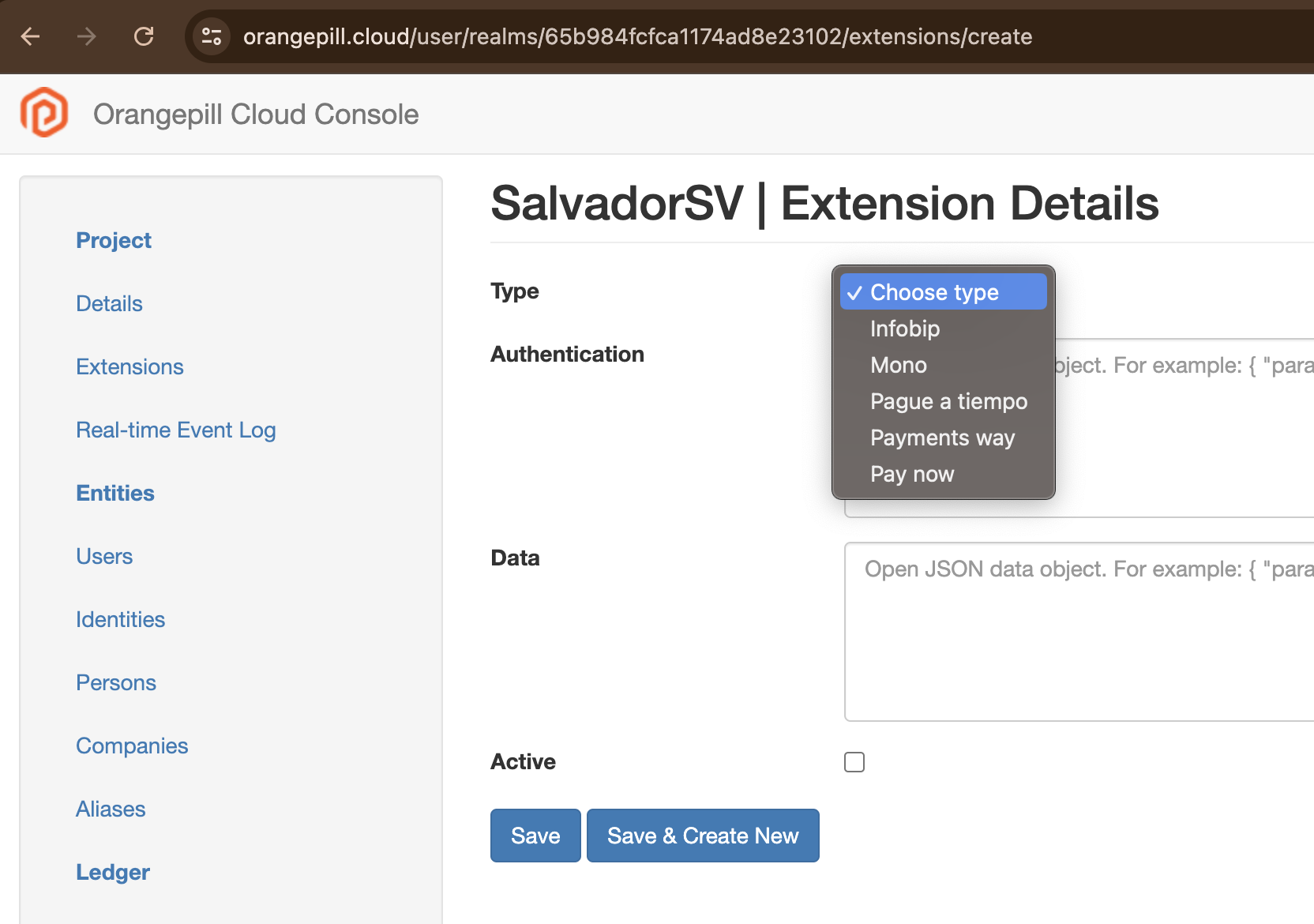
</code></pre>

{% endtab %}
{% endtabs %}

In response we get new `transaction`. This call is **async**.

```json
{
    "name": "EventStarted",
    "message": "Transaction is in processing pool.",
    "code": 200,
    "type": "transaction.processing",
    "data": {
        "id": "639d2416cd7325b35f409452",
        "source": {
            "account": "634b56217f6a7b0be52dffbd",
            "owner": "639675ab191e9023f356dfa6"
        },
        "destination": {
            "account": "6340be52dffbdb56217f6a7b",
            "owner": "639675ab191e9023f356dfa6"
        },
        "amount": "0.000110075",
        "asset": "ETH",
        "seal": {
            "my_signature_field": "my_signature_value"
        },
        "data": {
            "description": "Payment 0.000110075 ETH",
            "external_reference": "PAY001"
        },
        "owner": "639675ab191e9023f356dfa6",
        "created_at": 1671242774572,
        "status": "PROCESSING",
        "error": null,
        "value": "0.000110075"
    }
}
```

`transaction` will change `status` to `DONE` or `FAILED` once processing is finished.&#x20;

{% hint style="info" %}
If `source` and `destination` are Sub Accounts for different Ramp Account, `transaction` will generate `withdrawal` operation to target account `address`.
{% endhint %}

## Retrieve history

To filter out history of incoming or outgoing transactions for authenticated user, apply `?scope=outgoing` or `?scope=incoming` in RESTful API query. Those scopes will filter out transactions where authenticated user is owner of `source.account` or `destination.account`.

{% tabs %}
{% tab title="cURL" %}

```shell
echo 'get all outgoing transactions for authenticated user'

curl --location --request GET 'https://api.orangepill.cloud/v1/transactions?scope=outgoing' \
--header 'x-api-key: AXVubzpwQDU1dzByYM==' \
--header 'Content-Type: application/json'
```

{% endtab %}
{% endtabs %}

In response we get list of `transactions`.

```json
{
    "rows": [
        {
        "source": {
            "account": "634b56217f6a7b0be52dffbd"
        },
        "destination": {
            "account": "6340be52dffbdb56217f6a7b"
        },
        "value": 0.0000001,
        "currrency": "BTC",
        "seal": {
            "my_signature_field": "my_signature_value"
        },
        "data": {
            "description": "Payment 0.0000001 in Bitcoin",
            "external_reference": "PAY002"
        },
        "charges": null,
        "amount": 0.0000001,
        "status": "DONE",
        "created_at": "1519231809434",
        "updated_at": "1519809934211",
        "error": null
        },
    ],
    "total": 1,
    "page": 1,
    "pageSize": 10,
    "totalPages": 1
        
}
```


# Payment gateways

Payment gateways is the first step to transform fiat money into a virtual currency, basically this service is to create a payment link using the following payment gateways

* Mono
* Pague a tiempo
* Payments way
* Pay now
* Zynle pay
* Orangepill payments
* M-Pesa

To start using one of them, you have to follow the following steps:

* Create an account on Orangepill
* Create a realm
* Get credentials for one of prior listed payment gateways
* Go to extension section on Orangepill dashboard
* Create a new Extension

<figure><img src="/files/g34utYggHUDBgTiKx3Mo" alt=""><figcaption></figcaption></figure>

### Format of authentication object for each payment gateway

* Mono

```json
{"api_key":"****", "base_url":"****"}
```

* Pague a tiempo

```json

{"email":"****","password":"****","base_url":"****"}
```

* Payments way

```json
{"base_url":"****","api_key":"****"}
```

* Pay now

```json
{"base_url":"****","integration_id":"****","integration_key":"****"}
```

* Zynle pay

```json
{"base_url":"****","merchant_id":"****","api_id":"****","api_key":"****"}
```

* Orangepill payments

```json
{"base_url":"****","api_key":"****"}
```

* M-Pesa

```json
{"shortCode": "****","passKey": "****","consumerKey": "****","consumerSecret": "****","baseUrl": "****"}

```

### Usage

When you call payment gateways service you have to send two parameters

* payment\_product: name of the payment gateway
  * mono
  * payOnTime
  * paymentsWay
  * payNow
  * zynlePay
  * orangepillPayments
  * mpesa
* payment\_product\_parameters: it varies according the payment gateway selected

```bash
curl --location 'https://api.orangepill.cloud/v1/payment-gateways/createPaymentLink' \
--header 'Content-Type: application/json' \
--header 'x-api-key: API_KEY' \
--data-raw '{
    "payment_product": "mono",
    "payment_product_parameters": {
    }
}'
```

#### Mono

Request

```bash
curl --location 'https://api.orangepill.cloud/v1/payment-gateways/createPaymentLink' \
--header 'Content-Type: application/json' \
--header 'x-api-key: API_KEY' \
--data-raw '{
    "payment_product": "mono",
    "payment_product_parameters": {
        "account_id": "****",
        "amount": {
            "amount": 100,
            "currency": "COP"
        },
        "amount_validation": "free",
        "payer": {
            "document_number": "123456",
            "document_type": "CC",
            "email": "example@orangepill.cc",
            "name": "Angel",
            "phone": "+573112378437"
        },
        "redirect_url": "https://example.com",
        "reference": {
            "editable": false,
            "required": false,
            "value": ""
        },
        "usage_type": "single_use"
    }
}'

```

Response

````json

{
    "enabled": true,
    "id": "****",
    "link": "****",
    "reference": {
        "value": null,
        "required": false,
        "editable": false
    },
    "amount": {
        "currency": "COP",
        "amount": 100
    },
    "inserted_at": "2024-07-11T21:49:14.765544Z",
    "updated_at": "2024-07-11T21:49:14.765544Z",
    "external_id": null,
    "expires_at": null,
    "usage_type": "single_use",
    "account_id": "****",
    "redirect_url": "https://example.com",
    "payer": {
        "name": "Angel",
        "email": "example@orangepill.cc",
        "note": {
            "value": null,
            "required": false,
            "editable": false
        },
        "phone": "+573112378437",
        "document_number": "123456",
        "document_type": "CC"
    },
    "successful_payments": 0,
    "amount_validation": "free"
}
```
````

#### Pague a tiempo

Request

```bash
curl --location 'https://api.orangepill.cloud/v1/payment-gateways/createPaymentLink' \
--header 'Content-Type: application/json' \
--header 'x-api-key: API_KEY' \
--data '{
    "payment_product": "payOnTime",
    "payment_product_parameters": {
        "itin": "123456",
        "reason": "primary",
        "description": "solid state",
        "invoice_number": "77",
        "currency_code": "COP",
        "value":"100",
        "tax_percentage": "1",
        "tax_value": "1"
    }
}'
```

Response

```json
{
    "message": "Link de pago creado",
    "generated_link": "https://****/#/payment-link/****"
}
```

#### Payments way

Request

```bash
curl --location 'https://api.orangepill.cloud/v1/payment-gateways/createPaymentLink' \
--header 'Content-Type: application/json' \
--header 'x-api-key: API_KEY' \
--data '{
    "payment_product": "paymentsWay",
    "payment_product_parameters": {
        "amount": 1000.125,
        "description": "Description",
        "currency": "COP",
        "terminal_id": 123,
        "form_id": 123,
        "due_date": "2024/12/12",
        "redirection_url": "https://example.com",
        "services": [1,2]
    }
}'
```

Response

```json
{
    "id": "e22441b1-52ad-4b28-8afe-1c3eb772ffdf",
    "amount": "1000.13",
    "status": null,
    "currency": "COP",
    "isQr": false,
    "description": "Description",
    "due_date": "2024-12-12",
    "link": "https://****/Link/****",
    "created_at": "2024-07-11T21:53:57.021Z",
    "updated_at": null,
    "deleted_at": null,
    "base_color": "#f11f40",
    "image_url": null,
    "redirect_link": "https://example.com",
    "short_link": "https://****/7us0vc",
    "expiration_time": "23:59"
}
```

#### Pay now (card)

Request

```bash
curl --location 'https://api.orangepill.cloud/v1/payment-gateways/createPaymentLink' \
--header 'Content-Type: application/json' \
--header 'x-api-key: API_KEY' \
--data '{
    "payment_product": "payNow",
    "payment_product_parameters": {
        "reference": "ullam",
        "amount": 9.96363,
        "additional_info": "sequi",
        "return_url": "http://norris.net",
        "result_url": "http://adonis.name",
        "type": "card"
    }
}'
```

Response

```json
{
    "status": "Ok",
    "hash": "*****",
    "browser_url": "https://****/Payment/ConfirmPayment/18118406",
    "poll_url": "https://****/Interface/CheckPayment/?guid=****"
}
```

#### Pay now (mobile phone)

Request

```bash
curl --location 'https://api.orangepill.cloud/v1/payment-gateways/createPaymentLink' \
--header 'Content-Type: application/json' \
--header 'x-api-key: API_KEY' \
--data '{
    "payment_product": "payNow",
    "payment_product_parameters": {
        "reference": "ullam",
        "amount": 9.96363,
        "additional_info": "sequi",
        "return_url": "http://norris.net",
        "result_url": "http://adonis.name",
        "type": "mobilePhone",
        "phone": "0771111111",
        "method": "ecocash",
        "authemail": "example@test.com"
    }
}'
```

Response

```json
{
    "status": "Ok",
    "instructions": "Dial *151*2*4# and enter your EcoCash PIN. Once you have authorized the payment via your handset, please click Check For Payment below to conclude this transaction",
    "hash": "84F780315C3EB0656B71344C0E09C854F5FE1EDCD8A05365E55525B58296FF4C691A1B1C7671C079AB9B517B199F64B5EC320A55C46C6C36E62DE4B23DE02C60",
    "poll_url": "https://www.paynow.co.zw/Interface/CheckPayment/?guid=f4510f3b-67d4-48c2-b553-37dd18272fc4",
    "reference": "18384491"
}
```

#### Zynle pay

Request

```bash
curl --location 'https://api.orangepill.cloud/v1/payment-gateways/createPaymentLink' \
--header 'Content-Type: application/json' \
--header 'x-api-key: API_KEY' \
--data-raw '{
    "payment_product": "zynlePay",
    "payment_product_parameters": {
        "reference_no": "1725489982",
        "amount": 1.11,
        "description": "test description",
        "first_name": "Angel",
        "last_name": "Barrancos",
        "address": "Blooming Avenue",
        "email": "lbarrancos@orangepill.cc",
        "phone": "0774065514",
        "city": "Santa cruz",
        "state": "Santa cruz",
        "currency": "ZMW",
        "zip_code": "1234",
        "country": "Bolivia",
        "user_defined_1": "59179071059"
    }
}'
```

Response

```json
{
    "response_code": "100",
    "response_description": "Redirect",
    "reference_no": "1725489976",
    "transaction_id": 9692741235,
    "redirect_url": "https://sandbox.zynlepay.com/redirect-url/1725489976",
    "amount": 1.11,
    "udf1": "Valid card transaction",
    "udf2": "",
    "udf3": "",
    "udf4": "",
    "udf5": "",
    "operator_reference": 2592584423
}
```

#### Orangepill payments

Request

```bash
curl --location 'https://api.orangepill.cloud/v1/payment-gateways/createPaymentLink' \
--header 'Content-Type: application/json' \
--header 'x-api-key: API_KEY' \
--data '{
    "payment_product": "orangepillPayments",
    "payment_product_parameters": {
        "merchant_reference": "111",
        "payment_profile": "5d47ee6f-883b-4f84-a982-71bcac19a8b1",
        "amount": 1000,
        "organisation": "0c39337f-b691-4b5b-ba90-88dc2b2771c9",
        "customer": "cf856cd2-224d-4ac1-a7f8-1ea47c874856",
        "details": {
            "change_amount": true,
            "change_amount_max": 1000,
            "change_amount_min": 100000
        },
        "redirect_url": "https://example.com/redirect",
        "valid_until": "2024-09-16T02:02:22Z",
        "webhook_transaction_update": "https://example.com/test"
    }
}'
```

Response

```json
{
    "transaction": "",
    "customer": "cf856cd2-224d-4ac1-a7f8-1ea47c874856",
    "payment_profile": "5d47ee6f-883b-4f84-a982-71bcac19a8b1",
    "organisation": "0c39337f-b691-4b5b-ba90-88dc2b2771c9",
    "id": "74ac09f7-01ea-41be-8993-82076d49732c",
    "amount": 1000,
    "merchant_reference": "111",
    "payment_product": "",
    "status": "CREATED",
    "active": true,
    "redirect_url": "https://example.com/redirect",
    "webhook_transaction_update": "https://example.com/test",
    "details": {
        "change_amount": true,
        "change_amount_max": 1000,
        "change_amount_min": 100000,
    "redirect_url": "https://example.com/redirect",
        "approval_url": "https://sandbox-api.payments.orangepill.cloud/paymentlink/74ac09f7-01ea-41be-8993-82076d49732c"
    },
    "created_at": "2024-09-04T23:18:34+00:00",
    "updated_at": "2024-09-04T23:18:34+00:00",
    "valid_until": "2024-09-16T02:02:22+00:00"
}
```

#### M-Pesa

Request

```bash
curl --location 'https://api.orangepill.cloud/v1/payment-gateways/createPaymentLink' \
--header 'Content-Type: application/json' \
--header 'x-api-key: API_KEY' \
--data '{
    "payment_product": "mpesa",
    "payment_product_parameters": {
        "transaction_type": "CustomerPayBillOnline",
        "amount": 1,
        "source": "254708374149",
        "phoneNumber": "254708374149",
        "resultUrl": "https://example/result",
        "reference": "reference",
        "description": "description"
    }
}'
```

Response

```json
{
    "merchant_request_id": "b63c-4f5b-830c-97562f598bca31994",
    "checkout_request_id": "ws_CO_26112024072108728708374149",
    "response_code": "0",
    "response_description": "Success. Request accepted for processing",
    "customer_message": "Success. Request accepted for processing"
}
```

Once you get the response, you should use link provided by each payment gateways and it will display a form to make the payment using different financial instruments such as credit card, debit card, PSE and so on.

{% hint style="info" %}
Some payment gateways does not return a link because they use mobile money, such as follow:

* Pay Now (it has both, payment link and mobile money)
* M-Pesa

For mobile money the customer will get a USSD code to accept or reject the transfer
{% endhint %}

After you initiate the payment, the payment gateway will invoke a wallet agent which is in charge of emitting virtual currency but that process will be covered on another section.


# Payouts and Payins

Payouts offer a way of paying out money to a consumer, directly to their bank account. It provides a standard API interface for issuing  payouts across various payment processors and banks.

## Setup

In order to use payouts, a **payment-profile** needs to be setup with **payment-processor** and **rail** details for each bank

<img src="/files/K2XQQij4LdQDE56hnBxN" alt="payment profile model" class="gitbook-drawing">

#### Currently supported payment processors and rails

* Payments Way
  * ach
* Mono
  * ach
  * turbo
  * transfiya
* Movii
  * transfiya

### Rails

The rails object contains two important objects whose structure may depend on the specific rail:

* `config`
* `credentials` (all data in this field will be encrypted)

The `name` field must correspond to a supported rail name

#### Mono

Mono provides it's own fallback processing, and the alternative rails are specified in the `config.fallback_routing` field.

Request&#x20;

```bash
curl -X POST --location 'https://api.orangepill.cloud/v1/rails' \
--header 'x-api-key: API_KEY' \
--header 'Content-Type: application/json' \
--data '{
          "name": "turbo",
          "config": {
            "account_id": "my_acc_number",
            "fallback_routing": ["ach"]
            "base_url": "https://api.sandbox.cuentamono.com/v1"
          },
          "credentials": {
            "authorization": "Bearer key_012345XY",
          },
          "active": true,
          "deleted": false,
          "default": true
        }'
```

Response

```bash
{
  "id": "67ea61d6b5bb3aea747961ac",
  "name": "turbo",
  "config": {
     "account_id": "my_acc_number",
     "fallback_routing": ["ach"]
     "base_url": "https://api.sandbox.cuentamono.com/v1"
   },
  "credentials": {
     "authorization": "b34c88f6b6b0409855b5f3",
  },
  "default": true,
  "active": true,
  "deleted": false
}
```

#### Payments Way

Request

<pre class="language-bash"><code class="lang-bash"><strong>curl -X POST --location 'https://api.orangepill.cloud/v1/rails' \
</strong>--header 'x-api-key: API_KEY' \
--header 'Content-Type: application/json' \
--data '{
          "name": "ach",
          "config": {
            "bank_code": "1007",
            "base_url": "http://190.60.126.210:3001/CashOutService.svc",
          },
          "credentials": {
            "username": "MY_USER_NAME",
            "password": "my_password
          },
          "deleted": false,
          "default": false 
       }'
</code></pre>

#### Transfiya - Movii

Request

```bash
curl -X POST --location 'https://api.orangepill.cloud/v1/rails' \
--header 'x-api-key: API_KEY' \
--header 'Content-Type: application/json' \
--data '{
          {
        "name": "transfiya",
        "config": {
          "base_url": "https://movii-bridge-ehmrxbxhlq-uk.a.run.app"
        },
        "credentials": {
          "api_key": "b91964bd18889d78789baaa1dc4d75719c23485c500d674ebcc408c11",
          "signer_handle": "wilkjSAEuhreanAsfeapjgeAUENGdseaBboFs",
          "wallet_handle": "$573990000001",
          "client_id": "278e40d46ce942347rf7ca4092fe23e255",
          "client_secret": "08664b0c9bfd06093234cb44062rd942aba6b740a467664d"
        },
        "deleted": false,
        "default": true
      }'
```

### Payment processors

The payment processor `name` must correspond to a supported payment processor. The `rails` array contains the ids of rails linked to this payment processor.

Request

```bash
curl -X POST --location 'https://api.orangepill.cloud/v1/payment-processors' \
--header 'x-api-key: API_KEY' \
--header 'Content-Type: application/json' \
--data '{
            "name": "mono",
            "rails": ["67ea61d6b5bb3aea747961ac"],
            "default": true,
            "active": true,
            "deleted": false
      }'
```

Response

```bash
{
  "id": "67ea6bc8b5bb3aea747961ad",
  "name": "mono",
  "default": true,
  "active": true,
  "deleted": false,
  "rails": [
    {
      "id": "67ea61d6b5bb3aea747961ac",
      "name": "turbo",
      "config": {
         "account_id": "my_acc_number",
         "fallback_routing": ["ach"],
         "base_url": "https://api.sandbox.cuentamono.com/v1"
       },
    "credentials": {
       "authorization": "b34c88f6b6b0409855b5f3",
     
    },
    "default": true,
    "active": true,
    "deleted": false
    }
  ]
}
```

### Payment profiles

Payment profiles are the top level payout setup category and can contain several `payment_processors`&#x20;

The field `failover` specifies the fail-over logic in case of a payout transaction failure, and it can contain one of these values:

* RAIL - the next transaction will be tried with the same rail of a different payment processor
* PAYMENT\_PROCESSOR - next transaction will be tried with the next rail of the same payment processor

*note:* since Mono has it's own fail-over mechanism,  this field can be set to null

Request

```bash
curl -X POST --location 'https://api.orangepill.cloud/v1/payment-profiles' \
--header 'x-api-key: API_KEY' \
--header 'Content-Type: application/json' \
--data '{
        "name": "MY_PROFILE",
        "payment_processors": ["67ea6bc8b5bb3aea747961ad"],
        "failover": "RAIL",
        "default": true,
        "active": true,
        "deleted": false,
        "type": "payout"
  }'
```

Response

```bash
{
  "id": "67ea6f7ab5bb3aea747961ae",
  "name": "MY_PROFILE",
  "failover": null,
  "default": "RAIL",
  "active": true,
  "deleted": false,
  "payment_processors": [
       {
          "id": "67ea6bc8b5bb3aea747961ad",
          "name": "mono",
          "default": true,
          "active": true,
          "deleted": false,
          "rails": [
            {
              "id": "67ea61d6b5bb3aea747961ac",
              "name": "turbo",
              "config": {
                 "account_id": "my_acc_number",
                 "fallback_routing": ["ach"]
               },
            "credentials": {
               "authorization": "b34c88f6b6b0409855b5f3",
               "base_url": "https://api.sandbox.cuentamono.com/v1"
            },
            "default": true,
            "deleted": false
            }
          ]
        }
      ]
    }
  ]
```

## Payout

The payout API has a common interface for all payment processors and rails. The payout will be sent using the payment profile specified in the  `payment_profile` field. If this field is not specified, the payout will be sent with the *default* **payment profile** (which will use the *default* **payment processor** with the *default* **rail).**

Request

```bash
curl -X POST --location 'https://api.orangepill.cloud/v1/payout' \
--header 'x-api-key: API_KEY' \
--header 'Content-Type: application/json' \
--data '{
          "country": "CO",
          "payment_profile": "67ea6f7ab5bb3aea747961ae",
          "account": "1234567",
          "bank": "051",
          "account_type": "savings_account",
          "amount": 50000,
          "notify_url": "http://my-server.com/webhook",
          "document": "8881235000",
          "document_type": "CC",
          "name": "orangepill user",
          "email":"orangepill_user+4@orangepill.cc",
          "phone": "+573201111501",
          "receiver_id": "122222",
          "source_currency": "COP"
        }'
```

Response

```bash
{
  "id": "67ea7c7eb5bb3aea747961af",
  "payment_profile": "67ea6f7ab5bb3aea747961ae",
  "payment_processor": "mono",
  "rail": "ach",
  "bank": "051",
  "account": "1234567",
  "account_type": "savings_account",
  "amount": "50000",
  "source_currency": "COP",
  "notify_url": "http://my-server.com/webhook",
  "country": "CO",
  "document": "8881235000",
  "document_type": "CC",
  "external_id": "trn_02zVPwC62K0NoHV99Uyr3B",
  "status": "INIT",
  "status_description":""
  "name": "orangepill user",
  "email":"orangepill_user+4@orangepill.cc",
  "phone": "+573201111501",
  "receiver_id": "122222",
  "created_at": 1743420542246,
  "updated_at": 1743420543365,
  "retries": []
}
```

The initial response represents the data structure of the sent payout. \
Subsequent data will be sent to the web hook specified in the `notify_url`field with the updated statuses

## Payin

The payin API has a common interface for all payment processors and rails and is similar to the payout. The payin will be sent using the payment profile specified in the  `payment_profile` field, or will use the default. \
Payins and Payouts must have different Payment Profiles, each specifying either:\
`"type":"payin"` or `"type":"payout"` \
They can, however, reference the same payment processors and rails

#### Transfiya - Movii example

Request&#x20;

```bash
curl -X POST --location 'https://api.orangepill.cloud/v1/payout' \
--header 'x-api-key: API_KEY' \
--header 'Content-Type: application/json' \
--data '{
            "account": "$573051000002",
            "receiver_id": "wiFAcpfsuPyGSxyTMbnSkWVLGWfFKBboFs",
            "payment_profile": "687a2d53b96d3f93ce52e2f7",
            "amount": "10000",
            "currency": "COP",
            "additional_remark": "Test payin",
            "notify_url": "http://my-server.com/webhook"
        }'
```

Response

```bash
{ 
  "id": "688c89d34cd874d3fc986159",
  "payment_profile": "687a2d53b96d3f93ce52e2f7",
  "payment_processor": "687a2d2bb96d3f93ce52e2f6",
  "rail": "687a2c5bb96d3f93ce52e2f5",
  "amount": "10000",
  "account": "$573051000002",
  "receiver_id": "wiFAcpfsuPyGSxyTMbnSkWVLGWfFKBboFs",
  "additional_remark": "Test payin",
  "currency": "COP",
  "status": "INIT",
  "external_id": "020JVeIvCc2dkazhv",
  "notify_url": "http://my-server.com/webhook",
  "created_at": 1754040787936,
  "updated_at": 1754040788514,
  "retries": []
}
```

### Status list

* INIT   - payout initialized and sent to the payment processor
* PROCESSING - payout is being processed
* COMPLETED - payout transaction successfully completed
* FAILED - payout transaction failed

Additional information regarding failed statuses can be found in the `status_description` field


# KYC

To provide a holistic solution Orangepill platform offers a KYC (know your customer) solution.

Nowadays we offer the following KYC providers:

{% content-ref url="/pages/ynDkjv94beEhCWdjW2tj" %}
[Didit](/orangepill-api/kyc/didit)
{% endcontent-ref %}

{% content-ref url="/pages/BQgHGEt80JlpI1CJQsko" %}
[Sumsub](/orangepill-api/kyc/sumsub)
{% endcontent-ref %}


# Didit

In order to use Didit as KYC provider, you have to follow the following steps:

* As Didit partner we walkthrough you on the onboarding process, on this process we will provide you a Didit dashboard with an admin user
* Once you have your Didit workspace you can register the Webhook to get session updates, [here](#notify) you can find more info about the endpoint to get session updates

<figure><img src="/files/684yqeV19iOFXep3uMLF" alt=""><figcaption></figcaption></figure>

* You can get the credentials to create KYC sessions through our API

<figure><img src="/files/LZ7wwHDjG3UxzfB4WGHG" alt=""><figcaption></figcaption></figure>

* Then you have to create a KYC record passing credentials

```bash
curl --location 'https://api.orangepill.cloud/v1/kycs' \
--header 'Content-Type: application/json' \
--header 'x-api-key: ***' \
--data '{
    "provider": "didit",
    "baseUrl": "https://verification.didit.me",
    "authUrl": "https://apx.didit.me",
    "credentials": {
        "clientId": "***",
        "client_secret": "***"
    }
}'
```

```json
{
    "id": "67ee20bbdc4caf29375df067",
    "provider": "didit",
    "baseUrl": "https://verification.didit.me",
    "authUrl": "https://apx.didit.me",
    "createdAt": 1743659195718,
    "deleted": false
}
```

> You can't have multiple active KYC records for the same provider

* Finally you can create a session&#x20;

```json
curl --location 'https://api.orangepill.cloud/v1/kycs/session/didit' \
--header 'Content-Type: application/json' \
--header 'x-api-key: ***' \
--data '{
    "parameters": {
        "result_url": "https://test.ngrok-free.app"
    }
}'
```

```json
{
    "id": "2f1ab476-2d3e-4b36-8016-b761b98ce741",
    "number": 29,
    "token": "***",
    "status": "Not Started",
    "session_url": "https://verify.didit.me/session/eyJhbGciOiJIUzI1NiIsInR5cCI6IkpXVCJ9.eyJpYXQiOjE3NDM2NTkyMjcsImV4cCI6MTc0NDI2NDAyNywic2Vzc2lvbl9pZCI6IjJmMWFiNDc2LTJkM2UtNGIzNi04MDE2LWI3NjFiOThjZTc0MSJ9.tWnqWiZnrghkQ6R-RAnP4Ql_1Rf22qJhsBj_WZZuFs0",
    "result_url": "https://test.ngrok-free.app",
    "features": "OCR + FACE"
}
```

## API reference

To give you more clarity about KYC service we will split it in two:

* KYC: services to configure data needed to manage sessions
* Session: services to manage sessions

### KYC

#### Create

```bash
curl --location 'https://api.orangepill.cloud/v1/kycs' \
--header 'Content-Type: application/json' \
--header 'x-api-key: ***' \
--data '{
    "provider": "didit",
    "baseUrl": "https://verification.didit.me",
    "authUrl": "https://apx.didit.me",
    "credentials": {
        "clientId": "***",
        "client_secret": "***"
    }
}'
```

```json
{
    "id": "67ee20bbdc4caf29375df067",
    "provider": "didit",
    "baseUrl": "https://verification.didit.me",
    "authUrl": "https://apx.didit.me",
    "createdAt": 1743659195718,
    "deleted": false
}
```

#### Update

```bash
curl --location --request PATCH 'https://api.orangepill.cloud/v1/kycs/:id
--header 'Content-Type: application/json' \
--header 'x-api-key: ***' \
--data '{
    "provider": "didit",
    "baseUrl": "https://verification.didit.me",
    "authUrl": "https://apx.didit.me",
    "credentials": {
        "clientId": "***",
        "client_secret": "***"
    }
}'
```

```json
{
    "id": "67ee20bbdc4caf29375df067",
    "provider": "didit",
    "baseUrl": "https://verification.didit.me",
    "authUrl": "https://apx.didit.me",
    "createdAt": 1743659195718,
    "updatedAt": 1743659929846,
    "deleted": false
}
```

#### Delete

```bash
curl --location --request DELETE 'https://api.orangepill.cloud/v1/kycs/:id' \
--header 'x-api-key: ***'
```

```json
"67ee20bbdc4caf29375df067"
```

#### Resolve

```bash
curl --location 'https://api.orangepill.cloud/v1/kycs/:id' \
--header 'x-api-key: ***'   
```

```json
{
    "id": "67ee20bbdc4caf29375df067",
    "provider": "didit",
    "baseUrl": "https://verification.didit.me",
    "authUrl": "https://apx.didit.me",
    "createdAt": 1743659195718,
    "updatedAt": 1743659929846,
    "deleted": false
}
```

#### List

```bash
curl --location 'https://api.orangepill.cloud/v1/kycs' \
--header 'x-api-key: ***'
```

```json
{
    "rows": [
        {
            "id": "67ee20bbdc4caf29375df067",
            "provider": "didit",
            "baseUrl": "https://verification.didit.me",
            "authUrl": "https://apx.didit.me",
            "createdAt": 1743659195718,
            "updatedAt": 1743659929846,
            "deleted": false
        }
    ],
    "total": 1,
    "page": 1,
    "pageSize": 10,
    "totalPages": 1
}
```

### Sessions

#### Create

```bash
curl --location 'https://api.orangepill.cloud/v1/kycs/session/:provider' \
--header 'Content-Type: application/json' \
--header 'x-api-key: ***' \
--data '{
    "parameters": {
        "result_url": "https://test.ngrok-free.app"
    }
}'
```

```json
{
    "id": "2f1ab476-2d3e-4b36-8016-b761b98ce741",
    "number": 29,
    "token": "***",
    "status": "Not Started",
    "session_url": "https://verify.didit.me/session/eyJhbGciOiJIUzI1NiIsInR5cCI6IkpXVCJ9.eyJpYXQiOjE3NDM2NTkyMjcsImV4cCI6MTc0NDI2NDAyNywic2Vzc2lvbl9pZCI6IjJmMWFiNDc2LTJkM2UtNGIzNi04MDE2LWI3NjFiOThjZTc0MSJ9.tWnqWiZnrghkQ6R-RAnP4Ql_1Rf22qJhsBj_WZZuFs0",
    "result_url": "https://test.ngrok-free.app",
    "features": "OCR + FACE"
}
```

#### Update

```bash
curl --location --request PATCH 'https://api.orangepill.cloud/v1/kycs/session/:provider/:id' \
--header 'Content-Type: application/json' \
--header 'x-api-key: ***' \
--data '{
    "parameters": {
        "status": "approved",
        "comment": "test"
    }
}'
```

```json
{
    "id": "a0f6baf3-8c87-477e-9610-7da29d67dc42"
}
```

#### Get

```bash
curl --location 'https://api.orangepill.cloud/v1/kycs/session/:provider/:id' \
--header 'x-api-key: ***'
```

```json
{
    "id": "04150092-7adc-4620-b4e5-684eca447304",
    "number": 4,
    "status": "Approved",
    "session_url": "https://verify.didit.me/session/***",
    "result_url": null,
    "features": "OCR + FACE",
    "vendor_data": null
}
```

#### Generate PDF

```bash
curl --location 'https://api.orangepill.cloud/v1/kycs/session/:provider/:id/pdf' \
--header 'Content-Type: application/pdf' \
--header 'x-api-key: ***'
```

#### Notify

```bash
curl --location 'https://proxy.orangepill.cloud/v1/kycs/session/notify/:provider/:realm_key
--header 'Content-Type: application/json' \
--header 'x-api-key: ***' \
--data '{
    "created_at": 1747704352,
    "session_id": "4798642c-33d1-4492-813c-61d353b8f96d",
    "status": "Not Started",
    "timestamp": 1747704352,
    "vendor_data": "65c7e78d35e4fa63e35f3483"
}'
```

{% hint style="info" %}
This is and endpoint to be consumed exclusively for KYCs providers, you just have to register the url on Webhook section
{% endhint %}


# Sumsub

This document describes the process of integrating Sumsub's Know Your Customer (KYC) service into the Orangepill platform. It outlines the prerequisites, required configurations on both platforms.

## Prerequisites

Before Sumsub can be used as a KYC provider in Orangepill, you must complete the following setup steps:

#### **1. Identify the Realm Key (Source Key)**

In Orangepill, each **company** is associated with a **realm**, which acts as a logical grouping for identities and integrations. When a company is created:

* A **realm** is automatically created in Orangepill.
* A unique **realm key** (UUID) is generated and assigned to that realm.

This **realm key** will serve as the **source key** for integrating with Sumsub and must be used when creating related entities (e.g., webhooks, app tokens, applicants) within Sumsub.

> Example Realm Key:\
> `e69ea64e-64d1-4d64-8c5c-806923a537a8`

#### **2. Create a Webhook in Sumsub**

Configure a webhook in Sumsub to notify Orangepill about **applicant status changes**. Make sure to use the webhook type:

> **`applicantReviewed`**

This webhook is triggered whenever an applicant's review status changes (e.g., approved, rejected).

**Webhook URL Format:**

```
https://proxy.orangepill.cloud/v1/kycs/session/notify/sumsub/<realm-key>
```

After setting up the webhook:

* **Select the `applicantReviewed` type**.
* **Copy the Webhook Secret Key** — this will be used by Orangepill to verify the authenticity of incoming webhook requests via HMAC signature.
* **Assign the Realm Key as the Source Key** in Sumsub — this links the webhook to a specific realm and ensures only users/applicants within that context trigger notifications.

#### 3. Generate App Token and Secret Key

In Sumsub, generate an **App Token** scoped to the same realm (using the realm key as the source). This process returns:

* `app_token`: Used for authenticating API calls from Orangepill to Sumsub.
* `secret_key`: Used to sign requests.

This `app_token` and `secret_key` pair must also be stored alongside the realm’s configuration in Orangepill.

***

## Registering the Sumsub Provider in Orangepill

Once the necessary credentials have been collected, you can register Sumsub as a KYC provider within Orangepill using the internal API.

#### Example API Request

```bash
curl --location 'https://api.orangepill.cloud/v1/kycs' \
--header 'x-api-key: <API_KEY>' \
--header 'Content-Type: application/json' \
--data '{
    "provider": "sumsub",
    "base_url": "https://api.sumsub.com",
    "credentials": {
        "app_token": "<APP_TOKEN>",
        "secret_key": "<SECRET_KEY>",
        "webhook_secret": "<WEBHOOK_SECRET>"
    },
    "data": {
        "allow_session_storage": true
    }
}'
```

#### Field Descriptions

| Field                        | Description                                                                   |
| ---------------------------- | ----------------------------------------------------------------------------- |
| `provider`                   | The name of the provider. Must be `"sumsub"`.                                 |
| `base_url`                   | Sumsub API base URL. Usually `https://api.sumsub.com`.                        |
| `credentials.app_token`      | Token issued by Sumsub to identify your application.                          |
| `credentials.secret_key`     | Used to sign and verify Sumsub requests.                                      |
| `credentials.webhook_secret` | Secret for verifying webhook payloads from Sumsub.                            |
| `data.allow_session_storage` | If true, allows Orangepill to store `applicantId` on the associated identity. |

**Successful Response:**

```
{
    "id": "<PROVIDER_ID>",
    "provider": "sumsub",
    "data": {
        "allow_session_storage": true
    },
    "baseUrl": "https://api.sumsub.com",
    "createdAt": 1752855581224,
    "deleted": false
}
```

***

## Retrieve a Registered KYC Provider

Once a KYC provider (e.g., Sumsub) has been registered in Orangepill, you can retrieve its configuration using the provider’s unique identifier.

#### API: Get KYC Provider by ID

**Request:**

```bash
curl --location 'https://api.orangepill.cloud/v1/kycs/<PROVIDER_ID>' \
--header 'x-api-key: <API_KEY>'
```

* Replace `<provider_id>` with the ID returned during provider registration.
* Replace `<API_KEY>` with a valid Orangepill API key.

***

**Successful Response:**

```json
{
  "id": "<PROVIDER_ID>",
  "provider": "sumsub",
  "data": {
    "allow_session_storage": true
  },
  "baseUrl": "https://api.sumsub.com",
  "createdAt": 1752512730707,
  "deleted": false
}
```

***

## Create a KYC Verification Session

Once the provider has been registered and configured, you can initiate a KYC verification session for a user by creating an **applicant** in Sumsub through Orangepill’s API.

Orangepill will generate a Sumsub applicant using the user’s **identity ID** (used as the external user ID), and return a session token that can be used to launch the Sumsub SDK or WebApp.

#### API: Create Sumsub KYC Session

**Endpoint:**

```
POST /v1/kycs/session/sumsub
```

**Request:**

```bash
curl --location 'https://api.orangepill.cloud/v1/kycs/session/sumsub' \
--header 'x-api-key: <API_KEY>' \
--header 'Content-Type: application/json' \
--data '{
    "parameters": {
        "level_name": "basic-kyc-level",
        "external_user_id": "<IDENTITY_ID>"
    }
}'
```

#### Request Body Parameters

| Field              | Description                                                                                               |
| ------------------ | --------------------------------------------------------------------------------------------------------- |
| `level_name`       | The verification level configured in your Sumsub dashboard (e.g., `basic-kyc-level`).                     |
| `external_user_id` | The ID of the identity in Orangepill. This will be mapped to Sumsub’s `externalUserId` for the applicant. |

**Successful Response:**

```json
{
    "id": "<APPLICANT_ID>",
    "externalUserId": "<IDENTITY_ID>",
    "sourceKey": "<REALM_KEY>",
    ...
}
```

***

## Upload Verification Files for an Applicant

Once a Sumsub applicant has been created, the next step is to upload the necessary verification files (e.g., selfies, ID front/back images) using Orangepill’s unified API.

This endpoint allows the platform to send document files to Sumsub on behalf of the user.

#### API: Upload Verification File

**Endpoint:**

```url
POST /v1/kycs/verification/sumsub/file
```

**Request:**

```bash
curl --location 'https://api.orangepill.cloud/v1/kycs/verification/sumsub/file' \
--header 'x-api-key: <API_KEY>' \
--form 'applicantId="687a4fe322f276e950dcc5fc"' \
--form 'idDocType="SELFIE"' \
--form 'idDocSubType="FRONT_SIDE"' \
--form 'country="RUS"' \
--form 'content=@"/selfie.png"' \
--form 'firstName="JOHN"' \
--form 'lastName="WICK"'
```

#### Request Form Parameters

| Field          | Description                                                                                 |
| -------------- | ------------------------------------------------------------------------------------------- |
| `applicantId`  | The Sumsub applicant ID obtained from the session creation step.                            |
| `idDocType`    | Type of document being uploaded. Common values: `PASSPORT`, `ID_CARD`, `DRIVERS`, `SELFIE`. |
| `idDocSubType` | Document side or subcategory. E.g., `FRONT_SIDE`, `BACK_SIDE`, or leave blank for `SELFIE`. |
| `country`      | 3-letter ISO 3166-1 alpha-3 country code (e.g., `DEU` for Germany).                         |
| `content`      | The actual image or PDF file to upload. Must be a binary file (e.g., PNG, JPEG).            |
| `firstName`    | Applicant's first name (used by Sumsub to enrich data).                                     |
| `lastName`     | Applicant's last name (used by Sumsub to enrich data).                                      |

> ⚠️ The file size must comply with Sumsub’s upload restrictions (typically < 50MB per file).

#### Behavior

* This endpoint uploads the document to Sumsub on behalf of the applicant.
* Multiple documents can be uploaded using separate requests (e.g., front and back of ID card).
* If a required field is missing or the document is invalid, Sumsub will reject the upload and respond with an error.

**Successful Response:**

```json
{
    "idDocType": "SELFIE",
    "country": "RUS"
    "firstName": "JOHN",
    "lastName": "WICK"
}
```

***

## Submit Document Metadata Without File Upload

In some cases, it's necessary to send document-related information **without uploading a file**. This could include updating document details, enriching metadata, or triggering verification when documents are submitted through alternative channels.

Orangepill provides a dedicated endpoint to send **applicant metadata** to Sumsub, independent of file uploads.

#### API: Submit Verification Info

**Endpoint:**

```
bashCopyEditPOST /v1/kycs/verification/sumsub/info
```

**Request:**

```bash
bashCopyEditcurl --location 'https://api.orangepill.cloud/v1/kycs/verification/sumsub/info' \
--header 'x-api-key: <API_KEY>' \
--header 'Content-Type: application/json' \
--data '{
    "applicantId": "6877fa681a4796e48f32b888",
    "idDocType": "PASSPORT",
    "idDocSubType": "FRONT_SIDE",
    "firstName": "PETER",
    "lastName": "SULLIVAN",
    "country": "ZAF",
    "placeOfBirth": "ZAF"
}'
```

#### Behavior

* This endpoint sends applicant metadata to Sumsub.
* It does **not** include any file content.
* Can be used before or after file uploads to keep data up to date.
* Useful for compliance workflows where document info is verified separately.


# Payments API

## Introduction to Orangepill Payments API

Welcome to the Orangepill Payments API documentation, your gateway to seamless direct pay-in and pay-out operations. The Orangepill Payments API is designed to streamline financial transactions by offering a secure, efficient, and reliable solution for businesses of all sizes.

### Key Features

* **Direct Pay-In Operations**: Enable customers to deposit funds directly into your bank account, ensuring a smooth and straightforward payment experience.
* **Direct Pay-out Operations**: Easily process withdrawals or distribute funds to your users with flexible payout options.

Delve into this guide to explore how you can integrate and utilize the Payments API for optimized financial operations in your application.


# Register Gateway


# PayPal


# Colombia


# Mono


# PaymentsWay


# Coopcentral


# Movii


# Kenya


# M-Pesa


# Zambia


# Zynle


# Zimbabwe


# PayNow


# Payout


# Payin


# Payment Link


# SmartApps


# Payment Request

Use Apps.Payment to create Payment Request and related QR codes. Payment Request stores the details of a future payment.

The Orangepill platform's Payment Request feature, accessed via the `Apps.Payment` module, allows users to create and manage payment requests effectively. Each payment request must include the destination alias of the receiver, ensuring proper routing of funds. Optional fields enable users to specify the payment amount and currency, adding precision to transactions. Additionally, users can include a source alias to direct the request to a specific payer, making the process efficient for recurring or predetermined payments. To further streamline the payment process, `Apps.Payment` supports methods to generate and reveal QR codes representing the payment request. This QR code functionality simplifies the transaction process by allowing users to quickly and accurately share payment details, enhancing both the flexibility and reliability of handling pending payments within the platform.

## Payment Request Unique Code

Payment Request `id` is the unique identifier and code for this payment request. Use this information to share Payment request.

**Payment Request Code Example**

```json
"MljzDk8qxDsBkXW0wv3r"
```

## Callback

Apps.Payment supports POST REST API callback URL when Payment Request status changes. Callback URL must have public access. Information received to callback URL is the ID of updated Payment Request. Business logic behind callback URL should retrieve details about Payment Request and accept or reject payment depending on the new status. Use this feature to integrate external e-commerce or ERP system to acknowledge payment from Orangepill platform.

**Example of POST REST API call to callback URL**

```json
{
   "id": "MljzDk8qxDsBkXW0wv3r"
}
```

## Payment Status

Depending on the Payment Request version and the flow, different statuses are supported. By default, status `CREATED` is added to payment request. Upon receiving of total amount to destination account, payment request will be updated with status `DONE`.

**Complete supported status list**

```json
"CREATED"
"DONE"
"PENDING"
"ACCEPTED"
"CANCELLED"
"INCOMPLETE"
"PROCESSING"
"OVERPAID"
"EARLY"
"LATE"
"FAILED"
"REFUND"
"REFUNDED"
"ERROR"
```

## **Status changes log**

History of status changes can be found in object `log`.

```json
"log": [
    {
        "status": "INCOMPLETE",
        "created_at": 1634242457277
    },
    {
        "status": "DONE",
        "created_at": 1872242774572
    },

]
```

## Related Transactions

List of transactions related to payment request can be found in Array object `related`. Typical scenario where multiple transactions would be related to a payment request is when multiple payments were done to collect complete payment request amount, for example in split payment scenario.&#x20;

```json
"related": [
    {
        "type": "transaction",
        "value": "656a0fd58e907523577a53f6",
        "created_at": 1671242774572
    },
    {
        "type": "transaction",
        "value": "67523577a53f656a0fd58e90",
        "created_at": 1674277457212
    },
]
```

Transactions are automatically added to `related` Array if in it's `related` object contain reference to specific Apps.Payment entity.

```json
"related": [
    {
        "type": "apps.payment",
        "value": "MljzDk8qxDsBkXW0wv3r",
        "created_at": 1872242774572
    }
]
```

## Versions

Payment Request supports format versions, thus allowing future changes in format.

## [Payment Request v1.0](/smartapps/payment-request/payment-request-v1.0)


# Payment Request v1.0

Payment Request v1.0 Specification

### Version 1.0

<table><thead><tr><th width="196">Field</th><th>Description</th><th width="190">Example</th><th data-type="checkbox">Mandatory</th></tr></thead><tbody><tr><td>version</td><td>Payment Request version</td><td>1.0</td><td>true</td></tr><tr><td>destination.alias</td><td>Payee alias</td><td>@merchant1</td><td>true</td></tr><tr><td>source.alias</td><td>Payer alias</td><td>@user1</td><td>false</td></tr><tr><td>amount</td><td>Payment amount</td><td>100.12</td><td>false</td></tr><tr><td>asset</td><td>Payment currency</td><td>USD</td><td>false</td></tr><tr><td>description</td><td>Payment description</td><td>Order #1</td><td>false</td></tr><tr><td>tags</td><td>Array of tags</td><td>["online","sport"]</td><td>false</td></tr><tr><td>data.system</td><td>Ecommerce system that generated Payment request.</td><td>VTEX</td><td>false</td></tr><tr><td>data.callback</td><td>Status change callback URL.</td><td>https://domain.com/orangepill/payment</td><td>false</td></tr><tr><td>data.store</td><td>Store name</td><td>Pet shop Barney</td><td>false</td></tr><tr><td>data.merchant</td><td>Merchant name</td><td>Pet shop Ltd.</td><td>false</td></tr><tr><td>data.cart</td><td>Related cart id</td><td>cart737743</td><td>false</td></tr><tr><td>data.order</td><td>Related order id</td><td>623347473</td><td>false</td></tr><tr><td>data.invoice</td><td>Related invoice id</td><td>INV122-3</td><td>false</td></tr><tr><td>data.image</td><td>base64 invoice scan</td><td><pre><code>"png;base64,iVBORw0KGgo...
</code></pre></td><td>false</td></tr><tr><td>data.valid_until</td><td>UNIX timestamp. Validity expiry rule.</td><td>172266633528382</td><td>false</td></tr><tr><td>data.not_before</td><td>UNIX timestamp. Validity expiry rule.</td><td>172266633522332</td><td>false</td></tr></tbody></table>

### Static Payment Requests

Static Payment Requests contain only information about the payee, the receiver of payment and lack the information about exact amounts and payment reference. Example of Static Payment Requests are QR codes exposed at Merchant stores. Payer use this Payment Request to initiate the payment flow, yet needs to add additional information about the exact amount and reference of payment.

```json

{
	version: "1.0",
	destination: {
		alias: "@merchant_alias"
	},
	description: "Static Payment Request Example",
	data: {
		store: "Store name",
		merchant: "Merchant name",
	}
}

```

### Dynamic Payment Requests

Dynamic Payment Requests contain both complete information about the payee and the information about exact amounts and payment reference. Example of Dynamic Payment Requests are QR codes generated at checkout process on e-commerce platforms or printed on POS devices. Payer use this Payment Request to initiate the payment flow with known total amount and reference of payment.

```json

{
	version: "1.0",
	destination: {
		alias: "@merchant_alias"
	},
	asset: "USD",
	amount: 100.24,
	description: "Dynamic Payment Request Example",
	data: {
		store: "Store name",
		merchant: "Merchant name",
		order: "ord_uh2232i"
	}
}

```

### Direct Payment Requests

Direct Payment Requests contain complete information about the payee, payer and the information about exact amounts and payment reference. Example of Direct Payment Requests are subscriptions and recurring payments. Payer receives notification about Payment Request and initiates the payment flow with known total amount and reference of payment.

```json

{
	version: "1.0",
	destination: {
		alias: "@merchant_alias"
	},
	asset: "USD",
	amount: 100.24,
	description: "Dynamic Payment Request Example",
	data: {
		source: [
		   {
			alias: "@alice",
			amount: 50
	   	   },
		   {
			alias: "@bob",
			amount: 50.24
	   	   },
		],
		store: "Store name",
		merchant: "Merchant name",
		order: "ord_uh2232i"
	}
}

```

## Create Payment Request v1.0

When creating new Apps.Payment you can use additional fields.

Use `data` object to add custom fields and data.

Use `description` object to add custom description.

Use data.`valid_until` to define expiry for this Payment Request. Any transaction sent will change status to `LATE`.

Use data.`not_before` to define if there is start date to accept payments for this Payment Request. Any transaction sent will change status to `EARLY`.

{% tabs %}
{% tab title="cURL" %}

<pre class="language-shell"><code class="lang-shell"><strong>echo 'Create payment request'
</strong>
curl --location --request POST 'https://api.orangepill.cloud/v1/apps/payment' \
--header 'x-api-key: AXVubzpwQDU1dzByYM==' \
--header 'idempotency-key: 27373fabc392933dffabb' \
--header 'Content-Type: application/json' \
--data-raw '{
	"version": "1.0",
	"destination": {
		"alias": "@pet_shop_barney"
	},
	"amount": 100.23,
	"asset": "USD",
	"description": "Order ord_24hhh32 from WooCommerce",
	"data": {
		"system": "WOOCOMMERCE",
		"callback": "https://domain.com/orangepill/payments",
		"store": "Pet shop Barney",
		"merchant": "Pet shop Ltd.",
		"order": "ord_24hhh32"
	}   
}'
</code></pre>

{% endtab %}
{% endtabs %}

In response we get new Payment Request object.

```json
{
	"id": "MljzDk8qxDsBkXW0wv3r",
	"version": "1.0",
	"destination": {
		"alias": "@pet_shop_barney"
	},
	"amount": 100.23,
	"asset": "USD",
	"description": "Order ord_24hhh32 from WooCommerce",
	"data": {
		"system": "WOOCOMMERCE",
		"callback": "https://domain.com/orangepill/payments",		
		"store": "Pet shop Barney",
		"merchant": "Pet shop Ltd.",
		"order": "ord_24hhh32"
	},   
	"status": "CREATED",
	"owner": "639675ab191e9023f356dfa6",
   	"created_at": 1671242774572,
   	"error": null
}
```

## Get Payment Request details

You can get details of Payment Requests by providing `id`.

{% tabs %}
{% tab title="cURL" %}

<pre class="language-shell"><code class="lang-shell"><strong>echo 'get Payment Request with id MljzDk8qxDsBkXW0wv3r'
</strong>
curl --location --request GET 'https://api.orangepill.cloud/v1/apps/payment/MljzDk8qxDsBkXW0wv3r' \
--header 'x-api-key: AXVubzpwQDU1dzByYM==' \
--header 'Content-Type: application/json'
</code></pre>

{% endtab %}
{% endtabs %}

In response we get Payment Request entity.&#x20;

```json
{
	"id": "MljzDk8qxDsBkXW0wv3r",
	"version": "1.0",
	"destination": {
		"alias": "@pet_shop_barney"
	},
	"amount": 100.23,
	"asset": "USD",
	"description": "Order ord_24hhh32 from WooCommerce",
	"data": {
		"system": "WOOCOMMERCE",
		"callback": "https://domain.com/orangepill/payments",		
		"store": "Pet shop Barney",
		"merchant": "Pet shop Ltd.",
		"order": "ord_24hhh32"
	},   
	"status": "CREATED",
	"owner": "639675ab191e9023f356dfa6",
   	"created_at": 1671242774572,
   	"error": null
}
```

## Delete Payment Request

To delete Payment Request use following call.

{% tabs %}
{% tab title="cURL" %}

<pre class="language-shell"><code class="lang-shell"><strong>echo 'Delete payment request'
</strong>
curl --location --request DELETE 'https://api.orangepill.cloud/v1/apps/payment/MljzDk8qxDsBkXW0wv3r' \
--header 'x-api-key: AXVubzpwQDU1dzByYM==' \
</code></pre>

{% endtab %}
{% endtabs %}

In response we get `id` of deleted Payment Request object.

```json
"MljzDk8qxDsBkXW0wv3r"
```

## List Payment Requests

You can list all Payment Requests or filter them using query method..

{% tabs %}
{% tab title="cURL" %}

<pre class="language-shell"><code class="lang-shell"><strong>echo 'list Payment Requests with status DONE'
</strong>
curl --location --request GET 'https://api.orangepill.cloud/v1/apps/payment?query={"status":"DONE"}' \
--header 'x-api-key: AXVubzpwQDU1dzByYM==' \
--header 'Content-Type: application/json'
</code></pre>

{% endtab %}
{% endtabs %}

In response we get array of Payment Requests.&#x20;

```json
[
	{
		"id": "MljzDk8qxDsBkXW0wv3r",
		"version": "1.0",
		"destination": {
			"alias": "@pet_shop_barney"
		},
		"amount": 100.23,
		"asset": "USD",
		"description": "Order ord_24hhh32 from WooCommerce",
		"data": {
			"system": "WOOCOMMERCE",
			"callback": "https://domain.com/orangepill/payments",			
			"store": "Pet shop Barney",
			"merchant": "Pet shop Ltd.",
			"order": "ord_24hhh32"
		},   
		"status": "DONE",
		"owner": "639675ab191e9023f356dfa6",
	   	"created_at": 1671242774572,
	   	"error": null
	},
	{
		"id": "XW0wv3rzDk8jqxDMlsBk",
		"version": "1.0",
		"destination": {
			"alias": "@pet_shop_barney"
		},
		"amount": 200.23,
		"asset": "USD",
		"description": "Order ord_36yhgh11 from WooCommerce",
		"data": {
			"system": "WOOCOMMERCE",
			"callback": "https://domain.com/orangepill/payments",			
			"store": "Pet shop Barney",
			"merchant": "Pet shop Ltd.",
			"order": "ord_36yhgh11"
		},   
		"status": "DONE",
		"owner": "639675ab191e9023f356dfa6",
	   	"created_at": 1712427674572,
	   	"error": null
	}
]
```

## Generate QR Code for URL

You can encode URL as QR code. Use it to generate code with link for conversational channels like WhatsApp or custom URL for your mobile application.

Use endpoint GET /v1/apps/payment/qr/:format/:width/:data to get image of QR code form Orangepill platform.

Supported formats are `png` and `base64`.

> Use parameter `width` to define the size of QR code.
>
> Use parameter `data` to provide URL you want to encode.

<figure><img src="/files/qIUoYCMbX21DRLkcctxL" alt=""><figcaption><p>WhatsApp URL QR Code Example</p></figcaption></figure>

{% hint style="warning" %}
Use encodeUrl method for `data` parameter.  For example URL **`https://wa.me/447860034005?text=payment code q0YR6lzpXJiNo5GMjwXk`** should be encoded like **`https%3A%2F%2Fwa.me%2F447860034005%3Ftext%3Dpayment%2520code%2520q0YR6lzpXJiNo5GMjwXk`**.
{% endhint %}

### PNG format of QR Code

{% tabs %}
{% tab title="cURL" %}

<pre class="language-shell"><code class="lang-shell"><strong>echo 'Generate 200x200px PNG QR code for WhatsApp URL https://wa.me/447860034005?text=payment code q0YR6lzpXJiNo5GMjwXk'
</strong>
curl --location --request GET 'https://api.orangepill.cloud/v1/apps/payment/qr/png/200/https%3A%2F%2Fwa.me%2F447860034005%3Ftext%3Dpayment%2520code%2520q0YR6lzpXJiNo5GMjwXk' \
--header 'x-api-key: AXVubzpwQDU1dzByYM==' \
--header 'Content-Type: application/json'
</code></pre>

{% endtab %}
{% endtabs %}

In response we get QR code in PNG format.

<figure><img src="/files/qIUoYCMbX21DRLkcctxL" alt=""><figcaption><p>https://wa.me/447860034005?text=payment code q0YR6lzpXJiNo5GMjwXk</p></figcaption></figure>

### base64 format of QR code

{% tabs %}
{% tab title="cURL" %}

```shell
echo 'Generate 200x200px base64 QR code for WhatsApp URL https://wa.me/447860034005?text=payment code q0YR6lzpXJiNo5GMjwXk'

curl --location --request GET 'https://api.orangepill.cloud/v1/apps/payment/BJgJVrqEnQIpYpQpLxrY/qr/base64/200' \
--header 'x-api-key: AXVubzpwQDU1dzByYM==' \
--header 'Content-Type: application/json'
```

{% endtab %}
{% endtabs %}

In response we get base64 format of QR code PNG image.

{% code overflow="wrap" %}

```json
"png;base64,iVBORw0KGgoAAAANSUhEUgAAAMgAAADICAYAAACtWK6eAAAAAklEQVR4AewaftIAAAs2SURBVO3BQY4kx7IgQdVA3f/KOr1xwBdjQCArm4/8MBH7g7XW/9fDWmv0sNYaPay1Rg9rrdHDWmv0sNYaPay1Rg9rrdHDWmv0sNYaPay1Rg9rrdHDWmv0sNYa/fALKn9TxU3lExWHyq3iULlVHCqTipvKGxU3laPipnJU3FSOionKWxWHylsVE5Wj4qbyN1V84mGtNXpYa41++JKKb1B5o2KiclM5Kj5RMVG5VUxUDpVbxaFyqzhUJipvVXyi4lC5qfxWxTeo/NbDWmv0sNYaPay1Rj/8JSpvVHxC5RMqk4qbylFxU5moHBXfVvEJlZvKUXFTOSreqjhUvkHljYpve1hrjR7WWqMf/kMqJiq/pTJR+baKm8pE5ai4qUwqjoqJyq1ionJUvFXxX/Ow1ho9rLVGD2ut0Q//USrfUDFReaPipvKGyjdUTFR+S+UTFf91D2ut0cNaa/TDX1LxbSqTikNlUnFTeaPipnKofKLiLZVD5VbxiYo3Km4qh8qk4hsq/lce1lqjh7XW6GGtNfrhS1T+SRU3laPipvJGxU3ljYqbyidUjopJxU3lqJhU3FSOipvKUTGpuKlMVI6Kicq/xcNaa/Sw1hrZH/xHqEwq3lCZVExUbhWHyicq3lKZVBwqn6i4qXyi4lCZVPwXPKy1Rg9rrdHDWmtkf/AXqLxRcVM5Km4qb1RMVD5R8QmVb6u4qXyi4lCZVNxUjoqbylExUXmrYqLyRsUnHtZao4e11sj+4H9I5VbxWypvVUxUJhWHyjdUHCqfqJio/G0Vh8qtYqJyVExUJhU3laPiEw9rrdHDWmv0sNYa/fAlKm9VTFSOipvK36RyqzhUPlHxbRU3lTcqvkHlt1QmKp9Q+baHtdboYa01+uEvqXij4q2Kicqk4lB5S2WiMqmYqEwqPlFxqHxDxRsVN5VPVBwqt4o3VL7tYa01elhrjR7WWqMffkHlqJiofEPFoXKr+ITKUXFTOSpuKkfFTeWouFV8omKiclRMVG4Vh8pE5VbxCZWJym9VfNvDWmv0sNYa/fALFYfKpOKmclR8g8obFROVicqt4lB5S2VS8Vsq31bxDRWHyqTipnJU3FTeqPjEw1pr9LDWGj2stUY/fEnFJ1QmFZOKT6jcKiYVE5VPVBwqb6m8UXFT+ZtUbhWHyk3lDZWJyj/pYa01elhrjewPPqQyqThU3qr4hMqk4lD5RMVEZVJxU3mj4hMqn6i4qfxNFTeVScVEZVLxWw9rrdHDWmv0sNYa2R98SGVSMVE5Km4qR8VE5RMVn1B5q+INlU9U3FSOionKJypuKkfFTeWomKh8Q8Whcqv4rYe11uhhrTWyP/gClVvFoXKrOFRuFYfKreLbVI6Kicqt4lCZVNxUjoqJyq3i21SOipvKpOJQeatiovI3VXziYa01elhrjR7WWiP7gw+pHBU3lUnFofJWxaHyVsWh8lbFROWo+ITKreITKm9U3FQmFX+TyjdUTFSOik88rLVGD2ut0Q9fonKreKNiojKpuKkcFZ+o+AaVScUbKreKQ+XbKm4qR8VN5RMVR8VN5Y2Kicqt4rce1lqjh7XW6GGtNfrhL1GZVExUfkvlVjGpmKgcFd+g8kbFTWVS8Vsqb1UcKpOKb6iYqPxND2ut0cNaa/TDl1TcVCYqk4o3VG4VE5WJylExUflExURlonKrOFRuKkfFTWVS8QmVo+ITKpOKicqt4m96WGuNHtZao4e11sj+4EMqR8VE5dsqbiqTikPlVnGo3CoOlbcqJiq/VXFTeaPipvKJionKUXFT+baKQ2VS8YmHtdboYa01sj/4ApVbxUTlqHhL5W+qmKhMKm4qb1S8pXJUfELlVnGofEPFROWoeEtlUvE3Pay1Rg9rrdHDWmv0w7+MylHxVsVEZVJxqEwqJiq3ionKROWo+ITKreKomFRMVG4Vh8pE5S2Vo2JScVOZVPzWw1pr9LDWGv3wl6h8ouKNionKpOKm8gmViconKn6r4qYyqfitim+o+DaVo+ITD2ut0cNaa/Sw1hr98A+ouKkcKp9QeatiUjFRmVQcKreKicqh8g0qR8Wk4p9UcVM5VD6hcquYqPzWw1pr9LDWGtkffEjlExVvqEwqbiq/VXFTmVRMVN6ouKkcFZ9QuVW8oTKpmKi8VXGo3CoOlVvFoXKrOFQmFZ94WGuNHtZao4e11uiHX6h4Q+Wm8m9RcahMKt6qOFRuFYfKreJQuVV8QuUTFYfKWxWHylsqR8WkYlJxU/mth7XW6GGtNbI/+JDKb1W8pfKJik+oHBWfUPlExU1lUjFROSpuKkfFTWVS8YbKWxWHyrdVfOJhrTV6WGuNHtZaI/uDv0DlqLipfKLi21SOionKreJQmVRMVG4V36byRsVEZVLxlspRcVM5Km4qR8U/6WGtNXpYa41++AWVScWh8lbFROW3Km4Vh8q3qXxC5RsqPqFyVNxUDpVbxaHyCZV/i4e11uhhrTV6WGuNfviFikPlpnJUTFRuKkfFJypuKofKv0XFpGKiMqmYqLxVcajcKr6t4g2VW8VE5aj4xMNaa/Sw1hr98AsqR8VN5VC5VUwqPlFxqEwqbipHxU3lqLipHBU3lUnFoXKrmKgcFZ+ouKm8UfGWyqTiULlVHCqfUPm2h7XW6GGtNXpYa43sD/6HVD5R8Q0qn6g4VG4Vn1A5Km4qf1PFROVW8Vsqn6i4qRwVN5Wj4hMPa63Rw1prZH/wIZU3KiYqt4qJyqTiUPlExU3ljYqbylHxCZVbxURlUnGo3ComKr9VMVGZVNxUfqviEw9rrdHDWmv0sNYa2R98gcpbFROVo+ItlUnFROWomKhMKt5SOSpuKkfFTWVS8Vsqk4qbyqTiULlVHCq3in+jh7XW6GGtNbI/+JDKt1VMVCYVn1D5rYqJyqRiojKp+ITKrWKiclRMVCYVb6kcFTeVScVE5aj4xMNaa/Sw1ho9rLVGP/xCxaFyq3hD5abyRsVN5RMVh8qk4i2V36q4qRwqt4qJylExUblVHCpvVRwq31Dxv/Kw1ho9rLVGP/wlKpOKo2Kicqv4NpVPqHyi4rcqPqFyq/itiknFWyqHylsVh8q3Pay1Rg9rrdHDWmtkf/AhlTcq3lI5Km4qR8VN5Y2Km8pRMVG5VUxU/kkV/ysqt4pD5dsqJiq3it96WGuNHtZaI/uD/wiVo+Km8kbFWypHxTeoHBVvqbxRcVM5Km4qk4pDZVLxlspR8ZbKUfFPelhrjR7WWqOHtdboh19Q+ZsqbhWTik+oHBUTlUnFTeWoeEvlqJhUTFRuFYfKreITFYfKreITKkfFROVWMVE5Kj7xsNYaPay1Rj98ScU3qHxC5Y2KtyreUPmGit+q+AaVo+KmMlH5RMUbFROVb3tYa40e1lqjh7XW6Ie/ROWNirdU3qi4qRwqt4pD5VZxqHxCZaLyCZVJxVsqR8Wt4lD5NpVvUPmbHtZao4e11uiH/4NUbhWHyqRiUvGWyicq3lB5S+WfVHGo3ComKpOKQ+VWMVH5rYe11uhhrTV6WGuNfvg/ouJQuakcFROVtyoOlbcqDpWbyqTiExUTlUNlUjFRuakcFTeV36r4Jz2stUYPa63RD39JxbdVHCqTipvKoXKreKPirYpD5aZyVNxUfkvlrYqJykTlqLipHCpvVbyhMqn4toe11uhhrTV6WGuNfvgSlX9SxUTlVnGoTCpuKhOVo2JSMVGZVNxUjoqbyhsVE5WJyq3ijYqbykTlqLipHBU3lUPl2x7WWqOHtdbI/mCt9f/1sNYaPay1Rg9rrdHDWmv0sNYaPay1Rg9rrdHDWmv0sNYaPay1Rg9rrdHDWmv0sNYa/T+67UwBCRKuIQAAAABJRU5ErkJggg=="
```

{% endcode %}

## Generate QR Code for Payment Request Unique Code

You can encode Payment Request Unique Code as QR code.&#x20;

Use endpoint GET /v1/apps/payment/:payment\_requst\_unique\_code/qr/:format/:width to get image of QR code form Orangepill platform.

Supported formats are `png` and `base64`.

> Use parameter `width` to define the size of QR code.

<figure><img src="/files/BHpZDvELuYwabAdBHWJz" alt=""><figcaption><p>Payment Request QR Code Example</p></figcaption></figure>

### PNG format of QR Code

{% tabs %}
{% tab title="cURL" %}

<pre class="language-shell"><code class="lang-shell"><strong>echo 'Generate 200x200px PNG QR code for Payment Request Code BJgJVrqEnQIpYpQpLxrY'
</strong>
curl --location --request GET 'https://api.orangepill.cloud/v1/apps/payment/BJgJVrqEnQIpYpQpLxrY/qr/png/200' \
--header 'x-api-key: AXVubzpwQDU1dzByYM==' \
--header 'Content-Type: application/json'
</code></pre>

{% endtab %}
{% endtabs %}

In response we get QR code in PNG format.

<figure><img src="/files/BHpZDvELuYwabAdBHWJz" alt=""><figcaption><p>BJgJVrqEnQIpYpQpLxrY</p></figcaption></figure>

### base64 format of QR code

{% tabs %}
{% tab title="cURL" %}

```shell
echo 'Generate 200x200px base64 QR code for Payment Request Code BJgJVrqEnQIpYpQpLxrY'

curl --location --request GET 'https://api.orangepill.cloud/v1/apps/payment/BJgJVrqEnQIpYpQpLxrY/qr/base64/200' \
--header 'x-api-key: AXVubzpwQDU1dzByYM==' \
--header 'Content-Type: application/json'
```

{% endtab %}
{% endtabs %}

In response we get base64 format of QR code PNG image.

{% code overflow="wrap" %}

```json
"data:image/png;base64,iVBORw0KGgoAAAANSUhEUgAAAMgAAADICAYAAACtWK6eAAAAAklEQVR4AewaftIAAAXiSURBVO3BUW4j0REEwawG73/l9H4/TwMDDElJdkXEf6iqS0NVrYaqWg1VtRqqajVU1WqoqtVQVauhqlZDVa2GqloNVbUaqmo1VNVqqKrVUFWroapWQ1WthqpaDVW1GqpqNVTV6sWHJOE3UrkrCXep3JGET1A5JeEulbuS8BupvNtQVauhqlZDVa2GqloNVbV68WUq35KEO5Jwl8oTKncl4QmVK0l4N5VvScK3DFW1GqpqNVTVaqiq1YtfIAlPqHyCyrsl4S6VK0k4JeGkckXlW5LwhMpPGqpqNVTVaqiq1VBVqxf1MUk4qVxJwikJV1ROSTgl4S6V+m9DVa2GqloNVbUaqmo1VNXqRa2S8ITKXSrvpnIlCXXPUFWroapWQ1WthqpavfgFVH4jlbuScErCt6jcpXJKwhWVJ1T+sqGqVkNVrYaqWg1VtRqqavXiy5LwlyXhisopCSeVK0k4qVxJwh1JuKLybkn4XzRU1WqoqtVQVauhqlYvPkTlr1C5koSTypUknFTuUvlJKnep/L8Yqmo1VNVqqKrVUFWr+A8/LAknlbuS8AkqpyRcUbkjCVdUTkn4FpUrSTipnJLwLSrfMlTVaqiq1VBVq6GqVkNVrV58WRJOKqck3KXyCUk4qVxJwhNJeELllIQrKk8k4S6Vv2yoqtVQVauhqlZDVa1e/DEqdyXhpHJKwhWVUxKuqJyScJfKXUl4IgknlU9IwhMqpyRcUXm3oapWQ1WthqpaDVW1Gqpq9eLLVO5QuZKEu1ROSTipfILKE0m4KwknladUTkk4qVxJwl0qv81QVauhqlZDVa2Gqlq9+LIkPKFySsKVJJxUnlC5koSTyl1JOKnclYS7knBS+QSVu5Lw2wxVtRqqajVU1WqoqtWLD0nCXSqfoHJHEq6o3KVyRxKuqJyS8EQSrqickvBEEq6o/GVDVa2GqloNVbUaqmo1VNXqxYeoXEnCKQknlStJOKlcScJJ5a4knFR+msopCXcl4Scl4YrKHUn4lqGqVkNVrYaqWg1VtXrxIUm4onJKwl0qd6mckvAJSTipnFS+ReVKEu5SOSXhW5JwUvmWoapWQ1WthqpaDVW1Gqpq9eJDVO5SOSXhisopCU+o3JWEKyp3JOGnqZyS8ITK/6KhqlZDVa2GqloNVbWK//BFSTipPJGEKyo/KQl3qZyScEXl3ZJwl8opCVdU/rKhqlZDVa2GqloNVbWK//ABSXhC5UoS3k3lE5JwUrmShJPKlSScVE5JuKJySsK3qFxJwknllIQrKu82VNVqqKrVUFWroapWQ1Wt4j/8Qkm4onJKwhWVO5JwReXdknCXypUk/CSVUxKeUvlthqpaDVW1GqpqNVTVKv7DByThLpVTEj5B5YkkPKHyLUm4onJKwreoPJGEKyrvNlTVaqiq1VBVq6GqVkNVrV58iMoTKt+ShCsqT6icknBF5ZSEJ1SeUnkiCackXFE5JeGk8i1DVa2GqloNVbUaqmr14kOS8BupfEsSnlC5koSTyrck4aRyl8pdKqckXFF5t6GqVkNVrYaqWg1VtXrxZSrfkoSfpHJKwpUknFQ+IQlPqDyRhCsqd6h8y1BVq6GqVkNVrYaqWg1VtXrxCyThCZUnVK4k4d1UriThlIQrKqcknFSeSsK3JOEJlXcbqmo1VNVqqKrVUFWrF7VSOSXhisodSXgqCSeVUxLuUrmShJPKKQlXVJ5IwknlW4aqWg1VtRqqajVU1WqoqtWLIgmfkISTypUknFSuJOGUhLtUTkm4KwknlStJeLckXFF5t6GqVkNVrYaqWg1VtXrxC6j8JJUrSTipXEnCX6ZyVxI+QeW3GapqNVTVaqiq1VBVqxdfloS/QuUJlbtUTkl4QuVKEu5SuSMJV1ROSbiShJPKKQlXVN5tqKrVUFWroapWQ1WthqpaxX+oqktDVa2GqloNVbUaqmo1VNVqqKrVUFWroapWQ1WthqpaDVW1GqpqNVTVaqiq1VBVq6GqVkNVrYaqWg1VtRqqavUfaQVIm0GP+0MAAAAASUVORK5CYII="
```

{% endcode %}

## Reveal QR Code

You can use Orangepill API to reveal the image of QR code and decode the Payment Request Unique Code.

{% hint style="warning" %}
You must provide QR code in base64 format.
{% endhint %}

{% tabs %}
{% tab title="cURL" %}

<pre class="language-shell" data-overflow="wrap"><code class="lang-shell"><strong>echo 'Reveal Payment Request Unique Code from QR image'
</strong>
curl --location --request POST 'https://api.orangepill.cloud/v1/apps/payment/qr/reveal' \
--header 'x-api-key: AXVubzpwQDU1dzByYM==' \
--header 'Content-Type: application/json' \
--data-raw '{
	"base64": "data:image/png;base64,iVBORw0KGgoAAAANSUhEUgAAAMgAAADICAYAAACtWK6eAAAAAklEQVR4AewaftIAAAXiSURBVO3BUW4j0REEwawG73/l9H4/TwMDDElJdkXEf6iqS0NVrYaqWg1VtRqqajVU1WqoqtVQVauhqlZDVa2GqloNVbUaqmo1VNVqqKrVUFWroapWQ1WthqpaDVW1GqpqNVTV6sWHJOE3UrkrCXep3JGET1A5JeEulbuS8BupvNtQVauhqlZDVa2GqloNVbV68WUq35KEO5Jwl8oTKncl4QmVK0l4N5VvScK3DFW1GqpqNVTVaqiq1YtfIAlPqHyCyrsl4S6VK0k4JeGkckXlW5LwhMpPGqpqNVTVaqiq1VBVqxf1MUk4qVxJwikJV1ROSTgl4S6V+m9DVa2GqloNVbUaqmo1VNXqRa2S8ITKXSrvpnIlCXXPUFWroapWQ1WthqpavfgFVH4jlbuScErCt6jcpXJKwhWVJ1T+sqGqVkNVrYaqWg1VtRqqavXiy5LwlyXhisopCSeVK0k4qVxJwh1JuKLybkn4XzRU1WqoqtVQVauhqlYvPkTlr1C5koSTypUknFTuUvlJKnep/L8Yqmo1VNVqqKrVUFWr+A8/LAknlbuS8AkqpyRcUbkjCVdUTkn4FpUrSTipnJLwLSrfMlTVaqiq1VBVq6GqVkNVrV58WRJOKqck3KXyCUk4qVxJwhNJeELllIQrKk8k4S6Vv2yoqtVQVauhqlZDVa1e/DEqdyXhpHJKwhWVUxKuqJyScJfKXUl4IgknlU9IwhMqpyRcUXm3oapWQ1WthqpaDVW1Gqpq9eLLVO5QuZKEu1ROSTipfILKE0m4KwknladUTkk4qVxJwl0qv81QVauhqlZDVa2Gqlq9+LIkPKFySsKVJJxUnlC5koSTyl1JOKnclYS7knBS+QSVu5Lw2wxVtRqqajVU1WqoqtWLD0nCXSqfoHJHEq6o3KVyRxKuqJyS8EQSrqickvBEEq6o/GVDVa2GqloNVbUaqmo1VNXqxYeoXEnCKQknlStJOKlcScJJ5a4knFR+msopCXcl4Scl4YrKHUn4lqGqVkNVrYaqWg1VtXrxIUm4onJKwl0qd6mckvAJSTipnFS+ReVKEu5SOSXhW5JwUvmWoapWQ1WthqpaDVW1Gqpq9eJDVO5SOSXhisopCU+o3JWEKyp3JOGnqZyS8ITK/6KhqlZDVa2GqloNVbWK//BFSTipPJGEKyo/KQl3qZyScEXl3ZJwl8opCVdU/rKhqlZDVa2GqloNVbWK//ABSXhC5UoS3k3lE5JwUrmShJPKlSScVE5JuKJySsK3qFxJwknllIQrKu82VNVqqKrVUFWroapWQ1Wt4j/8Qkm4onJKwhWVO5JwReXdknCXypUk/CSVUxKeUvlthqpaDVW1GqpqNVTVKv7DByThLpVTEj5B5YkkPKHyLUm4onJKwreoPJGEKyrvNlTVaqiq1VBVq6GqVkNVrV58iMoTKt+ShCsqT6icknBF5ZSEJ1SeUnkiCackXFE5JeGk8i1DVa2GqloNVbUaqmr14kOS8BupfEsSnlC5koSTyrck4aRyl8pdKqckXFF5t6GqVkNVrYaqWg1VtXrxZSrfkoSfpHJKwpUknFQ+IQlPqDyRhCsqd6h8y1BVq6GqVkNVrYaqWg1VtXrxCyThCZUnVK4k4d1UriThlIQrKqcknFSeSsK3JOEJlXcbqmo1VNVqqKrVUFWrF7VSOSXhisodSXgqCSeVUxLuUrmShJPKKQlXVJ5IwknlW4aqWg1VtRqqajVU1WqoqtWLIgmfkISTypUknFSuJOGUhLtUTkm4KwknlStJeLckXFF5t6GqVkNVrYaqWg1VtXrxC6j8JJUrSTipXEnCX6ZyVxI+QeW3GapqNVTVaqiq1VBVqxdfloS/QuUJlbtUTkl4QuVKEu5SuSMJV1ROSbiShJPKKQlXVN5tqKrVUFWroapWQ1WthqpaxX+oqktDVa2GqloNVbUaqmo1VNVqqKrVUFWroapWQ1WthqpaDVW1GqpqNVTVaqiq1VBVq6GqVkNVrYaqWg1VtRqqavUfaQVIm0GP+0MAAAAASUVORK5CYII="
}'
</code></pre>

{% endtab %}
{% endtabs %}

In response we get Payment Request Unique Code.

```json
"BJgJVrqEnQIpYpQpLxrY"
```

## Make payment

To make payment and change status of the Payment Request, you must create transaction of type `payment` and reference Payment Request in `related` object.

Transaction can be in any currency. After the transaction is processed, amount in transaction asset is calculated and compared to amount in Payment Request currency. If transaction amount is equal or greater than the amount of Payment Request, status will be changed to `DONE`. If amount of transaction is less then amount in Payment Request, status will be changed to `INCOMPLETE`.&#x20;

After the Payment Request status is changed, Orangepill core will call callback URL.

{% tabs %}
{% tab title="cURL" %}

<pre class="language-shell"><code class="lang-shell"><strong>echo 'Pay with transaction'
</strong>
curl --location --request POST 'https://api.orangepill.cloud/v1/transaction' \
--header 'x-api-key: AXVubzpwQDU1dzByYM==' \
--header 'idempotency-key: 27373fabc392933dffabb' \
--header 'Content-Type: application/json' \
--data-raw '{
"source": {
    "account": "6695b47a6b1b76f77fc2116a"
},
"destination": {
	"alias": "@merchantalias"
},
"type": "payment",
"value": 5000,
"asset": "YOUR_POINTS",
"related": [{
    "type": "apps.payment",
    "value": "BJgJVrqEnQIpYpQpLxrY"
}],
"description": "Cart from WooCommerce",
"data": {}
}'
</code></pre>

{% endtab %}
{% endtabs %}

In response we get new Transaction object.

```json
{
    "id": "6698da2675e2ef1c0a7b18c7",
    "source": {
        "account": "6695b47a6b1b76f77fc2116a",
        "owner": "65c395e9765ee9ee257bd765",
        "holder": "6695b47974444801383847a2"
    },
    "destination": {
        "account": "6667c8baddbdb1bfe0b3e312",
        "alias": "LUISA_POSTRES_YOUR_POINTS",
        "owner": "65c395e9765ee9ee257bd765",
        "holder": "6667c87d3e551062b39dafb1"
    },
    "value": "5000",
    "asset": "YOUR_POINTS",
    "data": {},
    "type": "payment",
    "related": [
        {
            "type": "apps.payment",
            "value": "BJgJVrqEnQIpYpQpLxrY",
            "created_at": 1721141056486
        }
    ],
    "holder": "65c395e9765ee9ee257bd766",
    "owner": "65c395e9765ee9ee257bd765",
    "created_at": 1721293350429,
    "external": [],
    "status": "PROCESSING",
    "error": null,
    "amount": "5000"
}
```


# Forwarding Transactions

Use Apps.Forward to set automatic forwarding from virtual accounts.

Use SmartApp Forwarding to set template for automatic forwarding of received amount to another Virtual account. Amount of forwarding transaction can be expressed as `fixed` of `percentage` amount of incoming transaction. You can add multiple forwarding transactions for each Virtual account.

<figure><img src="/files/GksAh9RjuYxnwsnUAJQq" alt=""><figcaption></figcaption></figure>

## Create forwarding

Forwarding is transaction post-process routing.&#x20;

After transaction or deposit is processed all Apps.Forwards are triggered. If any condition is resolved TRUE  array of transactions is executed.

Set `value_type` as `FIXED` or `PERCENTAGE` and add `value` value. This fixed or percentage amount of original transaction that is forwarded as transaction.value in new, forwarded transactions.

### Condition Evaluation

The conditions are evaluated based on the attributes of the transaction. The conditions within an array act as logical OR operators, and the fields within the same condition object act as logical AND operators.

For the conditions array to be considered met, at least one condition within the array must be true. For a condition to be true, all specified fields within that condition object must match the corresponding fields in the transaction.

Additionally, it's important to note that min and max can be used together to specify a range, and if either min or max is alone, the transaction value is matched against that specific value.

Condition example

Explained:&#x20;

IF\
transaction arrived from account with id 656a0fd58e907523577a53f6, AND is of type paymentAND with transaction amount between 20 to 25 BTC\
OR\
transaction destination is alias ALIAS1 AND transaction amount exactly 0.002 BTC.

```json
"condition": [
    {
        "source": {
            "account": "656a0fd58e907523577a53f6"
        },
        "type": "payment",
        "asset": "BTC",        
        "amount": {
            "min": "20",
            "max": "25"
        }
    },
    {
        "destination": {
            "alias": "ALIAS1"
        },
        "asset": "BTC",        
        "amount": {
            "min": "0.002"
        }
        
    }
]
```

### Result Transaction

If condition is met for the transaction currently being processed, resulting transactions will be executed thus forwarding received amount to new destinations.

Forwarding transactions example

Explained:

Do 2 forwards. \
1\. send 10% of incoming transaction amount to account 65562b757789a763c76fed81\
2\. send 0.0001 BTC to alias alias2.

```json
"transactions": [
    {
        "destination": {
            "account": "65562b757789a763c76fed81"
        },
        "value_type": "PERCENTAGE",
        "value": "10",
        "asset": "BTC"
    },
    {
        "destination": {
            "alias": "alias2"
        },
        "value_type": "FIXED",
        "value": "0.0001",
        "asset": "BTC"
    }
]
```

## Create Apps.Forward

When creating new Apps.Forward you can use additional fields.

Use `data` object to add custom fields for this operation.

Use `description` object to add custom fields for this operation.

{% tabs %}
{% tab title="cURL" %}

<pre class="language-shell"><code class="lang-shell"><strong>echo 'Automatically forward 0.3% of incoming amount'
</strong>
curl --location --request POST 'https://api.orangepill.cloud/v1/apps/forward' \
--header 'x-api-key: AXVubzpwQDU1dzByYM==' \
--header 'idempotency-key: 27373fabc392933dffabb' \
--header 'Content-Type: application/json' \
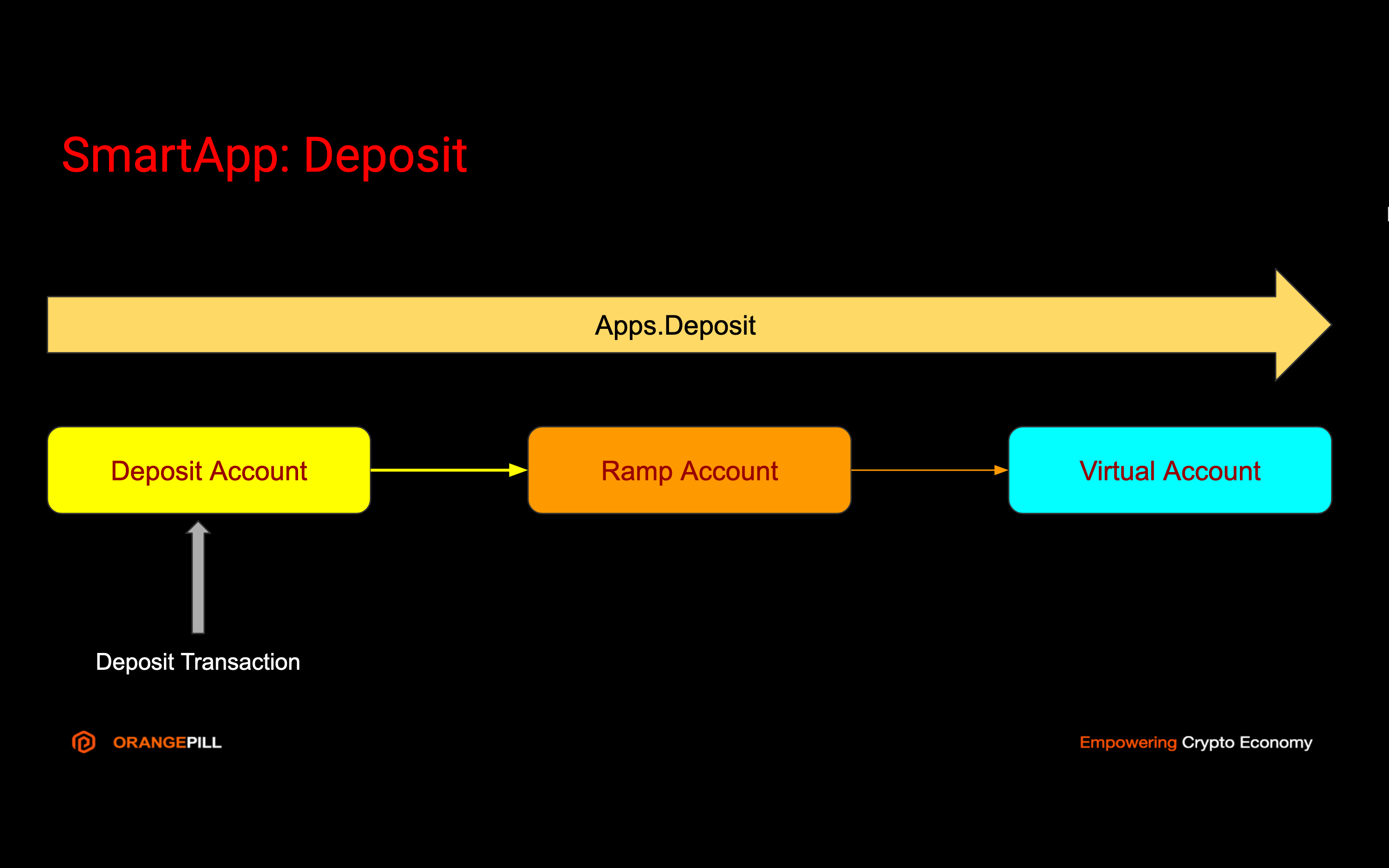
--data-raw '{
    "condition": [
        {
            "source": {
                "account": "656a0fd58e907523577a53f6"
            },
            "type": "payment",
            "asset": "BTC",        
            "amount": {
                "min": "20",
                "max": "25"
            }
        },
        {
            "destination": {
                "alias": "ALIAS1"
            },
            "asset": "BTC",        
            "amount": {
                "min": "0.002"
            }
            
        }
    ]
    ,
    "transactions": [
        "destination": {
            "account": "6340be52dffbdb56217f6a7b"
        },
        "value_type": "PERCENTAGE",    
        "value": 0.3,
        "asset": "BTC",
        "data": {
            "description": "Pay 0.3% fee"
        }
    ],
    "data": {
        "field1": "value1"
    },
    "description": "Default fees" 
}'
</code></pre>

{% endtab %}
{% endtabs %}

In response we get new forwarding object.

```json
{
    "id": "675ab191e9023f356dfa6396",
    "condition": [
        {
            "source": {
                "account": "656a0fd58e907523577a53f6"
            },
            "type": "payment",
            "asset": "BTC",        
            "amount": {
                "min": "20",
                "max": "25"
            }
        },
        {
            "destination": {
                "alias": "ALIAS1"
            },
            "asset": "BTC",        
            "amount": {
                "min": "0.002"
            }
            
        }
    ]
    ,
    "transactions": [
        "destination": {
            "account": "6340be52dffbdb56217f6a7b"
        },
        "value_type": "PERCENTAGE",    
        "value": 0.3,
        "asset": "BTC",
        "data": {
            "description": "Pay 0.3% fee"
        }
    ],
    "data": {
        "field1": "value1"
    },
    "description": "Default fees" 
    "owner": "639675ab191e9023f356dfa6",
    "created_at": 1671242774572,
    "error": null
}
```

## List Forwardings

You can list all Forwardings or filter it by account.

{% tabs %}
{% tab title="cURL" %}

<pre class="language-shell"><code class="lang-shell"><strong>echo 'list payments with status PENDING'
</strong>
curl --location --request GET 'https://api.orangepill.cloud/v1/apps/payment/6fbdb56217f6a7b340be52df' \
--header 'x-api-key: AXVubzpwQDU1dzByYM==' \
--header 'Content-Type: application/json'
</code></pre>

{% endtab %}
{% endtabs %}

In response we get array of `forwarding` objects.&#x20;

```json
[{
    "id": "675ab191e9023f356dfa6396",
    "condition": [
        {
            "source": {
                "account": "656a0fd58e907523577a53f6"
            },
            "type": "payment",
            "asset": "BTC",        
            "amount": {
                "min": "20",
                "max": "25"
            }
        },
        {
            "destination": {
                "alias": "ALIAS1"
            },
            "asset": "BTC",        
            "amount": {
                "min": "0.002"
            }
            
        }
    ]
    ,
    "transactions": [
        "destination": {
            "account": "6340be52dffbdb56217f6a7b"
        },
        "value_type": "PERCENTAGE",    
        "value": 0.3,
        "asset": "BTC",
        "data": {
            "description": "Pay 0.3% fee"
        }
    ],
    "data": {
        "field1": "value1"
    },
    "description": "Default fees" 
    "owner": "639675ab191e9023f356dfa6",
    "created_at": 1671242774572,
    "error": null
}
]
```

## Update Apps.Forward

You can update Apps.Forwrad and impact all new transcations. Transactions already processed will not be impacted by this change.

To update Apps.Forward you need the ID of that entity.

{% tabs %}
{% tab title="cURL" %}

<pre class="language-shell"><code class="lang-shell"><strong>echo 'Automatically forward 0.5% of incoming amount'
</strong>
curl --location --request PATCH 'https://api.orangepill.cloud/v1/apps/forward/675ab191e9023f356dfa6396' \
--header 'x-api-key: AXVubzpwQDU1dzByYM==' \
--header 'idempotency-key: 27373fabc392933dffabb' \
--header 'Content-Type: application/json' \
--data-raw '{
    "condition": [
        {
            "source": {
                "account": "656a0fd58e907523577a53f6"
            },
            "type": "payment",
            "asset": "BTC",        
            "value": {
                "min": "30",
                "max": "35"
            }
        },
        {
            "destination": {
                "alias": "ALIAS1"
            },
            "asset": "BTC",        
            "value": {
                "min": "0.004"
            }
            
        }
    ]
    ,
    "transactions": [
        "destination": {
            "account": "6340be52dffbdb56217f6a7b"
        },
        "value_type": "PERCENTAGE",    
        "value": 0.5,
        "asset": "BTC",
        "data": {
            "description": "Pay 0.5% fee"
        }
    ],
    "data": {
        "field1": "value1"
    },
    "description": "Default fees" 
}'
</code></pre>

{% endtab %}
{% endtabs %}

In response we get updated forwarding object.

```json
{
    "id": "675ab191e9023f356dfa6396",
    "condition": [
        {
            "source": {
                "account": "656a0fd58e907523577a53f6"
            },
            "type": "payment",
            "asset": "BTC",        
            "value": {
                "min": "30",
                "max": "35"
            }
        },
        {
            "destination": {
                "alias": "ALIAS1"
            },
            "asset": "BTC",        
            "value": {
                "min": "0.004"
            }
            
        }
    ]
    ,
    "transactions": [
        "destination": {
            "account": "6340be52dffbdb56217f6a7b"
        },
        "value_type": "PERCENTAGE",    
        "value": 0.5,
        "asset": "BTC",
        "data": {
            "description": "Pay 0.5% fee"
        }
    ],
    "data": {
        "field1": "value1"
    },
    "description": "Default fees" 
    "owner": "639675ab191e9023f356dfa6",
    "created_at": 1671242774572,
    "error": null
}
```

## Delete Apps.Forward

You can delete Apps.Forwrad and disable automatic routing for all new transcations. Transactions already processed will not be impacted by this change.

To delete Apps.Forward you need the ID of that entity.

{% tabs %}
{% tab title="cURL" %}

<pre class="language-shell"><code class="lang-shell"><strong>echo 'Automatically forward 0.5% of incoming amount'
</strong>
curl --location --request DELETE 'https://api.orangepill.cloud/v1/apps/forward/675ab191e9023f356dfa6396' \
--header 'x-api-key: AXVubzpwQDU1dzByYM==' \
--header 'idempotency-key: 27373fabc392933dffabb' \
--header 'Content-Type: application/json' 
</code></pre>

{% endtab %}
{% endtabs %}

In response we get id of deleted forwarding object.

```json
"675ab191e9023f356dfa6396"
```


# Blockchain Deposits

Use Apps.Deposit to forward blockchain deposit to virtual account.

To simplify acceptance of digital assets you can use Deposit SmartApp. Deposit SmartApp will orchestrate automatic forwarding of deposit to related Virtual account.

<figure><img src="/files/xFomqfE8XWGoh2H8oeFC" alt=""><figcaption></figcaption></figure>

Amount received to Virtual account will be diminished for the amount of blockchain fee paid for automatic withdrawal from Deposit account to Ramp account.

## Create Deposit

Use `seal` object to store immutable data about the deposit.

Use `data` object to store variable data about the deposit.

{% hint style="info" %}
Source Deposit account is automatically created.
{% endhint %}

{% hint style="info" %}
Target Virtual account must have related Ramp account assigned.
{% endhint %}

To create Deposit you must provide target Virtual account address or alias.

{% tabs %}
{% tab title="cURL" %}

<pre class="language-shell"><code class="lang-shell"><strong>echo 'Create deposit account'
</strong>
curl --location --request POST 'https://api.orangepill.cloud/v1/apps/deposit \
--header 'x-api-key: AXVubzpwQDU1dzByYM==' \
--header 'idempotency-key: 27373fabc392933dffabb' \
--header 'Content-Type: application/json' \
--data-raw '{
    "destination": {
        "account": "6340be52dffbdb56217f6a7b"
    },
    "asset": "BTC",    
    "seal": {
        "my_signature_field": "my_signature_value"
    },
    "data": {
        "description": "Desposit account for John James"
    }
}'
</code></pre>

{% endtab %}
{% endtabs %}

In response we get new `deposit` with status `PENDING` if validation was succesful. Notice that Deposit account is automatically created for `source`.

```json
{
    "id": "639d2416cd7325b35f409452",
    "source": {
        "account": "634b56217f6a7b0be52dffbd",
        "deposit_address": "bc1q7pna7w7462uruh8m54tcnzspva8xd98wmc546u",
        "owner": "639675ab191e9023f356dfa6"
    },
    "destination": {
        "account": "6340be52dffbdb56217f6a7b",
        "owner": "639675ab191e9023f356dfa6"
    },
    "asset": "BTC",
    "data": {
        "description": "Desposit account for John James"
    },
    "owner": "639675ab191e9023f356dfa6",
    "created_at": 1671242774572,
    "status": "PENDING",
    "error": null
}
```

### Deposit status

<table><thead><tr><th width="161">Status</th><th>Description</th></tr></thead><tbody><tr><td><code>PENDING</code></td><td>Awaiting for first deposit.</td></tr><tr><td><code>PROCESSING</code></td><td>Deposit received, withdrawal and forwarding in process.</td></tr><tr><td><code>DONE</code></td><td>Deposit processing was successful.</td></tr><tr><td><code>FAILED</code></td><td>Deposit creation or processing has failed.</td></tr></tbody></table>

##

{% hint style="info" %}
You can use the same Deposit App to receive multiple deposits. If the Deposit was in status `DONE`, it will change status to `PROCESSING` upon receiving of new deposit.
{% endhint %}

## List deposits

You can apply filters to get list of deposits.

{% tabs %}
{% tab title="cURL" %}

<pre class="language-shell"><code class="lang-shell"><strong>echo 'list deposits with status PENDING'
</strong>
curl --location --request GET 'https://api.orangepill.cloud/v1/apps/deposit?query={"status":"PENDING"}' \
--header 'x-api-key: AXVubzpwQDU1dzByYM==' \
--header 'Content-Type: application/json'
</code></pre>

{% endtab %}
{% endtabs %}

In response we get array of `payment` objects.&#x20;

```json
[{
    "id": "639d2416cd7325b35f409452",
    "source": {
        "account": "634b56217f6a7b0be52dffbd",
        "deposit_address": "bc1q7pna7w7462uruh8m54tcnzspva8xd98wmc546u",
        "owner": "639675ab191e9023f356dfa6"
    },
    "destination": {
        "account": "6340be52dffbdb56217f6a7b",
        "owner": "639675ab191e9023f356dfa6"
    },
    "asset": "BTC",
    "data": {
        "description": "Desposit account for John James"
    },
    "owner": "639675ab191e9023f356dfa6",
    "created_at": 1671242774572,
    "status": "PENDING",
    "error": null
}]
```


# Accept Blockchain Payments

Use Apps.Deposit.Payment to forward crypto deposit for specific payment to virtual account.

To simplify acceptance of digital assets you can use Payment SmartApp. Payment SmartApp will orchestrate automatic forwarding of deposit to related Virtual account.

<figure><img src="/files/fK2i42R3bQf3lRLuHT5V" alt=""><figcaption></figcaption></figure>

Amount received to Virtual account will be diminished for the amount of blockchain fee paid for automatic withdrawal from Deposit account to Ramp account.

## Create Payment

Use `seal` object to store immutable data about the payment.

Use `data` object to store variable data about the payment.

{% hint style="info" %}
Source Deposit account is automatically created.
{% endhint %}

{% hint style="info" %}
Target Virtual account must have related Ramp account assigned.
{% endhint %}

To create Payment you must provide target Virtual account address or alias.

Provide expected `amount` of deposit transaction to be able to track if it is paid in full.

{% tabs %}
{% tab title="cURL" %}

<pre class="language-shell"><code class="lang-shell"><strong>echo 'Create payment request for 0.03 BTC'
</strong>
curl --location --request POST 'https://api.orangepill.cloud/v1/apps/deposit/payment' \
--header 'x-api-key: AXVubzpwQDU1dzByYM==' \
--header 'idempotency-key: 27373fabc392933dffabb' \
--header 'Content-Type: application/json' \
--data-raw '{
    "destination": {
        "account": "6340be52dffbdb56217f6a7b"
    },
    "amount": 0.03,
    "asset": "BTC",
    "original_amount": 120.40,
    "original_currency": "USD",
    "valid_until": 1671242779881,
    "external": "INV12345",
    "seal": {
        "my_signature_field": "my_signature_value"
    },
    "data": {
        "description": "Payment 0.03 BTC",
        "invoice": "INV12345"
    }
}'
</code></pre>

{% endtab %}
{% endtabs %}

In response we get new `payment` with status `PENDING` if validation was succeful. Notice that Deposit account is automatically created for `source`.

```json
{
    "id": "639d2416cd7325b35f409452",
    "source": {
        "account": "634b56217f6a7b0be52dffbd",
        "deposit_address": "bc1q7pna7w7462uruh8m54tcnzspva8xd98wmc546u",
        "owner": "639675ab191e9023f356dfa6"
    },
    "destination": {
        "account": "6340be52dffbdb56217f6a7b",
        "owner": "639675ab191e9023f356dfa6"
    },
    "amount": "0.03",
    "asset": "ETH",
    "original_amount": 120.40,
    "original_currency": "USD",    
    "valid_until": 1671242779881,
    "external": "INV12345",    
    "seal": {
        "my_signature_field": "my_signature_value"
    },
    "data": {
        "description": "Payment 0.03 BTC",
        "invoice": "INV12345"
    },
    "owner": "639675ab191e9023f356dfa6",
    "created_at": 1671242774572,
    "status": "PENDING",
    "error": null
}
```

### Payment status

<table><thead><tr><th width="161">Status</th><th>Description</th></tr></thead><tbody><tr><td><code>PENDING</code></td><td>Awaiting for deposit.</td></tr><tr><td><code>PROCESSING</code></td><td>Deposit received, withdrawal and forwarding in process.</td></tr><tr><td><code>DONE</code></td><td>Payment processing was successful.</td></tr><tr><td><code>INCOMPLETE</code></td><td>Payment is on time but amount received is not full.</td></tr><tr><td><code>OVERPAID</code></td><td>Payment is on time but amount received is overpaid.</td></tr><tr><td><code>LATE</code></td><td>Payment was received in full but after valid time.</td></tr><tr><td><code>FAILED</code></td><td>Payment creation or processing has failed.</td></tr><tr><td><code>REFUND</code></td><td>Payment is ready for refund to source.</td></tr><tr><td><code>REFUNDED</code></td><td>Payment has been refunded to source payer.</td></tr></tbody></table>

## List payments

You can apply filters to get list of payments.

{% tabs %}
{% tab title="cURL" %}

<pre class="language-shell"><code class="lang-shell"><strong>echo 'list payments with status PENDING'
</strong>
curl --location --request GET 'https://api.orangepill.cloud/v1/apps/deposit/payment?query={"status":"PENDING"}' \
--header 'x-api-key: AXVubzpwQDU1dzByYM==' \
--header 'Content-Type: application/json'
</code></pre>

{% endtab %}
{% endtabs %}

In response we get array of `payment` objects.&#x20;

```json
[{
    "id": "639d2416cd7325b35f409452",
    "source": {
        "account": "634b56217f6a7b0be52dffbd",
        "deposit_address": "bc1q7pna7w7462uruh8m54tcnzspva8xd98wmc546u",        
        "owner": "639675ab191e9023f356dfa6"
    },
    "destination": {
        "account": "6340be52dffbdb56217f6a7b",
        "owner": "639675ab191e9023f356dfa6"
    },
    "amount": "0.03",
    "asset": "BTC",
    "original_amount": 120.40,
    "original_currency": "USD",    
    "valid_until": 1671242779881,
    "external": "INV12345",        
    "seal": {
        "my_signature_field": "my_signature_value"
    },
    "data": {
        "description": "Payment 0.03 Bitcoin",
        "invoice": "INV12345"
    },
    "owner": "639675ab191e9023f356dfa6",
    "created_at": 1671242774572,
    "status": "PENDING",
    "error": null
}]
```


# Orderbook

Use Apps.Orderbook to manage trading operations

## SOON!

Store new buy / sell trade. If there is trade already available to fill, fill as much trades as possible.\
It is possible to charge fees for the trades. Fees are an extra amount on top of the trade amount and are paid in the currency that you going to block e.g.: - BUY BTC/USDT - fees will be paid in USDT - SELL BTC/ETH - fees will be paid in BTC

If you fill type of the trade with FUTURE\_BUY or FUTURE\_SELL the trade will behave as a trade future. The trade is concluded now but will be fulfilled in future. The date of fulfillment is by the “Seal Date” field. You can also block a percentage of the amount until the future trade has expired.

Futures can also penalize contracting parties if they don’t have the agreed balance available in their accounts. The penalty is calculated in the following way: Penalty amount = (Percentage of incomplete deal amount because of shortage from user) × (Maximum Penalty percentage of futures deal based on blocked amount and time interval) × (total blocked value).

Example of the BTC/USDT trade future:

The maker creates a sell with the following properties: 1 BTC at a price of 60000 USDT, with a blocking percentage of 22%, a penalty percentage of 45%, a system commision of 1% and with an expiration time of within 12 hours.

```
{
  "type": "FUTURE_SELL",
  "price": "60000",
  "amount": "1",
  "pair": "BTC/USDT",
  "currency1Account": "60a236db1b57f60d62612bf3",
  "currency2Account": "609d0696bf835c241ac2920f",
  "fee": 1,
  "feeAccountId": "609d0696bf835c251ac2920a",
  "attr": {
    "sealDate": 1621990960631,
    "percentBlock": 22,
    "percentPenalty": 45
  }
}
```

The taker accepts the offer with a buy and blocks 13200 USDT (60000 USDT × 0.22) in their account.

```
{
  "type": "FUTURE_BUY",
  "price": "60000",
  "amount": "1",
  "pair": "BTC/USDT",
  "currency1AccountId": "60a236db1b57f60d62612bf2",
  "currency2AccountId": "609d0696bf835c241ac2920a",
  "attr": {
    "sealDate": 1621990960631,
    "percentBlock": 22,
    "percentPenalty": 45
  }
}
```

At the time of the trade, the maker and taker have the following conditions. The maker has 0.65 BTC (35% deficit) in their account and the taker has 49200 USDT (18% deficit) in their account.

The maker penalty is equal to 0.35 × 0.22 × (0.45 × 1 BTC) = 0.03465 BTC. The taker penalty is equal to 0.18 × 0.22 × (0.45 × 60000 USDT) = 1069.2 USDT.

The system commission for the maker is 1 BTC × 1% = 0.01 BTC. The system commission for the taker is 60000 USDT × 1% = 600 USDT.

The maker’s assets after deducting penalties and commissions equals 0.65 - 0.03465 - 0.01 = 0.60535 BTC. The taker’s assets after deducting penalties and commissions equals 49200 - 1069.2 - 600 = 47530.8 USDT.

The amount received by the maker after the trade is (0.60535 × 60000) + 1069.2 = 37390.2 USDT and the taker receives 0.60535 + 0.03465 = 0.64 BTC.


# Exchange Rates

Use Apps.Rate to get exchange rates for assets pair.

Use Apps.Rate to retrive price for asset pair and amount. You can retrieve exchange rate from various sources.

## Get sources

You can retrieve a list of available exchange rate sources.

{% tabs %}
{% tab title="cURL" %}

```shell
echo 'get exchange rate sources'

curl --location --request GET 'https://api.orangepill.cloud/v1/apps/rate/sources' \
--header 'x-api-key: AXVubzpwQDU1dzByYM==' \
--header 'Content-Type: application/json'
```

{% endtab %}
{% endtabs %}

In response you will get a list of exchange rate sources as an `Array`.

```json
[
    "default", "bitstamp"
]
```

{% hint style="info" %}
Use `default` source to get exchange rate for FIAT-FIAT pairs.
{% endhint %}

## Get price

You must provide exchange rate source.

{% tabs %}
{% tab title="cURL" %}

```shell
echo 'get exchange rate USD 100.10 to BTC from Bitstamp'

curl --location --request GET 'https://api.orangepill.cloud/v1/apps/rate/bitstamp/btc/usd/100.10' \
--header 'x-api-key: AXVubzpwQDU1dzByYM==' \
--header 'Content-Type: application/json'
```

{% endtab %}
{% endtabs %}

In response you will get exchange rate.

<pre class="language-json"><code class="lang-json"><strong>0.00233
</strong></code></pre>


# WebSocket Subscriptions

Use WebSocket subscription to get real-time data from Orangepill

Listen for events on your Realm so your integration can automatically trigger reactions. Orangepill uses Websocket to notify your application when an event occures in your Realm. WebSockets are particularly useful for asynchronous events like when a new account is created, new transaction is processed or when incoming deposits are receieved.

## Events

<table><thead><tr><th width="287.5">Event</th><th width="433.5">Description</th></tr></thead><tbody><tr><td><code>user.created</code></td><td>New user is successfully created.</td></tr><tr><td><code>user.updated</code></td><td>User is updated.</td></tr><tr><td><code>user.deleted</code></td><td>User is deleted. All related content is cascade deleted: identities, virtual currencies, accounts, transactions, deposits, withdrawals.</td></tr><tr><td><code>identity.created</code></td><td>New identity is successfully created.</td></tr><tr><td><code>identity.updated</code></td><td>Identity is updated.</td></tr><tr><td><code>identity.</code>deleted</td><td>Identity is deleted.</td></tr><tr><td><code>persons.sync.started*</code></td><td>Two-way synchronization of persons started.</td></tr><tr><td><code>persons.sync.done*</code></td><td>Two-way synchronization succesfully finished.</td></tr><tr><td><code>person.created*</code></td><td>Person profile is created.</td></tr><tr><td><code>person.updated*</code></td><td>Person profile is updated.</td></tr><tr><td><code>person.deleted*</code></td><td>Person profile is deleted.</td></tr><tr><td><code>person.assigned*</code></td><td>Person is assigned to Identity.</td></tr><tr><td><code>person.unassigned*</code></td><td>Person is unassigned from Identity.</td></tr><tr><td><code>company.created*</code></td><td>Company profile is created.</td></tr><tr><td><code>company.updated*</code></td><td>Company profile is updated.</td></tr><tr><td><code>company.deleted*</code></td><td>Company profile is deleted.</td></tr><tr><td><code>CHANNEL.message.sent*</code></td><td>Message is sent to CHANNEL. CHANNEL is sms, whatsapp, html and any other enabled.</td></tr><tr><td><code>CHANNEL.message.failed*</code></td><td>Message failed to CHANNEL. CHANNEL is sms, whatsapp, html and any other enabled.</td></tr><tr><td><code>account.creating</code></td><td>New account is being created.</td></tr><tr><td><code>account.created</code></td><td>Account is successfully created. </td></tr><tr><td><code>account.failed</code></td><td>Account creation has failed.</td></tr><tr><td><code>account.updated</code></td><td>Account has been updated.</td></tr><tr><td><code>account.incoming</code></td><td>Incoming balance.</td></tr><tr><td><code>account.outgoing</code></td><td>Outgoing balance.</td></tr><tr><td><code>transaction.processing</code></td><td>New transaction is created and being processed.</td></tr><tr><td><code>transaction.updated</code></td><td>Transaction is updated.</td></tr><tr><td><code>transaction.done</code></td><td>Transaction is successfully processed. </td></tr><tr><td><code>transaction.failed</code></td><td>Transaction processing failed.</td></tr><tr><td><code>deposit.pending</code></td><td>Incoming deposit detected.</td></tr><tr><td><code>deposit.received</code></td><td>Incoming deposit received.</td></tr><tr><td><code>deposit.processing</code></td><td>Deposit is stored and processing.</td></tr><tr><td><code>deposit.gas</code></td><td>Gas is withdrawn for ERC20, BEP20, TRC20 deposit processing.</td></tr><tr><td><code>deposit.processed</code></td><td>Deposit is successfully processed. </td></tr><tr><td><code>deposit.failed</code></td><td>Deposit processing failed.</td></tr><tr><td><code>withdrawal.creating</code></td><td>New withdrawal is created and being processed.</td></tr><tr><td><code>withdrawal.processed</code></td><td>Withdrawal is successfully processed. </td></tr><tr><td><code>withdrawal.failed</code></td><td>Withdrawal processing failed.</td></tr><tr><td><code>currency.created</code></td><td>Virtual currency is successfully created.</td></tr><tr><td><code>currency.failed</code></td><td>Virtual currency failed creating.</td></tr><tr><td><code>currency.issued</code></td><td>New Virtual currency supply issued. </td></tr><tr><td><code>currency.destroyed</code></td><td>Virtual currency supply destroyed.</td></tr><tr><td><code>alias.created</code></td><td>Alias successfully created.</td></tr><tr><td><code>alias.updated</code></td><td>Alias successfully updated.</td></tr><tr><td><code>alias.deleted</code></td><td>Alias successfully deleted.</td></tr><tr><td>apps.<code>forward.done</code></td><td>Transaction was successfully forwarded.</td></tr><tr><td>apps.<code>forward.failed</code></td><td>Transaction forwarding failed.</td></tr><tr><td><code>apps.payment.pending</code></td><td>Apps.Payment is created and pending.</td></tr><tr><td><code>apps.payment.status</code></td><td>Apps.Payment status change.</td></tr><tr><td><code>apps.payment.processing</code></td><td>Apps.Payment is being processed.</td></tr><tr><td><code>apps.payment.done</code></td><td>Apps.Payment is successfully processed.</td></tr><tr><td><code>apps.payment.failed</code></td><td>Apps.Payment processing failed.</td></tr><tr><td><code>apps.deposit.pending</code></td><td>Apps.Deposit is created and pending.</td></tr><tr><td><code>apps.deposit.processing</code></td><td>Apps.Deposit is being processed.</td></tr><tr><td><code>apps.deposit.done</code></td><td>Apps.Deposit is succesfully processed.</td></tr><tr><td><code>apps.deposit.failed</code></td><td>Apps.Deposit processing failed.</td></tr><tr><td><code>kycs.session.created</code></td><td>KYC session created</td></tr><tr><td><code>kycs.session.status.updated</code></td><td>KYC session status updated</td></tr></tbody></table>

{% hint style="info" %}
Events marked with \* supported with Infobip extension enabled.
{% endhint %}

## Event data

Each notification will include name of the event and id of the entity affected by event. If details of event are of your interest, use information from event `data` to retrieve entity details.

```json
{
    "type": "notification", // event notification
    "event": "transaction.processed", // event name
    "data": "63967141191e9023f356df9f", // id of affected entity
    "timestamp": "162553625262" // Date.now()
}
```

Connect to WebSocket notification server using URL `wss://stream.orangepill.cloud`.

To **subscribe** for notification events use your Realm Key in message.

```json
{ "type": "subscribe", "realm": <YOUR_REALM_KEY> }
```

You can **unsubscribe** from receiving notification events using similar message.

```json
{ "type": "unsubscribe", "realm": <YOUR_REALM_KEY> }
```

In successful response to subscribe and unsubscribe events you will receive object.

```json
{ "type":"info", "realm":"c9d4744c-0eae-4457-a665-2c18b9ac132b", "timestamp": 1671547687 }
```

If subscribe is not successful you will receive info and error objects.

```json
{ "type":"info", "realm":"NONE", "timestamp": 1671547687 }
```

```json
{ "type":"error", "realm":"Invalid Realm Key.", "timestamp": 1671547687 } }
```

Subscribe event response.

```json
{ "type":"subscribe", "realm":"c9d4744c-0eae-4457-a665-2c18b9ac132b", "timestamp": 1671547687 } }
```

Unsubscribe event response.

```json
{ "type":"unsubscribe", "realm":"c9d4744c-0eae-4457-a665-2c18b9ac132b", "timestamp": 1671547687 } }
```

## Example using JavaScript

Use <https://api.orangepill.cloud> for live example of Event Stream Explorer.

```javascript
// JavaScript example

const ws = new Sockette('wss://stream.orangepill.cloud', {
  timeout: 5e3,
  maxAttempts: 10,
  onopen: e => subscribe(),
  onmessage: e => message(e),
  onreconnect: e => {console.log('Reconnecting...'); subscribe();},
  onmaximum: e => {console.log('Stop Attempting!')},
  onclose: e => {console.log('Closed!'); cancelKeepAlive();},
  onerror: e => {console.log('Error:')}
});


function message(message) {

    var notification = JSON.parse(message.data);
    
    var event = notification.data.event;
    var data = notification.data.data;
    var timestamp = notification.data.timestamp;      

    // handle event with your logic
    switch (event) {
        case "account.created":
            // your logic here
        break;
        // ....
    }
}

function subscribe() {

    const realm = "<YOUR_REALM_KEY>";
    const obj = { "type": "subscribe", "realm": realm }
    ws.send(JSON.stringify(obj));
    keepAlive();

}

function unsubscribe() { 

    const realm = "<YOUR_REALM_KEY>";
    const obj = { "type": "unsubscribe", "realm": realm }
    ws.send(JSON.stringify(obj));
    
}

let timerId = 0; 

function keepAlive(timeout = 10000) { 
    ws.send('PING');  
    timerId = setTimeout(keepAlive, timeout);  
}

function cancelKeepAlive() {  
    if (timerId) {  
        clearTimeout(timerId);  
    }  
}

```


# Extensions

Extend your Orangepill projects with more features.


# Infobip People CDP

Enrich identity profiles and enable omnichannel communication with your customers.

[Infobip](https://www.infobip.com) is a leading global communication platform.

## Infobip People CDP

Using [Infobip People](https://www.infobip.com/people) Customer Data Platform you can extend Orangepill Identities with Persons and Companies profiles.

Enable Infobip extension using Orangepill API or Dashboard and start synchronizing People profiles with your Orangepill project.

To start using Persons and Comapnies profiles you must first signup to Infobip.

### Infobip signup

Go to [https://www.infobip.com/signup](https://www.infobip.com/signup?signup_source=OrangePill) and create your Infobip account.

<figure><img src="/files/yT8j5wbmfZBJQkGcSzyq" alt=""><figcaption></figcaption></figure>

Once your signup process is complete you will have access to Infobip Portal.

<figure><img src="/files/6ltWKzl7TCZ5HK8Db3RF" alt=""><figcaption></figcaption></figure>

{% hint style="info" %}
You will need API Key and API Base URL parameters to enable Infobip extension.
{% endhint %}

### Enable Infobip Extension

Customize API call with your Infobip credentials and configuration parameters.

<table><thead><tr><th width="258">Parameter</th><th>Description</th></tr></thead><tbody><tr><td>API_BASE_URL</td><td>Base URL for your Infobip account.</td></tr><tr><td>API_KEY</td><td>API KEY for your Infobip account.</td></tr><tr><td>SERVICE_SMS</td><td>Sender number for SMS channel.</td></tr><tr><td>SERVICE_WHATSAPP</td><td>Sender number for WhatsApp channel.</td></tr><tr><td>SERVICE_EMAIL</td><td>Sender email for Email channel.</td></tr></tbody></table>

{% tabs %}
{% tab title="cURL" %}

```shell
curl --location --request POST 'https://api.orangepill.cloud/v1/extensions' \
--header 'x-api-key: AXVubzpwQDU1dzByYM==' \
--header 'Content-Type: application/json' \
--data-raw '{
    "extension": "INFOBIP",
    "authentication": {
        "API_BASE_URL": "373jj44mzl.infobip.com",
        "API_KEY": "kjk25de23hb3b3chg23aakjk2hb3b3"
    },
    "data": {
        "SERVICE_SMS": "447860099299",
        "SERVICE_WHATSAPP": "447860099299",
        "SERVICE_EMAIL": "info@orangepill.cloud"
    },
}'
```

{% endtab %}
{% endtabs %}

in response is new `Extension`.&#x20;

{% tabs %}
{% tab title="Response" %}

```json
{
    "id": "64cccf835991a2de3b390fac",
    "extension": "INFOBIP",
    "authentication": {
        "API_BASE_URL": "373j********",
        "API_KEY": "kjk2********"
    },
    "data": {
        "SERVICE_SMS": "447860088593",
        "SERVICE_WHATSAPP": "447860088593",
        "SERVICE_EMAIL": "info@orangepill.cloud"
    },
    "created_at": 1691144067296,
    "updated_at": 1691753575794,
    "active": true,
    "error": null
}
```

{% endtab %}
{% endtabs %}

Now you can start using [Persons](/orangepill-api/persons-and-companies), [Companies](/orangepill-api/persons-and-companies) and use [Messaging Channels](/orangepill-api/messaging-channels) to communicate with your customers.

## People Events

Use People module in Infobip Portal to list Person events and start conversation.

<figure><img src="/files/MIq61Gy73DeNEgHWr8Y2" alt=""><figcaption></figcaption></figure>

### Default Orangepill Events

To enable receiving event notifications for [Person](/orangepill-api/persons-and-companies) activities in Orangepill you must create custom event definitions in [Infobip Portal](https://portal.infobip.com/people/events/definitions).

<figure><img src="/files/08J6BxlM3Q0fAKgGplWi" alt=""><figcaption></figcaption></figure>

Use button New Event Definition in [Infobip portal](https://portal.infobip.com/people/events/definitions/new-event-definition) to create new event.

<figure><img src="/files/TqeSLNcZuhpXvKkK1wuj" alt=""><figcaption></figcaption></figure>

Create event definitions for which you want to receive notifications in Infobip people module.

<table><thead><tr><th width="239.33333333333331">Custom Event</th><th>Parameters</th></tr></thead><tbody><tr><td><code>DepositDone</code></td><td><code>id: text</code><br><code>deposit_address: text</code><br><code>source_address: text</code><br><code>asset: text</code><br><code>amount: number</code><br><code>data: text</code></td></tr><tr><td><code>AppsDepositDone</code></td><td><code>id: text</code><br><code>deposit_address: text</code><br><code>asset: text</code><br><code>data: text</code></td></tr><tr><td><code>AppsDepositFailed</code></td><td><code>id: text</code><br><code>deposit_address: text</code><br><code>asset: text</code><br><code>data: text</code><br><code>error: text</code></td></tr><tr><td><code>AppsPaymentDone</code></td><td><code>id: text</code><br><code>deposit_address: text</code><br><code>asset: text</code><br><code>amount: number</code><br><code>data: text</code></td></tr><tr><td><code>AppsPaymentFailed</code></td><td><code>id: text</code><br><code>deposit_address: text</code><br><code>asset: text</code><br><code>amount: number</code><br><code>data: text</code><br><code>error: text</code></td></tr><tr><td><code>WithdrawalDone</code></td><td><code>id: text</code><br><code>destination_address: text</code><br><code>asset: text</code><br><code>data: text</code></td></tr><tr><td><code>WithdrawalFailed</code></td><td><code>id: text</code><br><code>destination_address: text</code><br><code>asset: text</code><br><code>data: text</code></td></tr><tr><td><code>TransactionReceived</code></td><td><code>id: text</code><br><code>amount: number</code><br><code>asset: text</code><br><code>type: text</code><br><code>data: text</code></td></tr><tr><td><code>TransactionFailed</code></td><td><code>id: text</code><br><code>amount: number</code><br><code>asset: text</code><br><code>type: text</code><br><code>data: text</code><br><code>error: text</code></td></tr></tbody></table>


# On Ramps and Off Ramps

Use On ramp and Off ramp integrations to get instant liquidity and witdhrawal.

You can easily pull liquidity or make withdrawals between Orangepill platform and external ramps, wallets and exchanges using Ramp REST API interface.

{% hint style="info" %}
You must have account on target ramps.
{% endhint %}

## Ramp methods

### Set authentication data

To use Ramps you must first set authentication data for identity.

{% hint style="info" %}
Consult [Supported ramps](#supported-ramps) table to understand which parameters are required to authenticate against specific ramp.
{% endhint %}

{% tabs %}
{% tab title="cURL" %}

<pre class="language-shell"><code class="lang-shell"><strong>echo 'Store authetication data for ramp Buda'
</strong>
curl --location --request POST 'https://api.orangepill.cloud/v1/ramps' \
--header 'x-api-key: AXVubzpwQDU1dzByYM==' \
--header 'idempotency-key: 27373fabc392933dffabb' \
--header 'Content-Type: application/json' \
--data-raw '{
    "ramp": "buda",    
    "identity": "639675ab191e9023f356dfa6",
    "authentication": {
        "api_key": "YOUR_API_KEY",
        "secret": "YOUR_SECRET
    },
    "data": {
        "description": "Authentication data for Buda"
    }
}'
</code></pre>

{% endtab %}
{% endtabs %}

In response we get new authentication object.

```json
{
    "id": "641a224c56c6fc279151d008",
    "ramp": "buda",    
    "identity": "639675ab191e9023f356dfa6",
    "authentication": {
        "api_key": "YOUR_API_KEY",
        "secret": "YOUR_SECRET"
    },
    "data": {
        "description": "Authentication data for Buda"
    }
}

```

### Supported countries

Use this method to retrieve list of supported countries for this ramp.

{% hint style="info" %}
Identity country must be on this list to be able to interact with a ramp.
{% endhint %}

{% tabs %}
{% tab title="cURL" %}

<pre class="language-shell"><code class="lang-shell"><strong>echo 'Get supported countries for ramp Buda'
</strong>
curl --location --request GET 'https://api.orangepill.cloud/v1/ramps/buda/countries' \
--header 'x-api-key: AXVubzpwQDU1dzByYM==' \
--header 'idempotency-key: 27373fabc392933dffabb' \
--header 'Content-Type: application/json' 
</code></pre>

{% endtab %}
{% endtabs %}

In response we get array of supported countries.

```json
[
    "AR",
    "CL",
    "CO",
    "PE"
]
```

### Supported assets

Use this method to retrieve list of supported assets for this ramp.

{% hint style="info" %}
Account must be on this list to be able to interact with a ramp.
{% endhint %}

{% tabs %}
{% tab title="cURL" %}

<pre class="language-shell"><code class="lang-shell"><strong>echo 'Get supported assets for ramp Buda'
</strong>
curl --location --request GET 'https://api.orangepill.cloud/v1/ramps/buda/assets' \
--header 'x-api-key: AXVubzpwQDU1dzByYM==' \
--header 'idempotency-key: 27373fabc392933dffabb' \
--header 'Content-Type: application/json' 
</code></pre>

{% endtab %}
{% endtabs %}

In response we get array of supported countries.

```json
[
    "BTC",
    "ETH",
    "LTC",
    "BCH",
    "USDC"
]
```

### Deposit from ramp

To get liquidity from Ramp you must provide Orangepll account where you want receive deposit.

{% hint style="info" %}
Account where you want to receive deposit must be of type `ramp`.
{% endhint %}

{% tabs %}
{% tab title="cURL" %}

<pre class="language-shell"><code class="lang-shell"><strong>echo 'Initiate deposit from ramp Buda'
</strong>
curl --location --request POST 'https://api.orangepill.cloud/v1/ramps/buda/deposit' \
--header 'x-api-key: AXVubzpwQDU1dzByYM==' \
--header 'idempotency-key: 27373fabc392933dffabb' \
--header 'Content-Type: application/json' \
--data-raw '{
    "account": "639675ab191e9023f356dfa6",    
    "asset": "BTC",
    "amount": 0.3,
    "data": {
        "description": "Deposit from ramp Buda"
    }
}'
</code></pre>

{% endtab %}
{% endtabs %}

In response we get result of operation.

```json
{
    "id": "641a224c56c6fc279151d008",
    "reference": "REFERENCE_TO_RAMP_OPERATION",
    "status": "PROCESSING",
    "error": null
}
```

### Withdrawal to ramp

To withdraw amount to Ramp you must provide Orangepll account.

{% hint style="info" %}
Account from which you want to withdraw must be of type `ramp`.
{% endhint %}

{% tabs %}
{% tab title="cURL" %}

<pre class="language-shell"><code class="lang-shell"><strong>echo 'Initiate withdrawal to ramp Buda'
</strong>
curl --location --request POST 'https://api.orangepill.cloud/v1/ramps/buda/withdrawal' \
--header 'x-api-key: AXVubzpwQDU1dzByYM==' \
--header 'idempotency-key: 27373fabc392933dffabb' \
--header 'Content-Type: application/json' \
--data-raw '{
    "account": "639675ab191e9023f356dfa6",    
    "asset": "BTC",
    "amount": 0.3,
    "data": {
        "description": "Withdrawal to ramp Buda"
    }
}'
</code></pre>

{% endtab %}
{% endtabs %}

In response you will get processing withdrawal.

```json
{
    "id": "634b56217f6a7b0be52dffac",
    "source": {
        "account": "639675ab191e9023f356dfa6",
        "ramp": "639675ab191e9023f356dfa6",
        "address": "637176640b45bd060bdced17"
    },
    "destination": {
        "address": "bc1qxyvqcwepfwsxstemz626uc73n0w6nxh3swgh68"
    },
    "asset": "BTC",
    "value": 0.3,
    "fee": {
        "paid_by": "receiver",
        "speed": "fast",
        "value": 0.0005
    },
    "data": {
        "my_field_1": "Salary 11/2022",
        "my_field_2": "I1234",        
    },
    "amount": 0.295,
    "status": "PROCESSING",
    "created_at": "1519211809934",
    "error": null
}
```

## Supported ramps

| Ramp     | URL parameter | Authentication                                                  |
| -------- | ------------- | --------------------------------------------------------------- |
| Buda.com | buda          | <p>api\_key: "YOUR\_API\_KEY",</p><p>secret: "YOUR\_SECRET"</p> |


# Integrations

Integrate your Orangepill solution with other platforms.


# Infobip Exchange

Build conversational interface for your DeFi and Open Finance products using Infobip Answers and Orangepill.

[Infobip](https://www.infobip.com/signup?signup_source=OrangePill) is a leading global onmichannel communication platform. Using Infobip you can build conversational interface for WhatsApp, Telegram, Viber and many other channels.

Use [Orangepill](https://orangepill.cloud) integration with [Infobip Answers](https://www.infobip.com/answers) to build Conversational Wallet products.

Use pre-built Orangepill functions to access account details, transaction history, create transactions, deposit, execute withdrawals and apply fees in easy to use drag-and-drop enabled environmnet. Access all features of Orangepill platform from chatbots. Extend conversational experiance for your customers using all features of Infobip platform.

## Conversational Wallet

A Conversational Wallet is an interface or platform that leverages the capabilities of Infobip and Orangepill. It is a financial technology solution, to provide a conversational and interactive channel for various financial services. It enables users to interact with their financial accounts, perform transactions and obtain information through conversations with a virtual assistant or chatbot.

The benefits of using a conversational channel for financial solutions are numerous:

1. Seamless User Experience: Conversational interfaces mimic human-like interactions, making it more intuitive and user-friendly compared to traditional graphical user interfaces. Users can interact with the Conversational Wallet through voice or text, allowing for a more natural and personalized experience.
2. Accessibility and Convenience: Conversational Wallets provide easy access to financial services anytime, anywhere. Users can engage with the platform using their preferred devices such as smartphones, smart speakers, or messaging apps, eliminating the need for physical visits to banks or websites.
3. Personalized Financial Guidance: By leveraging AI algorithms and user data, Conversational Wallets can offer tailored financial advice and recommendations based on an individual's financial goals, spending patterns, and preferences. Users can receive personalized insights, budgeting tips, investment suggestions, and reminders for bill payments, helping them make informed financial decisions.
4. Transactional Capabilities: Conversational Wallets enable users to perform various financial transactions directly through the interface. Users can transfer funds, pay bills, manage subscriptions, check account balances, and initiate investment transactions using simple text commands. This streamlines the financial management process and eliminates the need for multiple apps or interfaces.
5. Enhanced Security: Conversational Wallets can incorporate advanced security measures, such as multi-factor authentication and encryption, to ensure the privacy and safety of financial data. User interactions are securely encrypted, minimizing the risk of fraud or unauthorized access to sensitive information.
6. Improved Financial Literacy: Conversational Wallets can act as personalized financial assistants, providing educational content and explanations and money management techniques. Users can ask questions, seek clarifications, and receive educational materials, fostering financial literacy and empowering individuals to make better financial decisions.
7. Integration with Third-Party Services: Conversational Wallets can integrate with various third-party services, such as utility providers, e-commerce platforms, and financial institutions, enabling seamless transactions and data sharing. This integration expands the scope of financial services accessible through the Conversational Wallet and enhances its overall functionality.

Conversational Wallets powered by [Infobip Answers](https://www.infobip.com/answers) and Orangepill provide an innovative and efficient way to engage with financial services. They offer a personalized, convenient, and secure channel for managing finances, accessing information, and receiving tailored financial guidance, revolutionizing the way individuals interact with their money.

## Signup

To start building Conversational Wallets you must first signup to Infobip and Orangepill.

### Infobip signup

Go to [https://www.infobip.com/signup](https://www.infobip.com/signup?signup_source=OrangePill) and create your Infobip account.

<figure><img src="/files/yT8j5wbmfZBJQkGcSzyq" alt=""><figcaption></figcaption></figure>

Once your signup process is complete you will have access to Infobip portal.

<figure><img src="/files/Ex52B4JXDxGSfyi6TWx8" alt=""><figcaption></figcaption></figure>

### Orangepill signup

Go to <https://orangepill.cloud/user/register> and create your Orangepill account.

<figure><img src="/files/wzQSphjuRVUQC6FyBETf" alt=""><figcaption></figcaption></figure>

Once your signup process is complete you will have access to Orangepill console.

<figure><img src="/files/QrEuorhIH3wICDna1ej8" alt=""><figcaption></figcaption></figure>

To start building conversational wallet solution you must first create a new realm. Realm is a domain of data related to one project. Realm data will be related to Infobip Answers integration. To create a new realm select your country and base accounting currency.

<figure><img src="/files/I6cU5nTDRfP0mXVC9uAf" alt=""><figcaption></figcaption></figure>

To connect Orangepill realm with Infobip Answers you will need realm key data and a username and password of your Orangepill account.

<figure><img src="/files/YNrfPRVKDvFNG904taKs" alt=""><figcaption></figcaption></figure>

### Enable Orangepill integration

Find Orangepill app in Infobip Exchange marketplace.

<figure><img src="/files/ieYJrFB1mNAfm0e4Wili" alt=""><figcaption></figcaption></figure>

Open Orangepill app and add it to your account.

<figure><img src="/files/pbS8LXunorrtojxNtqmT" alt=""><figcaption></figcaption></figure>

Go to publish section and choose option to configure Orangepill integration.

<figure><img src="/files/GiQnN7j1VhYpDug2dVa9" alt=""><figcaption></figcaption></figure>

To connect Orangepill realm with your Infobip account enter realm key, Orangepill user credentials (you should be gotten them on your email) and a name (Informative name to know the purpose of your integration).

<figure><img src="/files/gXEQr3JfJzd80A3HwADc" alt=""><figcaption></figcaption></figure>

You are all set to start building conversational wallet.

### Register multiples realms on the same Infobip account (Optional)

Some customer could have more than on product, such as a Wallet, Digital Bank and so on, and they want to have a realm per product, for those uses cases they can leverage the same Infobip Account to have multiple chat bot (one per product), and here you have the step by step guide to get this done.

#### Register a second realm

First you have to go the exchanges section there you have to press my apps option.

<figure><img src="/files/NA1smOxdldMm1HPbC938" alt=""><figcaption></figcaption></figure>

Then you have to press over the Answer for Orangepill app, and you will be redirected to the next view.

<figure><img src="/files/lmsjgaG5dWNAvcaC8Jtl" alt=""><figcaption></figcaption></figure>

Here you have to press the OPEN button and then you will see the form to register the new realm

<figure><img src="/files/GgihFhHiW0Whyf8kV3Dt" alt=""><figcaption></figcaption></figure>

Finally you have to send the realm key on all requests you made from the bot.

<figure><img src="/files/QSXgKhZHgoN2p5O5MtsI" alt=""><figcaption></figcaption></figure>

If you don’t send it, the API will take the oldest realm key registered under your Infobip account.

## Build

### Chatbot

Use Answers->Chatbots to add new chatbot.

<figure><img src="/files/Eo9t8SQQcPlBpKpuiXeZ" alt=""><figcaption></figcaption></figure>

Choose to build it from the scratch.

<figure><img src="/files/zfDwEnihzaWjfuHYKLPE" alt=""><figcaption></figcaption></figure>

Configure chatbot name, channel and language.

<figure><img src="/files/KEtm1kKnai6XgvW1mQpR" alt=""><figcaption></figcaption></figure>

Use Infobip chatbot builder to develop conversational wallet for your use case.

<figure><img src="/files/2a9s056yugaIEDQbZ2ao" alt=""><figcaption></figcaption></figure>

For detaild documentation on Infobip conversational experiences consult <https://www.infobip.com/docs>.

### Impersonate Users

To relate chatbot user with Orangepill identity you must assign Orangepill alias value to match unique channel identifier. For WhatsApp, Viber, Line unique identifier is a phone number. For Telegram you must set user nickname or phone number.

{% hint style="info" %}
To impersonate user for Infobip chatbot simulator, assign alias WEB\_SIMULATION.
{% endhint %}

<figure><img src="/files/TEtnNuN2jiTrDBKiXo9I" alt=""><figcaption></figcaption></figure>

### Orangepill Actions for Answers

Choose Orangepill Action for Answers and add it to your chatbot flow.

<figure><img src="/files/AflnUxChserOwcqMmOFF" alt="" width="375"><figcaption></figcaption></figure>

To engage Orangepill Action you must collect input values using Infobip global or local attributes.

<figure><img src="/files/CyOyZgS2ADubND09OA23" alt="" width="375"><figcaption></figcaption></figure>

#### Get all accounts

List all accounts and balances of current aliased user.

#### Get virtual accounts

List all virtual accounts and balances of current aliased user.

To learn more about Orangepill virtual accounts check this [documentation page.](/orangepill-api/virtual-accounts)

#### Get ramp accounts

List all ramp accounts and balances of current aliased user.

{% hint style="info" %}
Use blockchain address displayed with ramp account to make deposit from external wallet.
{% endhint %}

To learn more about Orangepill ramp accounts check this [documentation page.](/orangepill-api/ramp-accounts)

#### Make transaction

Make transaction between two accounts. Provide source account of current aliased user and type alias of target account. You can use alias of target user instead of account. This will resolve default account for specific asset for target aliased user.

To learn more about Orangepill transactions check this [documentation page.](/orangepill-api/transactions)

#### Get incoming transactions

List incoming transfers to selected account.

#### Get outgoing transactions

List outgoing transfers from selected account.

#### Make withdrawal

Initiate withdrawal of assets to blockchain address.

To learn more about Orangepill withdrawals check this [documentation page.](/orangepill-api/withdrawal)

#### Get withdrawals

List withdrawals history.

### Deploy

To deploy chatbot use Activate button on Infobip portal.

<figure><img src="/files/KNVZpxvbDUAX9BobhCNH" alt=""><figcaption></figcaption></figure>

#### Simulator

While developing you can use chatbot simulator to test and debug. Remember to assign alias WEB\_SIMULATION to Identity you want to impersonate in simulator.&#x20;

<figure><img src="/files/K8Hg3TOmbigKHJ2hOFCB" alt=""><figcaption></figcaption></figure>

## Use cases

### Digital bank

Use Orangepill virtual currencies to implement support for FIAT. Operations of issue and destroy of virtual currency should map to operations of debit and credit.

You can extend conversational experiance with other Infobip building blocks like Moments and Conversations to provide complete experience, including interaction with live agents.

### Wallet for crypto assets

Use any of [45+ supported crypto assets](/orangepill-api/digital-assets) to create accounts, deposits and withdrawals for end user. Use virtual accounts to enable off-chain transactions for your users and optimize costs of blockchain processing.

More information about building crypto wallet you can find [here](/tutorials/simple-eth-wallet).

More information about building complete crypto exchange solution you can find [here](/tutorials/cryptocurrency-exchange).

More information about building crypto payment acceptence you can find [here](broken://pages/jHeo7pNzXGlgqUbdbowN).

### Loyalty points and Cashback solutions

You can create virtual currencies to represent loyalty points or cashback values. Apply automatic fees and comissions in fixed or percantage amount to enable your use case.

Find more information about automatic forwarding of transaction amounts [here](/smartapps/forwarding-transactions).


# Tutorials


# Conversational Wallet


# Crypto Payments Processor

Build full featured custom cryptocurrency payment processing solution.

## Introduction

This guide will walk you through the process of creating a robust payment processing system tailored to your specific needs. By harnessing the capabilities of Orangepill, you'll be able to seamlessly integrate various cryptocurrencies into your application, enabling secure and efficient transactions. Whether you're a developer, a business owner, or payment processor company, this documentation will provide you with the essential steps, tools, and insights to construct a powerful and adaptable cryptocurrency payment processing solution. Let's embark on this journey to revolutionize the way you handle digital transactions.

## Overview

The implementation journey begins with the **Project Setup** section, which details the prerequisites and environment configuration necessary to deploy the payment processor. This includes setting up API keys, establishing secure connections, and preparing the development environment for seamless integration.

**Merchants Onboarding** explains the procedures for enrolling merchants onto the platform. It covers account creation, KYC verification, and the establishment of necessary merchant-customer relationships. This section ensures that businesses can efficiently onboard new users and provide them with a frictionless experience.

The **Process Payment** section delves into the core of the payment processor. It elaborates on the steps required to initiate, validate, and confirm cryptocurrency transactions. This includes handling multiple cryptocurrencies, ensuring transaction security, and providing real-time notifications to both merchants and customers.

In **Withdraw Revenue**, the documentation provides insights into enabling merchants to seamlessly withdraw their earned revenues in cryptocurrency. This section covers the procedures for managing withdrawal requests securely and efficiently.

**Reports** outlines the generation of comprehensive transaction and revenue reports. Businesses can access valuable insights into their financial operations.

For those seeking advanced functionality, the optional section, **Automatic Revenue Fees**, explains how to configure automatic deduction of revenue fees after transactions have been processed. This enables businesses to effortlessly manage their revenue sharing models while reducing manual intervention.

By following the structured guidance in this documentation, businesses can implement a custom cryptocurrency payment processor using the Orangepill platform. This empowers them to offer a diverse range of payment options to their users while benefiting from the robust features and security measures provided by Orangepill.

## **Orangepill API-Centric Integration**

Orangepill operates as an API-first company, providing a seamless and versatile integration experience for implementing cryptocurrency payment processing solutions. All the features of our platform can be accessed through Orangepill API. This API-driven approach allows businesses to efficiently integrate and leverage our cutting-edge payment processing capabilities within their platforms, applications, and services.

To begin harnessing the power of Orangepill's API, it is crucial to familiarize yourself with its foundational aspects. Detailed information about the API's authorization mechanisms, security protocols, and data filtering techniques can be found in the dedicated [documentation page](/orangepill-api). This resource elaborates on the API's underlying principles, enabling developers to understand how to securely authenticate, make requests, and filter data for precise interactions with the payment processor.

By becoming well-versed in the Orangepill API basics, you will be equipped to seamlessly integrate our crypto payment processing features into your applications while adhering to industry-leading security practices. This API-centric approach not only enhances user experience but also ensures the efficient and secure management of cryptocurrency transactions within your business ecosystem.


# Project Setup

Setup your Orangepill account, project and supprted cryptocurrecies.

## Orangepill Signup

The initial step in establishing the crypto payment gateway involves signing up on the OrangePill Cloud platform through the following link: <https://orangepill.cloud/user/register>. During the registration process, users will be prompted to select their operating country and choose a basic accounting currency. This information will facilitate tailored payment processing. Once the registration is complete, users will receive their API access credentials via email. These credentials are vital for seamless integration of the payment gateway into their systems, enabling efficient and secure crypto transactions.

## Create Project

Use Orangepill Cloud Console dashboard for a new Project setup.  This crucial action allows you to build isolated spaces for development and production, ensuring data separation. This empowers your team to work efficiently while maintaining the integrity of the project's architecture.

{% hint style="info" %}
**Test environment**. While buidling solution we recommend using cryptocurrencies that support testnet networks. Testnet blockchain networks use fake coins. Check the list of [supported cryptocurrencies](/orangepill-api/digital-assets) and check which have support for testnet networks. We recommend using ETH testnet coin while building a solution.
{% endhint %}

Use Orangepill Dashboard or create new Project.

## Enable CDP extension

[Enabling the Customer Data Platform (CDP)](/extensions/infobip-people-cdp) extension within the Orangepill custom cryptocurrency processor solution is of paramount importance as it empowers you to seamlessly consolidate and harness customer data. By integrating CDP, you can gain invaluable insights into user behaviors, preferences, and interactions, enabling precise customization of services, targeted marketing strategies, and improved user experiences. This extension serves as the cornerstone for optimizing decision-making processes and enhancing customer satisfaction, ultimately contributing to the success and competitiveness of your cryptocurrency processing solution.

## Setup Main Cryptocurrency Accounts

To seamlessly incorporate cryptocurrency payments into your custom processor solution, it's essential to establish what Orangepill refers to as "Ramp Accounts," which essentially function as your main deposit accounts for each cryptocurrency you plan to accept. These Ramp Accounts act as centralized hubs for accumulating the cryptocurrency mass resulting from various payments. This aggregation optimizes blockchain fee costs for merchants when they eventually withdraw these funds, as fewer transactions are needed. For comprehensive details on setting up Ramp Accounts and their integration with your payment processor, consult the Orangepill platform documentation [here](/orangepill-api/ramp-accounts). This resource provides in-depth insights into the setup process, ensuring your business can effectively process cryptocurrency transactions while efficiently managing blockchain fees.

List of available cryptocurrencies and it's gas tokens can be found [here](/orangepill-api/digital-assets).

{% hint style="info" %}
For ERC20/BEP20/TRC20 assets make sure that Ramp Account has sufficient gas asset so that payment process can go seamlessly. If not, payments can get stucked on [Deposit Acoounts](/orangepill-api/deposit-accounts) and will need to be resolved manually once tha gas token is available.
{% endhint %}

Repeat this process for each cryptocurrency you want to support in your solution.


# Merchants Onboarding

Setup merchants and virtual accounts.

## **Creating User Accounts**

Begin the onboarding process by creating new user accounts for merchants. This can be achieved through the Orangepill dashboard or programmatically using the provided API. User accounts offer personalized control and management capabilities, setting the foundation for an efficient crypto payment processing experience tailored to each merchant's needs.

Check documentation on [creating Users](/orangepill-api/identities-and-users#create-user).

## **Create Virtual Accounts and Ramp Assignment**

Next, set up virtual accounts for the cryptocurrencies that merchants intend to accept. Virtual accounts act as designated containers, allowing for the organized reception of various cryptocurrencies. These virtual accounts must be linked to appropriate ramp accounts. Ramp accounts serve as bridges between virtual accounts and external crypto networks, ensuring secure and seamless fund transfers.

Check documentation on [creating Virtual Accounts](/orangepill-api/virtual-accounts).

By completing these two steps, you'll equip merchants with the tools they need to seamlessly integrate cryptocurrency payment processing into their operations.


# Process Payment

Create payment requests and subscribe for notifications on payment status.

## **Retrieve Supported Crypto Currencies and Prices**

Call the Orangepill API to receive a list of Ramp accounts and supported crypto currencies.

Use endpoint `https://api.orangepill.cloud/v1/accounts?query=:{"type":"ramp"}&fields=asset.`

In response you will get the list of Ramp accounts assets.

Display the current price for each currency by calling the Orangepill API to [retrieve price data](/smartapps/exchange-rates#get-price).

## &#x20;**Create a Customer Profile**

Create a customer profile, ensuring at least the customer's email is set. This email will be used to send successful payment notifications. Optionally, fill in the [complete customer profile](/orangepill-api/persons-and-companies#create-person-and-identity) information.

Call the Orangepill API to check if the customer already exists.

Use endpoint `https://api.orangepill.cloud/v1/identities/persons?email=EMAIL` to find customer with specific email.

If the customer doesn't exist, use the Orangepill API to onboard the new customer.

Check documentation on [creating new customer](#create-a-customer-profile).

## **Create a Payment Request**

Call the Orangepill API to create a new [Apps.Payment](/smartapps/accept-blockchain-payments) object for the payment request.

As a destination use alias of merchants virtual account.

Display the payment amount in the selected currency and a unique blockchain address where the payment should be made. Show a timer indicating the timespan within which the payment needs to be completed.

## **Implement Websocket Client for Payment Notifications**

Implement a websocket client to listen for notifications on the payment status. When a payment status update is received, process the notification accordingly.

Check documentation on [WebSocket subscription](/websocket-subscriptions).


# Withdraw Revenue

Merchants can use Orangepill Dashboard to withdraw their revenue.

The withdrawal process for revenues in cryptocurrencies through the custom crypto payment processor solution built with the Orangepill platform is straightforward and flexible. Merchants can conveniently manage their funds using the Orangepill Dashboard, where they can review their available revenue balances. From the Dashboard, merchants can initiate withdrawals to any exchange or blockchain address they choose. This allows for seamless movement of funds to their desired destinations.

[Check documentation](/orangepill-api/withdrawal) on withdrawals.


# Build Reports

Use Orangepill API to build various reports for operator and merchants.

## Get Payments

To retrieve list of payment use parametrized call to Orangepill API. Use payments data to build various reports.

[Check documentation](/smartapps/accept-blockchain-payments#list-payments) on listing payments.


# Automatic Revenue Fees

Optionally, Operator of crypto payment processor can automatically receive fees.

Creating automatic fees collection using Orangepill [Apps.Forward](/smartapps/forwarding-transactions) object in a custom crypto processing solution is a streamlined process. The operator begins by establishing virtual accounts for each supported cryptocurrency. Subsequently, the operator configures [Apps.Forward](/smartapps/forwarding-transactions) objects for each merchant's virtual account, with the flexibility to designate either fixed or percentage-based fees for forwarded amounts. The automation mechanism within the platform ensures that payment forwarding takes place automatically, empowering operator with a hassle-free and efficient fee collection system.&#x20;

Check documentation on [creating Virtual accounts](/orangepill-api/virtual-accounts).

Check documentation on [creating Apps.Forward](/smartapps/forwarding-transactions).


# Cryptocurrency Exchange

Use Orangepill to build crypto exchange.

## Solution Architecture

<figure><img src="/files/DM0he5PfjJIJJla9mdPI" alt=""><figcaption></figcaption></figure>

## Users model

In this example, user authentication and authorization is done outside of the Orangepill platform. Integration on the users level is done using `Identities` object of Orangepill platform. Use identities to map both your system user and your end users.

<figure><img src="/files/gwS5kxA3lFFEjXrr46b2" alt=""><figcaption></figcaption></figure>

### System identity

We will need user object and identity object that will represent your system user. System user will provide security context for all API calls to Orangepill platform.

Use Orangepill Dashboard to create new Realm. Realm will provide physical and logical sepration of your data in Orangepill project. Default user and Default identity will be auto-created during that process. Use this identity as system identity.

**IMPORTANT:** Make sure to have id of your system identity available as a constant inside your project.

#### API Authentication

Use **username** and **password** of system user to authenticate to Orangepill API. Additionally you will need to copy **Realm key** from Dashboard to build x-api-key authentication token.

Add **x-api-key** header parameter as authentication token.

Value for **x-api-key** is: **base64encode(username:password:Realm.key)**

### End user identities

Identities are acting as holders of accounts.

Use Identities to map your users to Orangepill platform. Store **username** or **user\_id** from your Users table in Identity `data` object to maintain relation between two identity systems.

```jsx
curl --location --request POST '<https://api.orangepill.cloud/v1/identities>' \\
--header 'x-api-key: AXVubzpwQDU1dzByYM==' \\
--header 'Content-Type: application/json' \\
--data-raw '{
    "country": "COUNTRY",
    "currency": "CURRENCY",
    "data": {
        "username": "USERNAME"
    }
}'
```

#### Import current users

If you already have users table with real data, build a batch script to pre-create identities for your existing users.

#### Map new user

Add code that will create Identity in Orangepill platform upon creation of user in your main system.

## Operational model

Make sure you have clear model on movement of digital assets. Each movement of digital assets balance will have a relation to manual administrative or automated operation.

### Accounting model

Use Orangepill platform to build accounts necessary to maintain information about movement of all assets included in your exchange operations.

<figure><img src="/files/27JmLsT5i8XhvsnhlHQa" alt=""><figcaption></figcaption></figure>

#### Liquidity accounts

Create ramp accounts for each digital asset in your exchange project. You will use those accounts to maintain liquidity of digital assets.

```jsx
curl --location --request POST '<https://api.orangepill.cloud/v1/accounts>' \\
--header 'x-api-key: AXVubzpwQDU1dzByYM==' \\
--header 'idempotency-key: 27373fabc392933deffdb' \\
--header 'Content-Type: application/json' \\
--data-raw '{
    "holder": "SYSTEM_IDENTIYTY",
    "asset": "ASSET",
    "type": "ramp",
    "data": {
        "description": "Master ASSET account."
    }
}'
```

#### Fees accounts

Create virtual account for each digital asset for the purpose of collecting fees.

```jsx
curl --location --request POST '<https://api.orangepill.cloud/v1/accounts>' \\
--header 'x-api-key: AXVubzpwQDU1dzByYM==' \\
--header 'idempotency-key: 27373fabc392933deffdb' \\
--header 'Content-Type: application/json' \\
--data-raw '{
    "holder": "SYSTEM_IDENTIYTY",
    "asset": "ASSET",
    "type": "virtual",
    "data": {
        "description": "Fees ASSET account."
    }
}'
```

#### FIAT accounts

To support FIAT transactions you will need to create a Virtual currency. Virtual currency will create master virtual account to maintain supply.

Initial supply should be amount of FIAT money currently available for exchange in your bank account.

```jsx
curl --location --request POST '<https://api.orangepill.cloud/v1/currencies> \\
--header 'x-api-key: AXVubzpwQDU1dzByYM==' \\
--header 'idempotency-key: 27373fabc392933deffdb' \\
--header 'Content-Type: application/json' \\
--data-raw '{
    "name": "VIRTUAL_USD",
    "supply": "1000",
    "base": "USD",
    "rate": "1",
    "currency": "USD"
}'
```

#### End User digital asset accounts

Build virtual accounts for each supported digital asset for each one of your users.

```jsx
curl --location --request POST '<https://api.orangepill.cloud/v1/accounts>' \\
--header 'x-api-key: AXVubzpwQDU1dzByYM==' \\
--header 'idempotency-key: 27373fabc392933deffdb' \\
--header 'Content-Type: application/json' \\
--data-raw '{
    "holder": "USER_IDENTIYTY",
    "asset": "ASSET",
    "type": "virtual",
    "data": {
        "description": "User ASSET account."
    }
}'
```

### Liquidity

Use blockchain address of liquidity accounts to maintain liquidity of your exchange. Use this address to deposit digital assets from your liquidity provider.

<figure><img src="/files/UVDgyPo1La9GMKPC3mvs" alt=""><figcaption></figcaption></figure>

Populate address field to retrieve blockchain address from ramp account.

```jsx
curl --location --request POST '<https://api.orangepill.cloud/v1/accounts/ACCOUNT?populate=address>' \\
--header 'x-api-key: AXVubzpwQDU1dzByYM==' \\
--header 'Content-Type: application/json'
```

In response you will get account object with populated address field.

```jsx
{
    "id": "63ab92d694bdaeb815cb4365",
    "asset": "ETH",
    "chain": "ethereum",
    "data": null,
    "holder": "639675ab191e9023f356dfa7",
    "currency": "USD",
    "type": "ramp",
    "testnet": false,
    "reference": "63ab92d611da79ce37322335",
    "subscription": "63ab92d750dede50c4c7e6af",
    "balance": {
        "available": 0,
        "total": 0,
        "assets": 0
    },
    "ramp": null,
    "owner": "639675ab191e9023f356dfa6",
    "created_at": 1672188630240,
    "error": null,
    "active": true,
    "frozen": false,
    "deleted": false,
    "address": {
        "id": "63ab92d794bdaeb815cb4367",
        "account": "63ab92d694bdaeb815cb4365",
        "data": null,
        "asset": "ETH",
        "address": "0x4e5ac860ee4c2db16a3bd4450bdeb21e14cf281e",
        "derivation_key": "1",
        "xpub": "xpub6ET1YuT1WEHNzdyoBYMhYScEZMTSBRixirKAps5FJcBTz2KNq2eRsRzEKQvmLearYNe9JXHpLFuPfYokQvr9emohL7ZQuo7U4CSBswYzZfw",
        "destination_tag": null,
        "memo": null,
        "message": null,
        "notification": null,
        "created_at": 1672188631469,
        "error": null
    }
}
```

Supply of digital assets deposited to liquidity accounts will maintain there until it is withdrawn.

You can get a list of all deposits.

```jsx
curl --location --request GET '<https://api.orangepill.cloud/v1/deposits>' \\
--header 'x-api-key: AXVubzpwQDU1dzByYM==' \\
--header 'Content-Type: application/json'
```

Also, you can withdraw digital assets from liquidity account.

```jsx
curl --location --request POST '<https://api.orangepill.cloud/v1/withdrawals> \\
--header 'x-api-key: AXVubzpwQDU1dzByYM==' \\
--header 'idempotency-key: 27373fabc392933deffff' \\
--header 'Content-Type: application/json' \\
--data-raw '{
    "source": {
        "account": "634b56217f6a7b0be52dffca"
    },
    "destination": {
        "address": "bc1qxyvqcwepfwsxstemz626uc73n0w6nxh3swgh68"
    },
    "asset": "BTC",
    "value": 0.15,
    "fee": {
        "paid_by": "receiver",
        "speed": "fast"
    },
    "data": {
        "description": "Withdrawal X"
    }
}'
```

### FIAT Integration

To support FIAT operations you must integrate a processes of debit and credit in your FIAT account, to processes of issue and destroy of your virtual FIAT currency.

<figure><img src="/files/uxcInvuDZweE0Xie5mNg" alt=""><figcaption></figcaption></figure>

#### Cash-in operation

When you receive FIAT amount from your end user, make sure you issue a new supply of virtual FIAT currency. You can map this operation to your other system using `data` object.

```jsx
curl --location --request POST '<https://api.orangepill.cloud/v1/currencies/VIRTUAL_FIAT_ACCOUNT/issue> \\
--header 'x-api-key: AXVubzpwQDU1dzByYM==' \\
--header 'idempotency-key: 27373fabc392933deffdb' \\
--header 'Content-Type: application/json' \\
--data-raw '{
    "account": "63a633e84ab7d02420b732ae",
    "amount": "AMOUNT",
		"data": {
			"description": "Cash in for user X",
			"reference":"REFERENCE_TO_EXTERNAL_OPERATION"
		}
}'
```

#### Cash-out operation

When you send FIAT amount to your end user, make sure you destroy a supply of virtual FIAT currency.

```jsx
curl --location --request POST '<https://api.orangepill.cloud/v1/currencies/VIRTUAL_FIAT_ACCOUNT/destroy> \\
--header 'x-api-key: AXVubzpwQDU1dzByYM==' \\
--header 'idempotency-key: 27373fabc392933deffdb' \\
--header 'Content-Type: application/json' \\
--data-raw '{
    "account": "63a633e84ab7d02420b732ae",
    "amount": "AMOUNT",
		"data": {
			"description": "Cash out for user X",
			"reference":"REFERENCE_TO_EXTERNAL_OPERATION"
		}
}'
```

### Fees model

To implement fees model, you will need to send fees to your fees accounts before end user executes operation. Make sure you define fees amounts you want to charge your end users for various operations. To implement fee charging you must calculate fee amount and move it to your fees accounts before you execute operation for end user.

**Example of charging fees for exchange**

1. user starts exchange operation
2. calculate fee amount
3. move fee amount to your fee account
4. continue executing exchange operation, diminished in amount for the fee amount

To move digital assets to your fee account use transaction operation.

```jsx
echo 'move 0.0000001 BTC from account to account'

curl --location --request POST '<https://api.orangepill.cloud/v1/transactions>' \\
--header 'x-api-key: AXVubzpwQDU1dzByYM==' \\
--header 'idempotency-key: 27373fabc392933dffabb' \\
--header 'Content-Type: application/json' \\
--data-raw '{
    "source": {
        "account": "634b56217f6a7b0be52dffbd"
    },
    "destination": {
        "account": "6340be52dffbdb56217f6a7b"
    },
    "value": 0.0000001,
    "asset": "BTC",
    "data": {
        "description": "Payment of 0.0000001 fee in Bitcoin",
        "external_reference": "REFERENCE"
    }
}'
```

## Exchange swap

Implementation of exchange operation must include both movements of digital assets in a swap operation.

### FIAT -> Digital Asset

1. (receive FIAT cash-in)
2. calculate fee amount
3. issue FIAT supply
4. send digital assets from liquidity account to fees virtual account
5. send digital assets from liquidity account to end user virtual account

<figure><img src="/files/BAhoKwm3DtZ1EcHDV0eN" alt=""><figcaption></figcaption></figure>

### Digital Asset → FIAT

1. calculate fee amount
2. send digital assets from end user virtual account to fees virtual account
3. send digital assets from end user virtual account to Liquidity account
4. destroy FIAT supply
5. (send FIAT cash-out)

<figure><img src="/files/fnEjxsTceihqgqlqXI2a" alt=""><figcaption></figcaption></figure>

### Digital Asset → Digital Asset

1. calculate fee amount
2. send digital assets from end user virtual account to fees virtual account
3. send digital assets from end user virtual account to Liquidity account
4. send digital assets from Liquidity virtual account to end user virtual account

## Front End Integration

Use Orangepill API to show data in your front end application. IMPORTANT: to filter data related to specific user add identity filter in URL of API call. For example: `?holder=IDENTITY`

### List accounts

To list user accounts and it’s balances for specific user, call `accounts` endpoint and add `identity` as a filter.

```jsx
curl --location --request POST '<https://api.orangepill.cloud/v1/accounts?holder=IDENTITY>' \\
--header 'x-api-key: AXVubzpwQDU1dzByYM==' \\
--header 'Content-Type: application/json'
```

### List transactions

Use filter to display transactions related to source or destination account.

```jsx
curl --location --request POST '<https://api.orangepill.cloud/v1/transaction?source.account=ACCOUNT>' \\
--header 'x-api-key: AXVubzpwQDU1dzByYM==' \\
--header 'Content-Type: application/json'
```


# Simple ETH Wallet

Move ETH around.

Download Postman collection used in this demo.&#x20;

{% file src="/files/WjEiaYWMoHUfULE0OkB9" %}
Postman collection used in this example
{% endfile %}

{% embed url="<https://drive.google.com/file/d/1zSVRKFQ7MAz9sQ_gFzHcRMXDdiVgFaFe/view?usp=sharing>" %}